
24/7 Customer Support

Free returns

Same-day & Next-day Delivery

Quality Guaranteed

Unlock Your Welcome Offers: FREE Delivery | Up to 80% OFF | Free 30-day JoyPlus trial
Download the APP
Buying Nintendo Switch controllers can seem straightforward until you compare compatibility, connection type, button layouts and missing features. A controller that looks suitable in a product photo may only work in handheld mode, require the console dock or lack motion controls that a particular game expects.
The most useful approach is to match the controller to how you actually play, rather than paying for features you will not use.
A Nintendo Switch 2 controller is not automatically suitable for the original Nintendo Switch. The Nintendo Switch 2 Pro Controller - Black, for example, is designed for Nintendo Switch 2 only. Conversely, some wireless Nintendo Switch controllers work across the original Switch family and Switch 2, but may not include access to every Switch 2-specific function.
Always check the listed console models before ordering, particularly if your household owns more than one Nintendo system.
A full-size gamepad may offer a comfortable grip but omit HD Rumble, motion controls, NFC or an IR camera. A wired Nintendo Switch controller may be responsive and simple to set up, yet still lack motion sensing.
These omissions are not necessarily drawbacks if you mainly play traditional platformers or fighting games. They can matter for motion-based party games, compatible amiibo features or titles that use gesture input.
A Switch controller pair could mean two independent Joy-Con-style pads, a left-and-right handheld set or two complete wireless gamepads. Check the box contents carefully. A pair of Twin Pads may be ideal for multiplayer, while a single full-size controller is more suitable for solo play.
Also check whether a Joy-Con grip, charging cable or charging accessory is included. These extras can affect the real cost of setting up a comfortable play arrangement.
For TV play, confirm whether the controller connects to the console dock by USB or pairs wirelessly. A wired Nintendo Switch controller generally needs the dock’s USB port and is most suitable for docked gaming. Its cable length also affects comfort: a 3-metre lead gives more flexibility in a typical UK living room.
Wireless models offer freedom from cable management, but they need pairing and regular charging. If you choose a rechargeable controller, check the stated battery duration and whether it can be used while charging.
For handheld play, look for controllers that attach directly to the console rails. A handheld Switch controller such as a split-pad design may improve grip size and button access, but it may not work wirelessly or in TV mode.
Consider the games you play most:
A Pokémon Switch controller with a traditional D-pad may be more practical for handheld platforming than a standard compact Joy-Con layout. For racing fans, a separate wheel accessory is designed for compatible Joy-Con 2 controllers and is not a replacement gamepad.
Compact controls are easy for children to hold and store, while full-size grips may feel more comfortable for adults during longer sessions. For families, colour-coded controllers or a two-controller pack can reduce confusion when several people are playing locally.
Look at the cable, charging method, button spacing and intended mode of use rather than relying on artwork or licensing alone. A Mario Switch controller or themed Pokémon design can add personality, but its technical specification should still suit your games.
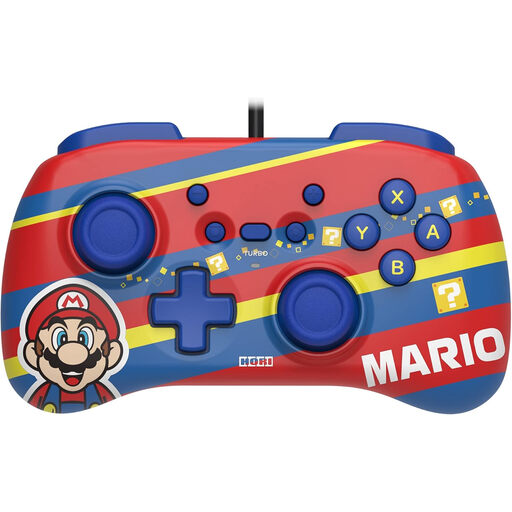
Why This Fits Their Persona: Its compact shape suits younger players or smaller hands, while the 3-metre USB cable makes it practical for docked family gaming in a UK home.
The wired plug-and-play setup avoids wireless pairing and battery concerns. Its limitations are clear: no motion controls, HD Rumble, NFC or IR camera.
3-metre USB cable, Turbo function, full button layout and Mario artwork.

Why This Fits Their Persona: Players who mainly use Nintendo Switch 2 in TV or tabletop mode may prefer a traditional full-size wireless controller with integrated features.
Its stated compatibility is Nintendo Switch 2 only, reducing the risk of buying for the wrong console. The feature list clearly identifies HD Rumble 2, motion controls, NFC and the 3.5mm audio jack.
Mappable GL/GR rear buttons, dedicated C Button, rechargeable wireless design and headphone jack.
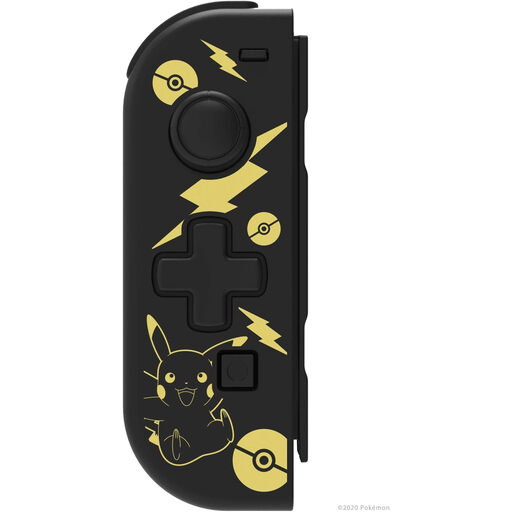
Why This Fits Their Persona: Handheld players who focus on 2D platformers, fighting games or retro titles may value its traditional D-pad and ergonomic shape.
The product is explicitly handheld-only and does not sync wirelessly, so its use case is clear before purchase.
Traditional D-pad, direct rail attachment and Pikachu-themed black-and-gold design.
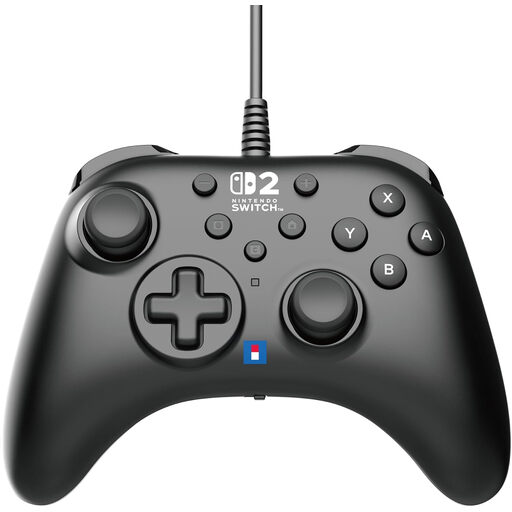
Why This Fits Their Persona: Docked players who prefer a fixed connection and adjustable controls can use the 3-metre cable across Nintendo Switch and Nintendo Switch 2 setups.
The wired format avoids charging and wireless pairing. Its lack of HD Rumble, motion controls, NFC and IR camera is stated clearly.
Programmable rear buttons, three Turbo speeds and adjustable analogue-stick dead zones.
We have compiled a complete, real-time list of products that fully satisfy these strict selection criteria and UK safety regulations.
Compatibility depends on the individual model. Some third-party wireless controllers list both console generations, while products such as the Nintendo Switch 2 Pro Controller are designed for Nintendo Switch 2 only. Check the product specification before buying, especially if you want to use one controller with two systems.
Most wired models connect through a USB-A plug and are intended for the Nintendo Switch dock. They are therefore generally unsuitable for handheld play unless the manufacturer specifically provides another connection method or adapter.
Battery duration varies by model, settings and usage. Product descriptions may state an estimated playtime, but vibration, motion features and lighting can affect practical results. Charge the controller using the supplied or approved cable, store it away from moisture and avoid leaving a rechargeable battery fully depleted for long periods.