Who needs which setup?

Residents who want a straightforward answer point

A fixed, single-purpose screen is worth considering when the resident needs to see and speak to a caller without navigating a phone. Check that the screen is included and that its controls are comfortable for the person using it.

Families who can manage a connected system

A smart doorbell and indoor display may suit a household where someone can set up accounts, maintain Wi-Fi and troubleshoot the connection while the resident uses an indoor alert or screen.

Households focused on recording and privacy

Look closely at where footage is stored, which functions require a subscription and what the camera captures beyond the doorway. The Information Commissioner's Office advises positioning home cameras to capture only the owner's property where possible.

What matters when choosing?

Choose the resident's way of answering first, then check whether the connection, recording method and installation will work at the property.

Concern What to check Who this matters to
Answering indoors Check that a visual monitor is included and that the resident can see and speak to callers using its controls. I want to answer from a familiar screen rather than find and open a phone app when the bell rings. About 36% of consumers put straightforward in-home answering first.
Connection and support Check Wi-Fi coverage at the door, display compatibility and who will manage accounts and interruptions. If I help manage the household's devices, remote alerts matter, but I need to keep the setup working for the resident. For about 29% of consumers, that connected-home support is the primary concern.
Recording and privacy Check where recordings are stored, whether the desired features require a subscription and what falls within the camera view. I want control over recordings without capturing more of the street or neighbouring property than necessary. Roughly 21% of consumers make recording and privacy their main priority.
Installation and power Check the available wiring or sockets, the mounting position and who would recharge a battery-powered unit. The doorway may rule out a convenient-looking system if its power or mounting needs cannot be met. Around 14% of consumers put property fit ahead of the other concerns.

What is easy to overlook?

  • Assuming ‘wireless’ means no Wi-Fi

    Wireless may describe the connection between indoor and outdoor units rather than the system's internet connection. EZVIZ describes its EP7 as needing no wiring between those units, but also describes Wi-Fi communication.

    Ask separately how the units connect to each other, whether an internet connection is needed and what still works when Wi-Fi is unavailable.

  • Expecting a chime to show the visitor

    A chime provides an alert, not necessarily a picture or a way to answer. Ring says compatible Echo devices with screens can show Live View after a doorbell press; a dedicated video-doorphone uses its indoor monitor.

    List the actions the resident must manage—notice the alert, see the caller and speak—and confirm which included device handles each one.

    A separate compatible screen or other accessory may be needed for the intended answer point.

  • Overlooking the recording hardware

    A local-storage option does not establish what storage hardware is included or how footage can be retrieved. TP-Link states that the Tapo D235 supports microSD storage; the household still needs to check the required card and recording behaviour.

    Confirm the storage device, capacity and access method for the exact model, including what happens to recordings if the device or card is lost.

    A compatible memory card or hub may be an additional requirement, depending on the system.

  • Mounting the camera before checking its view

    GOV.UK guidance says UK data-protection law applies if a domestic CCTV system captures images of people beyond the boundary of private domestic property.

    Plan the mounting position and assess the actual image after installation. The Information Commissioner's Office advises capturing only your own property where possible.

Brands to consider

Reolink

Its UK Wi-Fi and PoE video-doorbell ranges are options for households considering a chime, app access and local storage.

  • Reolink describes local storage for its Wi-Fi and PoE doorbells without a required monthly recording plan.
  • The supplied chime is not a visual monitor. Check Wi-Fi coverage for the Wi-Fi model or the required Ethernet connection for PoE.

EZVIZ

The CP7 and EP7 video-doorphone kits provide a fixed indoor touch screen for visitor answering.

  • EZVIZ lists a 7-inch indoor screen for both models.
  • CP7 uses a two-wire installation. EP7 avoids wiring between the indoor and outdoor units but still describes Wi-Fi communication; check whether the resident can use the touch controls.

eufy

The E340 is a smart-doorbell option for a household prepared to arrange its alert devices and account setup.

  • eufy describes battery or wired operation and pairing with selected chimes, bases and Alexa or Google devices.
  • Check the exact accessory compatibility and setup requirements rather than assuming the resident can answer on an included screen.

Ring

A Ring doorbell paired with a compatible screen-equipped Echo device is an option where someone can manage the Ring and Alexa setup.

  • Ring says compatible Echo screens can show a 15-second Live View after a doorbell press in the UK.
  • Ring says Live View is available without a subscription, while reviewing recorded video requires one.

TP-Link Tapo

The Tapo D235 is an app-led doorbell option for households considering local recording.

  • TP-Link describes microSD storage for the D235, with Tapo Care available separately.
  • An app-led setup is not the same as a stand-alone indoor video monitor; establish how the resident would see and answer a caller.

Joybuy indoor-monitor options

These video-doorbell options are worth checking when the household wants an indoor point for seeing and speaking to visitors. Confirm the everyday answer sequence with the intended resident before settling on either model.
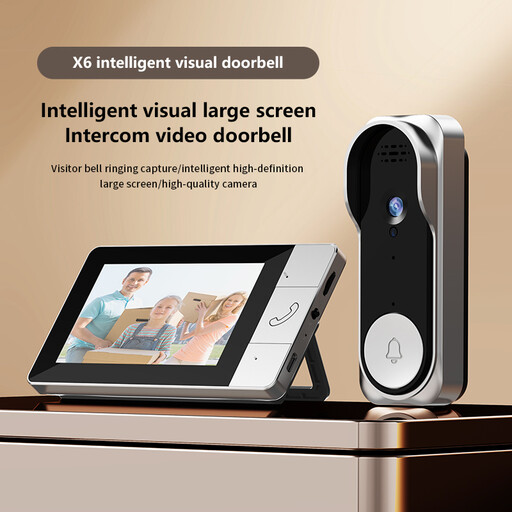
Verbex NT601A video doorbell

Verbex NT601A video doorbell

Consider this model if the resident needs an indoor answer point without routine Wi-Fi use. Its listing describes an indoor monitor and two-way conversation; check the controls with the resident, test the connection at the intended doorway and confirm what is needed for video recording.

View on Joybuy
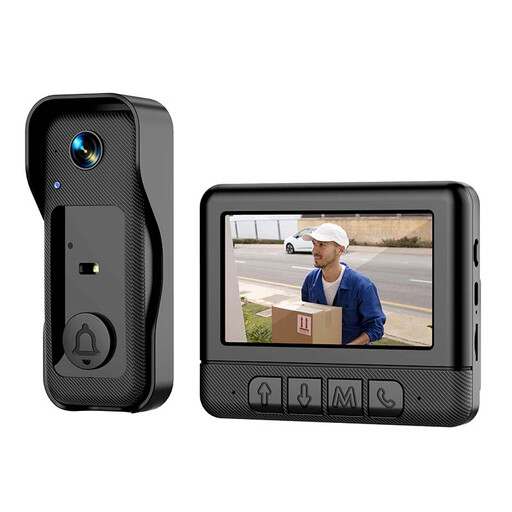
Rexsun X6 smart video doorbell

Rexsun X6 smart video doorbell

The described indoor monitor makes this a model to examine for visitor answering, but confirm whether ordinary setup or answering requires a smartphone or app. The product name states that a memory card is not included; check recording requirements and whether the planned mounting position meets the product's exposure guidance.

View on Joybuy

Questions about setup and use

Can a smart display replace a phone for answering the door?

A compatible display can give the resident a screen at home, but someone may still need to set up and maintain the doorbell, accounts and Wi-Fi. Ring says compatible screen-equipped Echo devices can show Live View after a press; check the exact pairing and answer controls before relying on this route.

Can we record visitors without a subscription?

Some models offer local recording: Reolink describes local storage for its UK Wi-Fi and PoE doorbells, and TP-Link says the Tapo D235 supports microSD storage. Ring says reviewing recorded video requires a subscription, although Live View does not. Check the exact model's storage hardware and which recording features you intend to use.

Is a battery doorbell easier for an older relative?

Battery power may avoid some wiring work, but someone must keep the device charged. eufy describes battery and wired options for the E340, while Reolink offers wired Wi-Fi and PoE doorbells. Choose an arrangement the household can maintain at its doorway.

Does a UK video doorbell create data-protection obligations?

GOV.UK guidance says UK data-protection law applies when a domestic camera captures images of people beyond the private property boundary. The Information Commissioner's Office advises positioning cameras to capture only your own property where possible, so assess the installed view rather than judging it from the planned mounting position alone.