For drafting at a fixed desk, start with a conventional laptop and one compatible monitor: the manuscript can stay on one display while notes remain on the other. An integrated dual-screen laptop makes more sense when both panels need to travel with you. Whichever route you choose, check whether your intended two-screen arrangement includes the laptop display and whether the exact model supports the connections you need.
Which setup suits your writing routine?
Writers working mainly at one desk
If you want the manuscript on one screen and an outline or reference material on the other, a conventional laptop with a compatible external monitor gives you that arrangement. Microsoft Support explains how to extend a Windows desktop after connecting displays.
Writers who need both panels while mobile
If your writing location changes and a separate monitor is impractical, an integrated dual-screen laptop is worth considering. ASUS describes the Zenbook DUO UX8406 with two 14-inch displays, a detachable keyboard and a built-in kickstand; check whether that layout suits your typing position.
Mac users building a desk setup
If your writing applications and files suit macOS, a MacBook Air can be paired with external displays. Apple lists support for up to two external displays on the M5 MacBook Air, but the display limit and required connections must be checked for the exact Mac model and monitors.
What matters when choosing?
Decide whether you mean a laptop screen plus one monitor, two external monitors or two screens built into the laptop. Then check the typing layout and whether the second screen needs to accompany you.
| Concern |
What to check |
Who this matters to |
| Display arrangement |
Confirm the exact model supports your intended number of displays, then match its video output to the monitor input and cable. |
I want my manuscript and notes visible together, so I need to know whether my chosen screens can actually connect. For around 42% of consumers, getting that display arrangement right would be the primary concern. |
| Writing comfort |
Consider the keyboard layout and where each screen and keyboard will sit during a long drafting session. |
When I draft for an extended stretch, the screen positions and typing layout matter as much as having two panels. Around 33% of consumers would put sustained writing comfort first. |
| Mobility and software |
Decide whether both screens must travel with you and whether your writing applications and files suit the operating system. |
I move between writing locations or need to keep using my existing applications, so the setup has to fit that routine. Mobility and software fit would come first for around 25% of consumers. |
Mistakes to avoid
-
Assuming any USB-C port will drive your monitor
A connector’s shape does not establish the display arrangement it supports. Microsoft Support says external-display capability depends on the device model and cables or adapters; Apple also advises matching cables to the available ports.
Check the exact laptop’s video-output specification against the monitor inputs before choosing a cable or adapter.
A compatible cable, adapter or dock may be needed in addition to the laptop and monitor.
-
Confusing two screens with two external monitors
A laptop display plus one monitor is a different requirement from running two external monitors. Apple specifies external-display support by Mac model, while Microsoft Support describes model-specific limits and resolution or refresh-rate trade-offs for some Surface configurations.
Write down the complete arrangement you want, including whether the laptop’s own screen stays in use, and check that arrangement against the exact model’s specifications.
-
Choosing built-in dual screens for a mostly fixed desk
An integrated design changes the physical writing setup. ASUS describes a detachable keyboard and kickstand on the Zenbook DUO UX8406, rather than a conventional laptop beside a separate monitor.
Consider how often you need both panels away from your desk and whether the keyboard and screen positions suit sustained drafting.
-
Treating a retailer's returns policy as your only protection
UK distance-sale cancellation rules and remedies for faulty goods address different circumstances. GOV.UK describes online cancellation and protections concerning faulty goods; a retailer's voluntary policy is separate.
Check the applicable cancellation conditions and exceptions alongside the retailer's policy, and keep your order confirmation in case you need to raise a fault.
Relevant brands to consider
ASUS
For writers considering two screens built into one laptop, ASUS describes the Zenbook DUO UX8406 with two 14-inch OLED touchscreens, a detachable keyboard and a kickstand.
- Both panels can be used without carrying a separate monitor.
- Check whether its keyboard and kickstand arrangement suits where and how long you write.
Apple
For a macOS writing workflow, Apple specifies support for up to two external displays on the M5 MacBook Air while its built-in screen remains active.
- The specified M5 model offers a conventional laptop route to a multi-display desk.
- Do not assume another MacBook Air model has the same display support; match cables or adapters to its ports and your monitors.
Lenovo
For a conventional Windows laptop used with a desk monitor, Lenovo identifies HDMI and Thunderbolt 4 display connections in the ThinkPad X1 Carbon Gen 13 family.
- Those stated connections offer options for attaching a compatible external display.
- Check the exact configuration's ports, keyboard layout, supplied charger and warranty before ordering.
Dell
For a laptop-and-dock desk setup, Dell lists Latitude 7450 configurations and describes multi-display support on its Pro Thunderbolt 4 Smart Dock SD25TB4.
- A compatible dock can bring desk display connections and charging into one accessory.
- A dock's stated display capability does not establish that every laptop and monitor combination will work; check compatibility for the complete setup.
Joybuy laptop choices
These choices cover two ways to keep a manuscript and notes visible: an ASUS laptop with integrated panels for writing away from a fixed monitor, and an M5 MacBook Air for a macOS setup using an external display.
 No image available
ASUS Zenbook DUO UX8406CA-QL135W 14-inch Dual OLED Touch, Core Ultra 7 255H, 16 GB, 1 TB
Consider this configuration if you need two laptop screens for a manuscript and notes away from a fixed desk.
Its product name specifies an Intel Core Ultra 7 255H processor, 16 GB LPDDR5X memory and a 1 TB SSD. Confirm the exact screen resolution and whether the detachable-keyboard layout suits your writing position before ordering.
View on Joybuy
 No image available
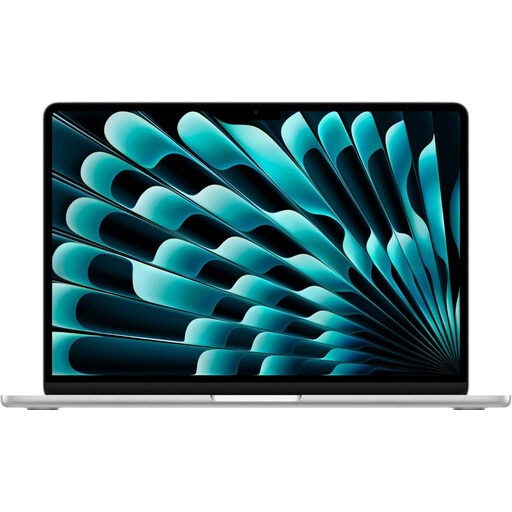
Apple 15-inch MacBook Air (2026), M5, 16 GB, 1 TB, Silver
Consider this conventional laptop if you write in macOS and plan to place an external display beside it at your desk. Apple specifies support for up to two external displays on the M5 MacBook Air while its built-in display remains active.
This variant's product name specifies an M5 chip with a 10-core CPU and 10-core GPU, 16 GB memory and a 1 TB SSD. Check the cables or adapters needed for your monitors; external monitors are separate from this laptop.
View on Joybuy
Common questions
Do I need a dual-screen laptop to write with two screens?
No: a laptop's built-in display plus one compatible monitor also gives you two screens. Choose integrated panels when you need both screens away from a fixed desk; check display support and connections for a laptop-and-monitor arrangement.
Do I need a dock for one external monitor?
Not necessarily: a suitable video-capable laptop port, monitor input and cable may be enough. Consider a compatible dock if you also need its other connections or a single accessory for a permanent desk setup.
How do I keep notes on the second screen in Windows?
Connect a compatible display and select Extend rather than Duplicate in Windows display settings. Microsoft Support says you can then adjust the connected displays individually and place your notes beside the manuscript.
What should I check about returning a laptop bought online?
Check the applicable UK distance-sale cancellation conditions separately from remedies if the laptop is faulty. GOV.UK describes these as distinct consumer protections; review any applicable exceptions and the retailer's voluntary policy without treating that policy as a replacement for statutory rights.


