People recording proceeds
If you repeatedly enter ticket totals, cash amounts or reconciled proceeds on a shared computer, you need a numeric layout that is easy to find and stays in place during entry.


If the shared computer’s keyboard works well but lacks a number pad, a wired standalone keypad adds a dedicated place to enter raffle proceeds without replacing the keyboard. Choose a full-size keyboard when the main keyboard also needs replacing, but check that the exact model has the required number-pad layout. Wireless placement can be useful across desks, with connection and power arrangements to manage.
If you repeatedly enter ticket totals, cash amounts or reconciled proceeds on a shared computer, you need a numeric layout that is easy to find and stays in place during entry.
If the existing laptop or compact keyboard otherwise suits the work, a separate keypad lets you add numeric input without changing the main keyboard.
If several people use the workstation, weigh connection and compatibility alongside cleaning needs. Where raffle records contain personal data, access to those records also needs separate consideration.
Start with the existing keyboard: add a keypad if it still meets users’ needs, or consider a full-size replacement if the keyboard itself is the problem. Then check how the input device will connect and fit on the shared desk.
Choose it when: The main keyboard works well and repeated number entry is the missing function.
Trade-off: It needs a suitable connection and will not fix wear or layout problems with the main keyboard.
Choose it when: Cable routing or moving the keypad between desks matters more than keeping it at one fixed position.
Trade-off: Check the exact connection type and how power and any receiver will be managed.
Choose it when: The shared workstation needs a replacement main keyboard as well as numeric entry.
Trade-off: It takes more desk width; spill protection applies only where the particular model specifies it.
| Concern | What to check | Who this matters to |
|---|---|---|
| Number-entry layout | Check the position of Enter and other keys used in the spreadsheet, whether Num Lock status is visible, and whether the device stays stable on the desk. | When I enter proceeds repeatedly, I want a numeric area I can use consistently without hunting for keys. Around 36% of consumers put number entry first. |
| Connection and compatibility | Check available ports, the exact connection type and stated operating-system support; shortcut behaviour may vary. | At a computer used by several staff, I need the input device ready when it is my turn to record figures. For around 29% of consumers, dependable connection and compatibility come first. |
| Shared-desk upkeep | Check the exact model’s cleaning instructions and any stated spill protection; do not assume these features apply to every keypad. | If the main keyboard is worn or the desk is prone to spills, I would weigh replacing it rather than adding another device. Upkeep is the primary concern for around 21% of consumers. |
| Desk placement | Check usable desk space, cable routing and where a separate keypad would sit alongside the main keyboard. | When the working area is tight or equipment moves between desks, I need a layout that fits the space. Around 14% of consumers prioritise placement flexibility. |
Trust describes its wireless Xalas keypad as connecting through a 2.4 GHz USB micro receiver and using AAA batteries. That arrangement calls for a compatible port and a plan to keep the receiver and batteries available.
Read the connection details for the exact model. For a fixed desk, compare the upkeep with a wired option before choosing wireless.
A misplaced receiver or depleted batteries can interrupt number entry until the device is ready to use again.
Kensington states that its wired numeric keypad works with Windows, macOS and ChromeOS, but some of its shortcut keys are Windows-only. Compatibility with an operating system does not establish that every key will behave as your spreadsheet requires.
Check the shared computer’s operating system and the functions staff use, including Num Lock and relevant shortcuts, for the exact keypad.
An input device does not control who can open or edit a raffle record. If the record contains personal data, the Information Commissioner’s Office identifies appropriate security measures and access rights as matters for the organisation to address.
Decide who needs access to the record, set permissions accordingly and avoid leaving it open to unauthorised users.
A separate numeric pad addresses number entry, not screen or main-keyboard positioning. For prolonged laptop work, the Health and Safety Executive advises using a separate keyboard and mouse so the laptop screen can be raised.
Assess the screen, keyboard, mouse and desk arrangement together if staff spend extended periods entering records.
Trust’s Xalas range offers standalone keypad options for adding numeric input to an existing computer.
Kensington describes both a dedicated wired keypad and a full-size keyboard with an integrated number pad.
Logitech’s described K120 and K270 models are full-size keyboard alternatives with integrated number pads.
These full-size keyboards are options to examine if the shared desk needs a replacement main keyboard. Before choosing either for raffle proceeds, confirm that its exact layout includes the number pad and keys your record-keeping requires.
 No image available
Consider this if the shared desk needs a replacement keyboard and wireless placement is useful, rather than a compact keypad add-on.
Confirm the number-pad layout, connection requirements and power arrangements for the office computer before buying.
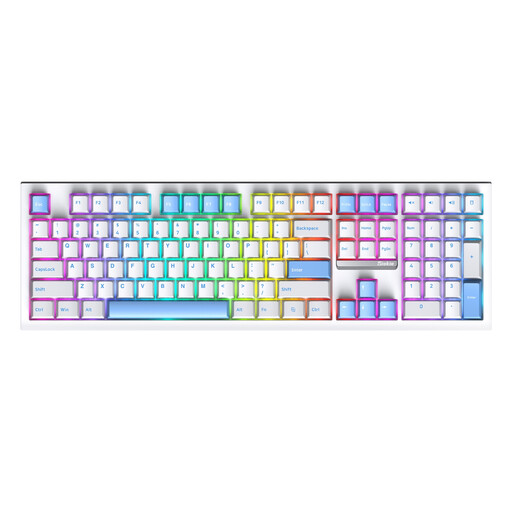 No image available
Consider this White full-size model if replacing the main keyboard is appropriate for the shared desk.
The product name specifies 108 keys and detachable switches. Check its number-pad layout, connection modes, operating-system compatibility and spreadsheet-key behaviour for the exact variant.
A wired keypad is a straightforward choice for a fixed desk with a compatible free port; wireless is worth considering when cable-free placement matters more. Check the exact wireless model’s connection and power requirements, including whether it uses a USB receiver.
Only if the exact model states support for the operating systems you use. Kensington specifies all three for its wired numeric keypad but notes that some shortcut keys are Windows-only, so check the spreadsheet functions staff need.
No. A keypad changes how figures are entered, not who can access the file. If the record contains personal data, consider the Information Commissioner’s Office guidance on appropriate security measures and access rights when setting up the shared computer.
They may apply if the spreadsheet contains identifiable people’s details. The Fundraising Regulator says privacy legislation is likely to apply when personal data is used for fundraising; the organiser should assess the raffle’s purpose, the information recorded and who can access it rather than assume that every proceeds sheet is the same.
Not on its own. The Health and Safety Executive advises a separate keyboard and mouse for prolonged laptop use so the screen can be raised; assess the complete workstation rather than relying on the keypad to address screen and keyboard positioning.