
24/7 Customer Support

Free returns

Same-day & Next-day Delivery

Quality Guaranteed

Unlock Your Welcome Offers: FREE Delivery | Up to 80% OFF | Free 30-day JoyPlus trial
Download the APP
A suitable OBD2 car diagnostic scanner can help UK car owners read fault codes, monitor live data and complete selected maintenance tasks without immediately booking a garage appointment. However, buying the wrong device can lead to limited vehicle coverage, unexpected software fees or functions that are unavailable on your particular model.
This guide explains the main buying traps, the specifications worth checking and which type of scanner may suit different users.
A full-system car diagnostic tool may communicate with several control modules, including the engine, gearbox, ABS, SRS, air conditioning and body systems. That does not mean every special function is available across all makes, models and production specifications.
Functions such as ECU coding, injector coding, electronic parking brake resets and active tests are vehicle-dependent. Before ordering, provide the seller with your vehicle’s make, model, engine, registration details or VIN, together with the function you need.
An automotive code reader can display and clear a diagnostic trouble code, but deleting the code does not repair the underlying problem. Warning lights may return if the fault remains. A reliable workflow is to:
A scanner should support diagnosis rather than encourage repeated code deletion.
“Free updates” can mean different things. Some tools include lifetime free updates, while others provide a limited update period and require a subscription afterwards for advanced functions. Also, FCA AutoAuth access may require a separate account or manufacturer-related payment. That cost is not necessarily included with the scanner.
Read the update terms carefully and check whether basic OBD2 functions remain available after any included update period ends.
A basic reader may only access the powertrain system. For broader troubleshooting, look for a scanner that can access available ECUs across multiple systems, read and clear codes, retrieve freeze-frame data and display live readings.
A live data OBD2 scanner should present values in a readable format, such as graphs, gauges or grouped parameters. Multiple PID display can help compare readings, for example engine speed, coolant temperature and sensor voltages. Data logging is useful when an intermittent fault does not appear during a short inspection.
A bi-directional OBD2 scanner, also called an active test scan tool, can send approved commands to vehicle modules. Depending on the vehicle, this may allow you to activate a cooling fan, fuel pump, window, solenoid, headlamp or air-conditioning clutch.
This can reduce guesswork, but active tests should be carried out with a charged battery and according to the vehicle’s service procedure. Available tests vary substantially, so confirm compatibility rather than relying on a long feature list.
Newer vehicles may use CAN-FD, while some advanced systems use DoIP. A CAN-FD diagnostic scanner or DoIP diagnostic tool can offer wider compatibility with newer vehicle networks, but the protocol alone does not guarantee access to every module.
For UK households with several vehicles, a wireless car diagnostic scanner can be convenient. Check:
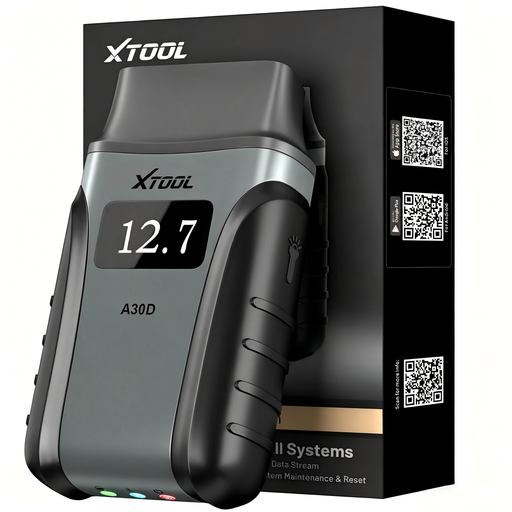
Why This Fits Their Persona: Its wireless phone-and-tablet operation suits DIY owners who want more than engine-code reading without investing in a larger workshop tablet.
It lists full-system diagnostics, live data and 19 reset functions, while clearly noting that functions vary by vehicle. Lifetime software updates also reduce the risk of recurring update charges.
Wireless Bluetooth connection, CAN-FD support, FCA AutoAuth compatibility and up to eight live-data parameters displayed together.
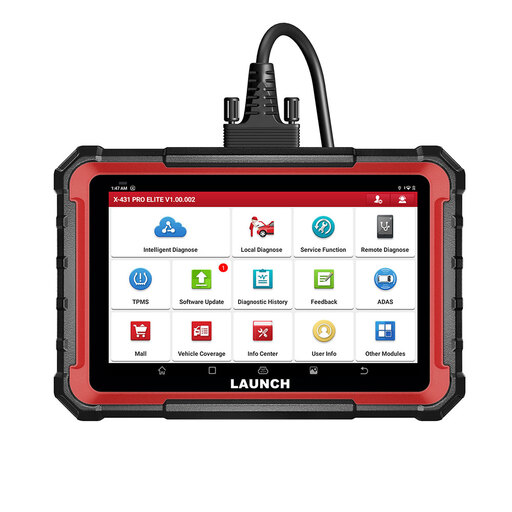
Why This Fits Their Persona: The dedicated tablet format is suitable for independent garages, used-car inspectors and owners who prefer a larger screen for repeated diagnostic work.
Its specification separates two-year free updates from continued tool use, helping buyers understand the ongoing software position before ordering.
Eight-inch touchscreen, ECU coding, bi-directional control, CAN-FD and DoIP support, plus extensive reset and repair-information functions.
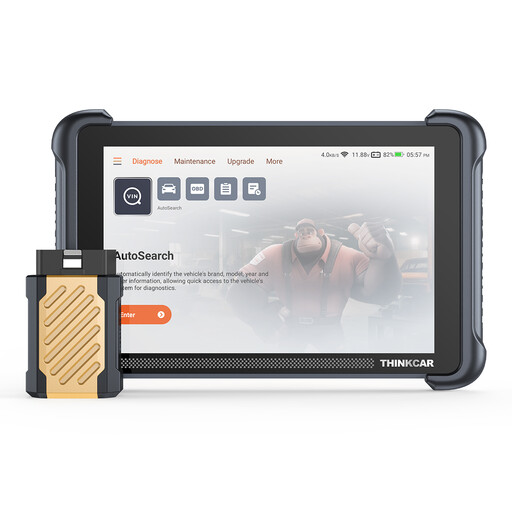
Why This Fits Their Persona: Its larger hardware and broad protocol support suit busy workshops or enthusiasts working across European, Asian and American vehicles.
It specifies 34 reset functions and identifies that complex coding can depend on the vehicle, internet access and stable power, rather than presenting coding as universal.
Eight-inch display, Bluetooth connection, ECU coding, active testing, CAN-FD and DoIP protocols, with lifetime free software updates.
We have compiled a complete, real-time list of products that fully satisfy these strict selection criteria and UK safety regulations.
Before connecting a scanner, park safely, engage the handbrake and check the vehicle battery condition. For coding, relearning or prolonged active tests, use a suitable battery maintainer where recommended. Do not disconnect the tool during software updates or module programming.
Keep the app, scanner firmware and vehicle software package current. Store the device away from damp conditions, excessive heat and direct sunlight, particularly when it is kept in a van or unheated garage.
It can clear certain stored codes and reset the warning light, but it cannot guarantee an MOT pass. Emissions readiness monitors may need to complete their drive cycle, and an unresolved fault can switch the light on again.
It can be suitable for selected workshop tasks, provided its vehicle coverage, connection method, active tests and reporting functions meet your workload. A dedicated tablet may be more convenient for repeated inspections, while a phone-based device is easier to carry between vehicles.
The term usually refers to software updates supplied by the scanner manufacturer. It does not necessarily include vehicle-manufacturer services, FCA AutoAuth access, mobile data, internet charges or optional hardware. Check the product terms and confirm which functions remain available without an additional subscription.