
24/7 Customer Support

Free returns

Same-day & Next-day Delivery

Quality Guaranteed

Unlock Your Welcome Offers: FREE Delivery | Up to 80% OFF | Free 30-day JoyPlus trial
Download the APP
A warning light can turn a routine journey into an expensive visit to a garage. An OBD2 car diagnostic scanner may help you read fault codes, inspect live data and confirm whether a repair has addressed the issue. However, the market includes everything from basic engine code readers to full-system tools with active testing and ECU coding.
The challenge is knowing which features are genuinely useful for your vehicle and which are simply impressive-sounding specifications.
Many entry-level devices only communicate with the engine control module. They may read and clear engine-related fault codes but have no access to the ABS, SRS or transmission systems.
If you want to investigate airbag warnings, electronic braking faults or gearbox issues, look for a full-system car diagnostic tool. Confirm that it specifically lists the systems you need rather than relying on phrases such as “professional car scanner” or “all-in-one”.
A scanner may advertise 15, 20 or 30 reset functions, but availability depends on the vehicle’s make, model, engine, system and software. Oil resets may be widely supported, while injector coding, DPF regeneration, battery registration or gearbox relearning can be restricted.
Before buying, provide the seller with your vehicle details and ask whether the required function is supported. A larger number of menu options does not automatically mean the tool will perform every operation on your car.
“Free updates” can refer only to basic OBD2 functions, while advanced vehicle software may require a separate subscription. Similarly, an FCA AutoAuth scanner may support secure gateway access but still require you to create and pay for an official AutoAuth account.
Check exactly what is included: update duration, supported functions after the update period and any third-party account or cable requirements.
A standard car code reader is suitable for reading emissions-related engine codes, viewing some live data and checking readiness monitors. For more detailed diagnosis, choose a scanner that can access ECM, TCM, ABS and SRS at minimum.
Newer vehicles may use CAN FD, while some European vehicles use faster Ethernet-based DoIP communication. If you own a newer vehicle or plan to use the scanner across a mixed fleet, built-in CAN FD support can reduce the need for additional adapters. Protocol support does not guarantee coverage, so always check the vehicle list.
A bi-directional OBD2 scanner can send selected commands to the vehicle’s control units. This may allow an active test diagnostic tool to operate components such as cooling fans, windows, fuel injectors, lights or valves, where supported.
This is different from simply reading a code. Active testing should be performed carefully, with the ignition, battery voltage and operating conditions set according to the vehicle and scanner instructions. A stable battery maintainer is advisable for extended procedures and coding work.
Useful functions for UK vehicle owners may include:
A device with lifetime free updates can be more predictable for long-term ownership, but read the product conditions carefully. Some products offer free updates for all listed functions, while others provide a limited update period or require renewal for specialist coverage.
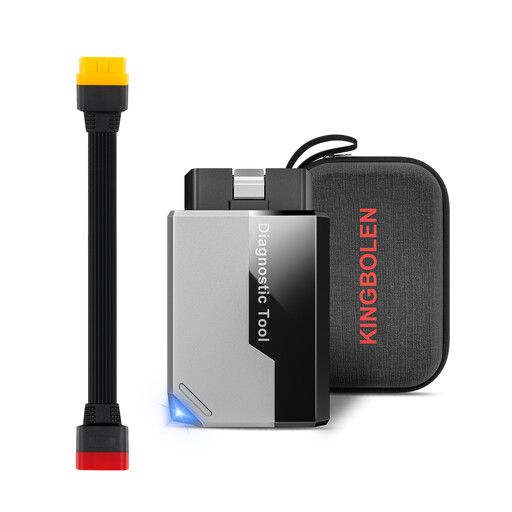
Why This Fits Their Persona: Its compact Bluetooth design works with Android and iOS phones, making it practical for home garages, used-car checks and occasional DIY maintenance in the UK.
It clearly combines full-system scanning, 15 listed service functions and bi-directional testing rather than offering engine-only code reading.
Bluetooth 5.2, CAN FD support, a 36cm extension cable and lifetime update access are listed features.
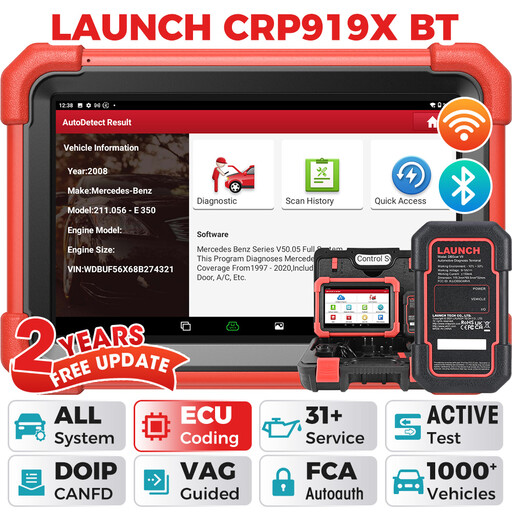
Why This Fits Their Persona: The larger tablet interface and wireless VCI suit independent garages, mobile mechanics and users who need to review multiple vehicle systems at the roadside or in a workshop.
It specifies all-system diagnosis, active tests, CAN FD, DoIP and FCA AutoAuth support instead of relying on a basic engine-only interface.
The listed specification includes a 7-inch touchscreen, 31 reset services, two years of free updates and a five-year warranty.
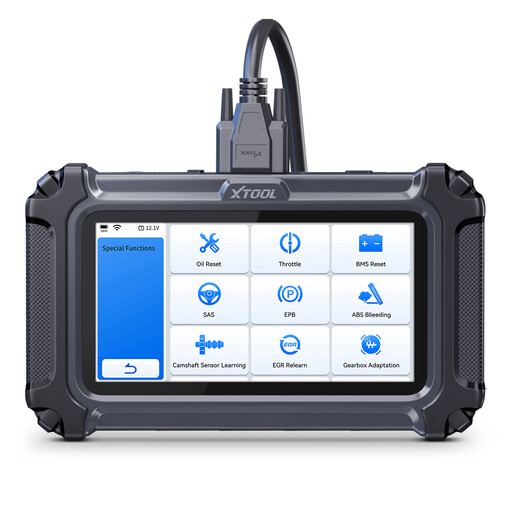
Why This Fits Their Persona: With full-system scanning and more than 30 listed reset and relearn functions, it is suited to home mechanics, fleet users and small workshops handling varied maintenance tasks.
The product information identifies vehicle-dependent availability and recommends checking compatibility, helping set realistic expectations about specialist functions.
It lists CAN FD and FCA support, a 5.45-inch touchscreen, four-system diagnostics, lifetime free updates and battery voltage display.
We have compiled a complete, real-time list of products that fully satisfy these strict selection criteria and UK safety regulations.
Locate the vehicle’s 16-pin diagnostic socket, usually beneath the dashboard near the steering column. Switch the ignition on without necessarily starting the engine, then follow the scanner’s instructions. For Bluetooth models, download the specified app and check that your phone has sufficient storage for vehicle software.
Do not clear codes before recording them. A cleared warning light does not repair the underlying fault, and some readiness monitors may need to complete their drive cycles again. During coding, relearning or active testing, maintain stable vehicle voltage and avoid disconnecting the device.
It can often clear a stored diagnostic trouble code after a repair, where the vehicle and function are supported. The warning light may return if the fault remains. Clearing codes should not be treated as confirmation that a vehicle is safe to drive.
It depends on the model. Some offer lifetime free updates, while others include a fixed update period and then charge for continued access to certain vehicle software. FCA AutoAuth access may involve a separate manufacturer authorisation account.
A scanner can remain useful for several years when stored away from moisture, heat and direct sunlight. Its practical lifespan also depends on software support, connector condition, battery health and whether it communicates with the vehicles you intend to service.