
24/7 Customer Support

Free returns

Same-day & Next-day Delivery

Quality Guaranteed

Unlock Your Welcome Offers: FREE Delivery | Up to 80% OFF | Free 30-day JoyPlus trial
Download the APP
A warning light can turn a routine journey into an expensive garage visit. An OBD2 scanner may help you understand what your vehicle is reporting, but choosing the wrong device can leave you with limited system access, unexpected update costs or functions that do not work with your particular car.
The product descriptions in this category often use similar terms, so it is worth looking beyond headline claims. A practical buying decision starts with three common pitfalls.
A basic OBD2 code reader generally focuses on the engine and emissions system. It may read and clear diagnostic trouble codes, display live data and show inspection readiness, but it might not access the ABS, SRS or transmission modules.
If your aim is to diagnose braking, airbag, gearbox or body-electronic faults, look for a full-system car scanner rather than an engine-only reader.
Features such as EPB reset, battery registration, DPF regeneration, injector coding and ECU coding are vehicle-dependent. The scanner may include the function in its menu, but your car’s make, model, engine, year and control module determine whether it can be used.
Before buying, provide the seller with your VIN and ask for confirmation. This is particularly important for ABS SRS transmission scanner functions, immobiliser work and module coding.
Some devices include free updates for a stated period, while others offer lifetime access to certain software functions. “Lifetime free updates” does not necessarily mean that every manufacturer service, security gateway or online account is included.
For example, FCA AutoAuth access may require a separate account or manufacturer charge. Treat update terms, supported vehicles and optional services as separate checks rather than assuming they are all covered by the purchase price.
For routine checks, confirm that the automotive diagnostic tool supports:
For repair work, check whether the product supports all available vehicle systems. A car fault code reader with engine-only access is not equivalent to a scanner that can communicate with ECM, TCM, ABS, SRS, BCM or HVAC modules.
A car scanner with reset functions can be useful after completed maintenance, but the number of listed resets is less important than compatibility. Common services include oil reset, EPB, SAS calibration, BMS registration, TPMS reset, ABS bleeding, throttle relearn and gearbox learning.
A bidirectional OBD2 scanner or active test diagnostic tool can send selected commands to a vehicle’s ECU, such as operating a cooling fan, window, light, valve or fuel pump. Use these tests only when you understand the procedure and the vehicle is safely secured. A scan result is information for diagnosis, not confirmation that a component is safe to replace.
Newer vehicles may use CAN FD or DoIP communication. If you maintain several modern cars, a CAN FD scanner or DoIP diagnostic tool may offer broader compatibility than a basic Bluetooth adapter.
Also compare:
A wireless adapter is convenient for driveway checks, while a dedicated tablet may be more suitable for a workshop or mobile mechanic.
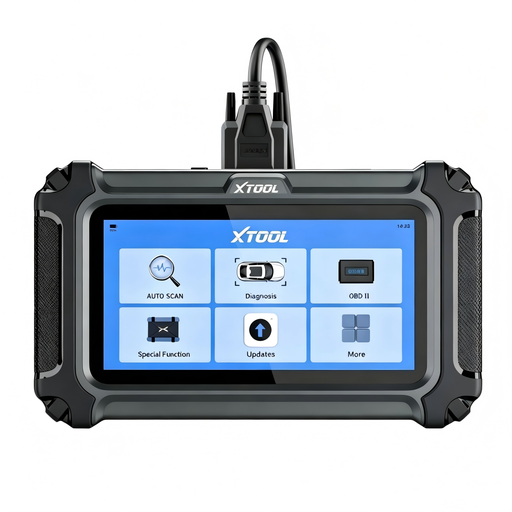
Why This Fits Their Persona: A practical handheld option for UK DIY owners who want more than engine-code reading without moving to a larger workshop tablet.
It specifies engine, transmission, ABS and SRS diagnostics, plus 16 reset functions. Compatibility still needs checking by vehicle.
5.45-inch touchscreen, CAN FD support, live-data graphing and stated lifetime free updates.
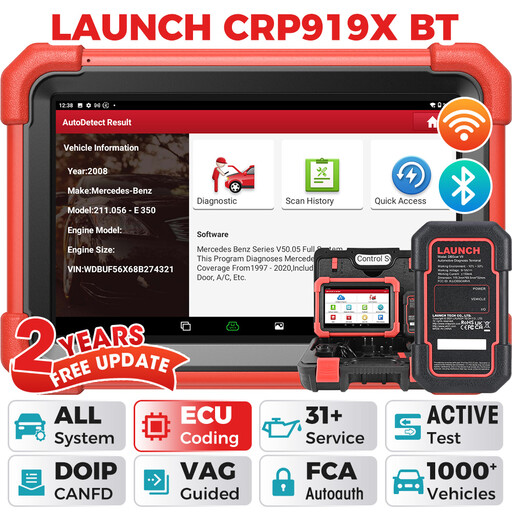
Why This Fits Their Persona: Suits independent garages and advanced home mechanics needing tablet-based access, wireless VCI communication and wider service coverage.
It clearly separates two years of free updates from FCA AutoAuth requirements, which may involve a separate account.
All-system diagnostics, 31 listed reset services, active tests, ECU coding, CAN FD and DoIP support.
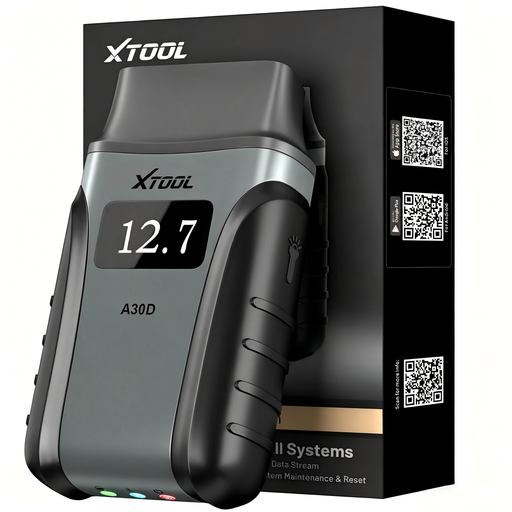
Why This Fits Their Persona: Designed for mobile mechanics, home garages and users who need wireless active testing from an Android or iOS device.
Its specifications identify vehicle-dependent functions and separate FCA AutoAuth from the scanner’s included features.
19 reset functions, all-system scanning, up to eight live-data PIDs, CAN FD and Bluetooth connectivity.
We have compiled a complete, real-time list of products that fully satisfy these strict selection criteria and UK safety regulations.
No. The diagnostic socket and communication protocol may be standard, but system access and service functions vary by make, model, engine and control module. Check compatibility before purchase.
No. Clearing a code removes or hides the stored warning in suitable circumstances; it does not repair the cause. Record the code first and investigate the related system.
The hardware may have no recurring charge for standard functions, but app licences, advanced vehicle software, secure-gateway access and update plans vary. Read the product’s update and subscription terms before ordering.