
24/7 Customer Support

Free returns

Same-day & Next-day Delivery

Quality Guaranteed

Unlock Your Welcome Offers: FREE Delivery | Up to 80% OFF | Free 30-day JoyPlus trial
Download the APP
A warning light on the dashboard does not always require an immediate trip to a garage, but guessing at the cause can become expensive. An OBD2 scanner lets you read diagnostic trouble codes, view live vehicle data and, on more advanced models, check systems beyond the engine.
However, product listings often use terms such as “full system”, “professional” and “lifetime updates” without explaining what they mean in daily use. This guide from the Joybuy Product Recommendation Officer focuses on the practical details UK car owners, home mechanics, used-car buyers and independent garages should check before purchasing.
A basic automotive code reader may only access the engine control module. That can be useful for a check-engine warning, but it may not communicate with ABS, SRS, transmission, steering, TPMS or body control modules.
If you want to investigate an airbag warning, electronic parking brake issue or gearbox fault, look for a full-system car diagnostic tool rather than a basic engine-only reader. Even then, coverage varies by vehicle make, model, year, engine and equipment level.
A listing may mention 20 or 30 service functions, including oil reset, BMS registration, DPF regeneration, injector coding and throttle relearn. These are not universal features. A scanner may display a function but be unable to perform it on your particular vehicle.
Before ordering, check the manufacturer’s compatibility list or provide the vehicle VIN and the exact function required. This is especially important for ECU coding scanners, immobiliser functions, battery registration and advanced adaptations.
“Free updates” can refer only to basic software, while premium vehicle coverage or special functions may require a subscription. Some vehicles also require manufacturer authentication, such as FCA AutoAuth, which is separate from the scanner itself.
Check whether updates are lifetime, limited-term or subscription-based. For UK ownership, also consider app availability, smartphone compatibility, language support and whether the device can operate reliably without mobile data.
For routine troubleshooting, prioritise a scanner that can read and clear diagnostic trouble codes, display ECU information, show freeze-frame data and stream live readings. Useful parameters may include engine speed, coolant temperature, fuel trims, battery voltage and wheel-speed information.
A car diagnostic scanner with graphing can make changing sensor values easier to compare. Some compact Bluetooth units display several live data streams through a mobile app, while tablet-based devices offer larger screens and report storage.
A Bluetooth OBD2 scanner is convenient for driveway work and used-car inspections because your phone or tablet acts as the display. Check whether it supports both iOS and Android, the Bluetooth version and the app required for operation.
For newer vehicles, CAN FD and DoIP support may improve compatibility with newer communication networks. These protocols do not guarantee access to every module or function, so vehicle-specific confirmation remains necessary.
An OBD2 scanner with reset functions may handle oil service reminders, electronic parking brakes, steering-angle calibration, battery registration or TPMS procedures. More advanced models may operate as a bidirectional scan tool, sending commands to actuators such as cooling fans, fuel pumps, windows or wipers.
Active testing should be approached carefully and performed according to the vehicle’s service procedure. ECU coding and programming can cause problems if the battery voltage drops or the wrong vehicle profile is selected. Use a suitable battery maintainer where the manufacturer recommends one, and do not disconnect the scanner during a coding operation.
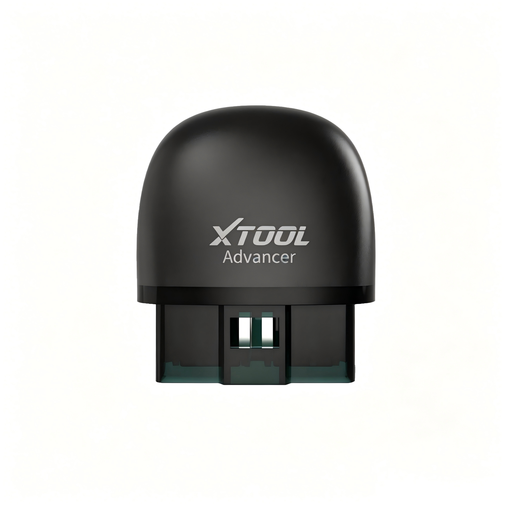
Why This Fits Their Persona: A compact wireless option for UK drivers who want phone-based diagnostics, used-car checks and routine monitoring without a handheld tablet.
It goes beyond engine-code reading with full-system scanning, AutoVIN, live data and standard OBD2 test modes. Confirm vehicle coverage before purchase.
Bluetooth 5.0, iOS and Android support, battery-voltage monitoring, oil reset and no subscription for standard diagnostics.
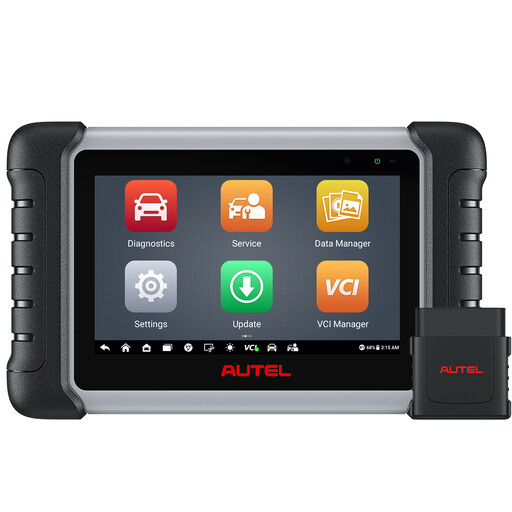
Why This Fits Their Persona: A tablet-style diagnostic platform for experienced home mechanics, mobile technicians and small garages handling several vehicle brands.
Its listed coverage includes full-system diagnostics, active tests and maintenance functions, while update duration and vehicle access should still be checked before ordering.
Wireless operation, bidirectional active tests, 38+ listed service functions and support for battery testing accessories.
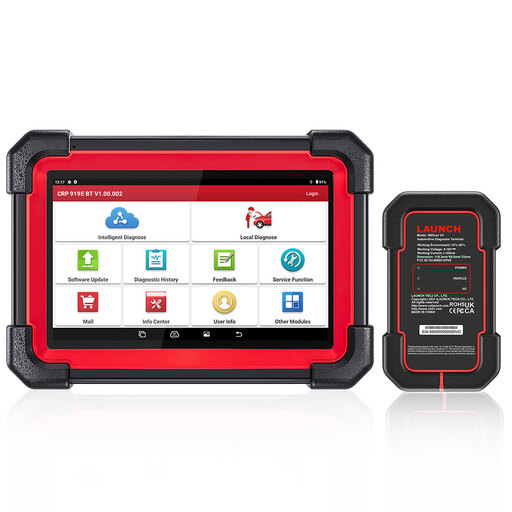
Why This Fits Their Persona: Suitable for users who need a dedicated screen, active testing, ECU coding and broader protocol support for regular repair work.
The listing identifies CAN FD, DoIP, bidirectional control and ECU coding, but these advanced functions remain vehicle-dependent and may require online accounts.
7-inch tablet, full-system diagnostics, 31+ listed service functions, CAN FD and DoIP support, plus wireless VCI communication.
We have compiled a complete, real-time list of products that fully satisfy these strict selection criteria and UK safety regulations.
Yes. A suitable scanner can reveal stored or pending fault codes, live readings, readiness-monitor status and, on some models, faults in ABS, SRS or transmission modules. Ask the seller’s permission, scan before and after a test drive and treat a recently cleared fault memory as a reason to investigate further.
Power consumption varies. A device left connected may continue drawing power when the car is parked. Look for a stated sleep or auto-sleep mode and disconnect the scanner if the manufacturer does not confirm safe long-term connection.
No. A reset updates a maintenance value or relearns a system after suitable work has been completed. It does not replace a faulty sensor, repair a braking system or guarantee that a warning light will stay off. Always diagnose the cause first and confirm compatibility for the specific vehicle.