For a household printing only a few documents a month, a monochrome laser multifunction printer suits mainly black-and-white work when scanning and copying still need to fit into one device. Keep a colour inkjet all-in-one in consideration if colour output matters; choose separate printing and scanning devices if a dedicated scanner or independent replacement matters more than having one appliance. Check the exact model's computer compatibility, connections, maintenance guidance and replacement supplies before deciding.
Who each option suits
Households printing black-and-white documents
If forms, labels and notices make up most of your printing, a monochrome multifunction device lets you retain occasional scanning and copying in one machine. Brother UK lists print, scan and copy functions for the DCP-L1640W; check the functions on any other model you consider.
Occasional colour and photo users
If colour documents or small photos are part of the job, a monochrome printer will leave that need unmet. Canon UK lists colour printing alongside scanning and copying for the PIXMA TS3750i series, giving you a concrete example of the inkjet all-in-one route.
Households that put scanning first
A separate flatbed scanner is worth considering if you want to choose its scanning features independently or keep it when you replace the printer. Check computer compatibility before settling on a model: the Canon UK Store lists the CanoScan LiDE 400 as Windows-only.
What should drive the choice?
For a household printing a few documents a month, decide which job would determine the purchase if the options conflict: convenient black-and-white documents, colour output, or a dedicated scanner. Then check the precise functions and connections of the model you shortlist.
| Concern |
What to check |
Who this matters to |
| Black-and-white documents in one device |
Confirm print, scan and copy functions rather than assuming every laser printer includes them. Check the connections you need. |
If I mainly print forms or labels, I want to keep occasional scanning without finding room for another machine. Around 50% of consumers put that combined black-and-white need first. |
| Colour documents and photos |
Check colour-print and scanning functions, plus the photo sizes you actually need. Read the model's ink maintenance guidance. |
Colour may be occasional, but if a document or photo requires it, monochrome output will not do the job. Around 30% of consumers make colour capability their primary concern. |
| Dedicated scanning |
Compare scanner type and document size; confirm computer compatibility and the space needed for two devices. |
If scanning is the task I care most about, I may prefer to choose and replace the scanner independently. For roughly 20% of consumers, that flexibility is the deciding need. |
Buying mistakes to avoid
-
Choosing monochrome when colour is essential
A monochrome multifunction printer can still scan and copy, but it cannot produce the colour documents or photos you need to print.
List the tasks that genuinely require colour before choosing a printer. If colour output is non-negotiable, assess a colour-capable option rather than relying on a mono laser for every job.
-
Assuming every built-in scanner meets the same needs
A separate scanner can be selected for its own format and features. Canon UK specifies the CanoScan LiDE 400 as an A4 flatbed scanner, while the Canon UK Store lists a Windows-only compatibility condition for that model.
If scanning drives the purchase, compare document size, scanner type, computer support and desk space before deciding between an all-in-one and two devices.
-
Overlooking inkjet maintenance because you rarely print
Infrequent printing does not remove the need to understand an inkjet's maintenance procedure. Epson UK advises a nozzle check followed by head cleaning for listed symptoms such as blank pages or missing colours; that guidance does not establish how often a particular printer will need attention.
Read the instructions for the exact inkjet model you are considering, including its cartridge or ink-tank guidance, before choosing it for occasional use.
Relevant brands to consider
These brands illustrate different printer and scanner routes; choose by the functions of a specific model rather than treating a brand name as a guarantee of fit.
Brother
Brother UK lists both the DCP-L1640W monochrome print-scan-copy device and the HL-L2400DW print-only monochrome laser, so the model name matters when you need scanning.
- The DCP-L1640W combines printing, scanning and copying for a document-focused household.
- The monochrome models named here do not meet a requirement to print in colour.
Canon
Canon UK lists the colour PIXMA TS3750i all-in-one and the separate CanoScan LiDE 400 A4 flatbed scanner, representing two different ways to retain scanning at home.
- The PIXMA TS3750i series lists printing, copying and scanning; the LiDE 400 lets you select a scanner separately.
- The Canon UK Store lists Windows-only compatibility for the LiDE 400, so check the computer it would connect to.
HP
The HP Store UK lists the LaserJet M234dw as a black-and-white multifunction printer with printing, copying and scanning.
- The M234dw is another one-device option to examine when documents are mainly black and white.
- Its black-and-white output cannot meet a colour-print requirement.
Joybuy products for these needs
These choices include a monochrome multifunction printer for document-focused use and two inkjet all-in-ones to consider when colour printing also matters. For only a few pages each month, weigh the functions you will use against each model's maintenance requirements.
 No image available
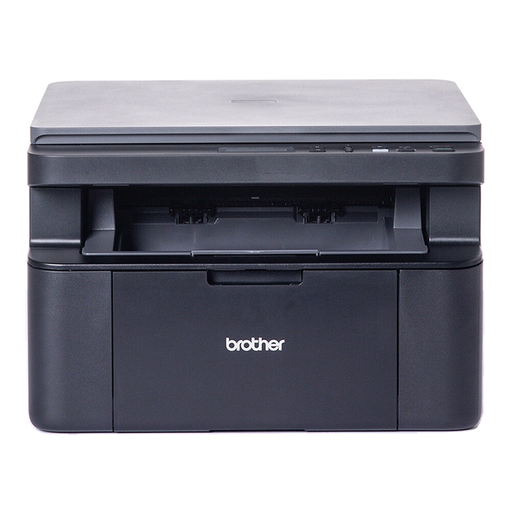
Brother DCP-L1640W Mono Laser Printer
For mainly black-and-white documents with occasional scans or copies, Brother UK lists the DCP-L1640W as a print-scan-copy model. Check whether you need automatic two-sided printing or an automatic document feeder before choosing it; monochrome printing will not cover colour tasks.
View on Joybuy
 No image available
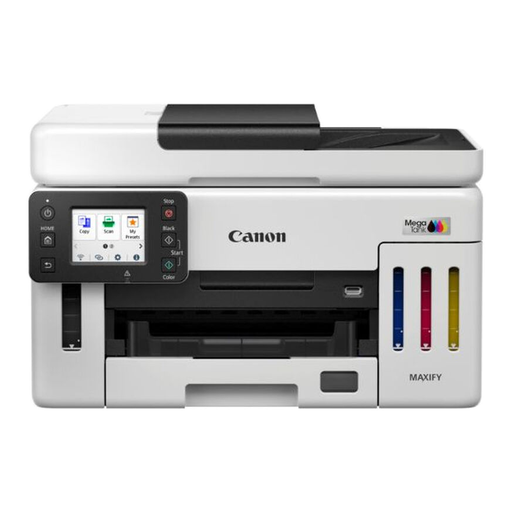
Canon MAXIFY GX6150
If colour printing and scanning need to share one device, consider whether the MAXIFY GX6150 fits your document tasks. For very infrequent printing, check this model's ink maintenance instructions; if you handle multi-page scans, confirm that its document-feeding arrangement suits them.
View on Joybuy
 No image available
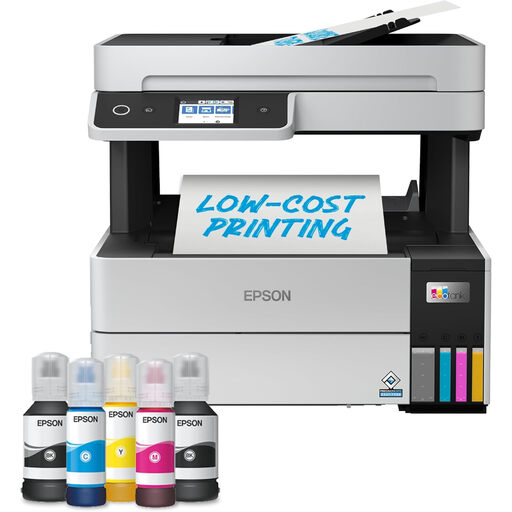
Epson EcoTank ET-5150 A4 Wi-Fi Multifunction Printer
For A4 documents where printing, scanning and copying belong in one device, consider whether this Wi-Fi model matches your tasks. If you print only a few pages a month, check the ET-5150's maintenance guidance and whether its home-office focus suits your usage.
View on Joybuy
Common questions
Does printing only a few black-and-white pages make a laser all-in-one the right choice?
A monochrome laser all-in-one is a direct fit when black-and-white documents are your main output and you want scanning or copying in the same device. Brother UK lists those three functions for the DCP-L1640W, and the HP Store UK lists them for the LaserJet M234dw. Check colour needs and the exact model's functions rather than assuming every laser printer includes a scanner.
When should I still consider an inkjet all-in-one?
Consider an inkjet all-in-one if you need colour documents or small photos as well as scanning and copying. Canon UK lists those functions for the PIXMA TS3750i series. Read the maintenance guidance for the exact printer you choose; Epson UK describes nozzle checks and head cleaning for particular print-quality symptoms, not an inevitable outcome of infrequent use.
When is a separate scanner worth having?
A separate scanner is worth considering when scanning is the deciding task or you want to replace the printer independently. Check document size, scanner type and computer compatibility: Canon UK specifies the CanoScan LiDE 400 as an A4 flatbed scanner, while the Canon UK Store lists that model as Windows-only.
What should I do with an old printer?
Take an unwanted printer through an appropriate electrical-waste route rather than ordinary household rubbish. GOV.UK says householders can take waste electrical products to a local household waste recycling centre; check your local authority's instructions for accepted items and any separate cartridge arrangements.


