Joybuy printer options
These Joybuy options include mono laser printers, a refillable-colour all-in-one and a portable thermal A4 printer. Check whether the exact model provides scanning as well as printing, and match its connection and consumables to your intended jobs.
 No image available
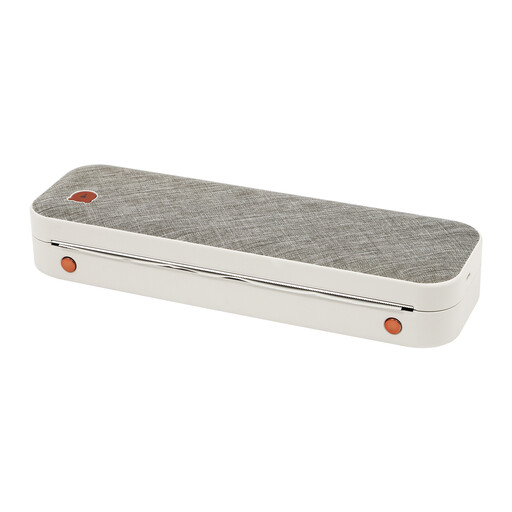
Cordless A4 Thermal Printer, 203DPI
Consider this format for A4 document or test-paper printing when a portable thermal printer suits the job.
Bluetooth and USB connections are specified. It uses thermal paper, so check that this printing method meets your needs.
View on Joybuy
 No image available
Brother DCP-L1640W Mono Laser Printer
Consider this mono laser multifunction model for black-text jobs when you also need copying and colour scanning.
Print, copy and colour scan are specified, along with Wi-Fi, Ethernet and USB. The listed replacement toner is TN1150; confirm that the exact consumable suits your printer.
View on Joybuy
 No image available
HP LaserJet M209dw Wireless Black & White Printer
Consider this monochrome laser printer for black-and-white documents if you do not need scanning from the printer.
Dual-band Wi-Fi, USB and automatic duplex printing are specified. Print output is black and white, so it is not for colour worksheets or diagrams.
View on Joybuy
 No image available
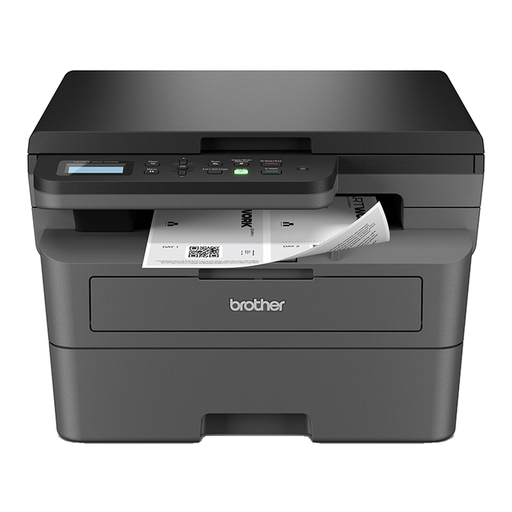
Brother DCP-L2627DWE 3-in-1 Mono Laser Printer
Consider this mono laser multifunction model for text documents when you also need copying and scanning.
Wi-Fi, automatic duplex printing and a 50-sheet ADF are specified. The ADF may be relevant if you regularly scan or copy multi-page documents. Print output is monochrome.
View on Joybuy
 No image available
Epson EcoTank ET-2951 A4 Wireless Colour All-in-One Ink Tank Printer, Black
Consider this refillable-colour all-in-one if you need colour printing, copying and scanning and are prepared to maintain an inkjet.
Wi-Fi, automatic duplex printing, print, copy and scan functions, and refillable ink tanks are specified. Epson advises regular colour printing in its inkjet maintenance guidance; ink can dry during long idle periods.
View on Joybuy
Frequently asked questions
Do I need a scanner, or will a print-only model do?
Choose a model explicitly specified to scan if you need to turn paper forms or homework into digital files; Wi-Fi or mobile printing alone does not establish scanning. Brother’s DCP-L2620DW, Canon’s PIXMA TS7650i and Epson’s ET-2860 are each specified to print, scan and copy.
Will a printer’s Wi-Fi work with my computer and home network?
Check the exact model’s support information against your operating-system version and network before buying. Brother lists drivers for Windows 11, macOS, ChromeOS and Linux for the DCP-L2620DW, and HP lists supported Windows and macOS versions for the Smart Tank 5105. Wi-Fi support alone does not establish compatibility with every device or router.
What should I do if an Epson inkjet prints with gaps after sitting unused?
For Epson inkjets covered by its guidance, start with a nozzle check and use head cleaning if the pattern has gaps. Epson also advises printing a colour test page weekly and switching the printer off with its power button. Follow the manual for your particular model, since repeated intensive cleaning uses ink.
Is an ink subscription necessarily suitable for occasional printing?
Not necessarily; check whether the service’s conditions fit your own irregular use before choosing it. HP says the DeskJet 2820e’s Instant Ink trial becomes chargeable unless cancelled, and its HP+ arrangement has separate internet and Original HP Ink conditions.
What can I do if a newly bought printer is faulty?
UK consumer remedies are separate from a manufacturer’s warranty. GOV.UK says goods that are faulty, not as described or not fit for their intended purpose may qualify for a refund, repair or replacement; the applicable remedy depends on the circumstances and timing.


