What to consider before choosing
For UK small organisations, the National Cyber Security Centre and Information Commissioner's Office highlight the importance of separate copies, secure storage and a workable recovery process. Decide what must be restored and how the copy will be protected before comparing capacity or interfaces.
| Concern |
What to check when buying |
Who this matters to |
| Separate recovery copy |
Where each copy is stored; when a drive is disconnected; cloud access and version controls; whether a test restore works. |
If I need a copy that is less exposed to an incident affecting the workplace or connected devices, I will check how it is separated and restored. Around 33% of consumers prioritise having a separate recovery copy. |
| Confidentiality and access |
Whether encryption is available and enabled; who holds recovery credentials; whether authorised staff can restore files. |
When backups contain customer or other sensitive records, I need to restrict access without locking out the people responsible for recovery. Around 27% of consumers put sensitive-record protection first. |
| Device coverage |
Which computers, folders and phones are covered; required formats, ports, cables or apps; how each workflow restores files. |
If my team uses more than one operating system or backs up phones as well as laptops, I need to check each device's actual backup route. Around 20% of consumers prioritise mixed-device coverage. |
| Capacity and local restore |
Current data volume and retained versions; usable destination space; connection requirements and a trial restore. |
When I need room for backup history and a practical local restore, I will check the planned capacity and test representative files. Around 20% of consumers prioritise local capacity and restoration. |
Joybuy product choices
These Joybuy choices cover removable backup storage: portable SSDs, external hard drives and encrypted USB storage. They do not represent cloud backup services, so compare them with your chosen backup workflow and recovery requirements.
 No image available
Samsung Portable SSD T7, 4 TB, Grey
A portable local-drive option when you need a removable destination for backup files.
4 TB; USB Type-C; USB 3.2 Gen 2. The listing says encryption needs to be set up using Samsung software; do not assume it is enabled by default.
Joybuy
 No image available
Samsung T7 Shield Portable SSD, 1 TB, Blue
A portable local-copy option when you may need to carry the drive between locations.
1 TB; USB 3.2 Gen 2. The listing says encryption needs to be set up using Samsung software and that IP65 protection does not permit submersion.
Joybuy
 No image available
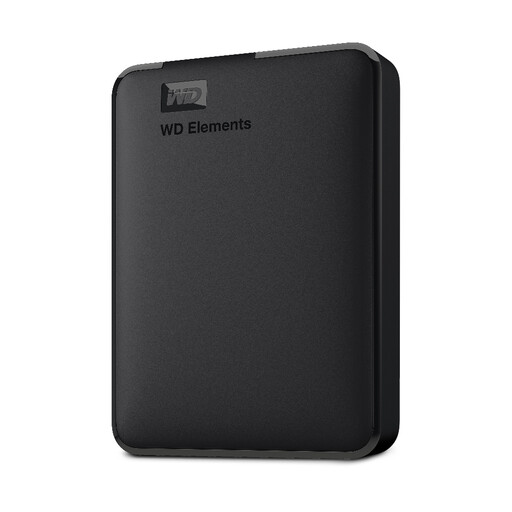
Western Digital Elements Portable Hard Drive, 5 TB, Black
A portable HDD option when the planned backup files and retained versions fit the listed capacity.
5 TB; USB 3.0. The listing describes use with Windows without additional software installation.
Joybuy
 No image available
Western Digital My Passport Portable External Hard Drive, 2 TB, Black
A portable local-drive option when scheduled backups suit the organisation's workflow.
2 TB. The listing describes scheduled backup software and AES 256-bit hardware encryption with password protection; check setup and credential recovery before relying on these features.
Joybuy
 No image available
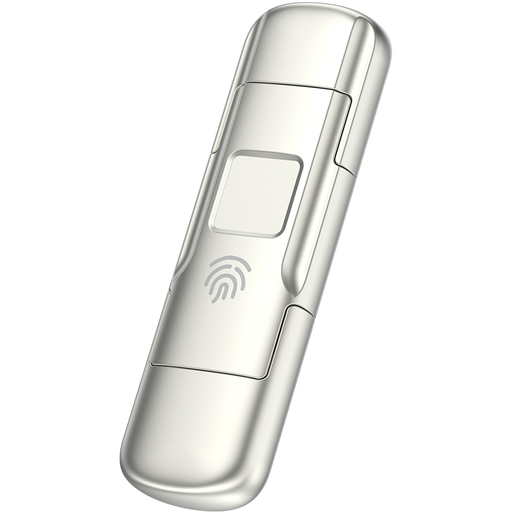
MOVESPEED YSUYC-256GSN USB Flash Drive, 256 GB, Silver
A smaller-capacity removable option when you need to carry a selected set of sensitive files between compatible devices.
256 GB; USB-A and Type-C interfaces; the product name states fingerprint encryption and read/write speeds of 550/500 MB/s. Check that the capacity and interfaces suit the files and devices you intend to use.
Joybuy
Frequently asked questions
Is an external drive enough if it stays connected to the office laptop?
No: do not treat a drive as an offline copy while it remains connected. The National Cyber Security Centre advises disconnecting storage when it is not in use, and the Information Commissioner's Office advises keeping external storage separate from the main workplace, encrypting it and checking that it works.
Will the same drive automatically back up Windows PCs, Macs and phones?
No: a shared connector does not establish that one backup workflow covers every device. Microsoft describes Windows File History using a selected external or network destination; Apple says Time Machine cannot use a Windows-formatted disk unchanged. Apple also documents separate iPhone file-transfer and computer-backup methods, so check the process for each device and operating system.
Must a UK organisation encrypt every backup containing personal information?
The Information Commissioner's Office says UK GDPR requires appropriate technical and organisational security measures, but does not specifically mandate encryption of all personal information. The ICO advises considering encryption in light of processing risks and specifically recommends encrypting external backup storage; keep the credentials needed for authorised restoration.
How long should backup copies of personal information be retained?
The Information Commissioner's Office says there is no universal retention period in data protection law: keep personal information only as long as needed for its purpose and justify the period. Check whether the backup service's version history and deletion controls can implement the organisation's retention policy and any other applicable record-keeping requirements.
What should we check before using a cloud provider for customer information?
If the provider processes personal information for your organisation, assess the applicable controller–processor contract, security, access and retention terms. If the arrangement involves a restricted international transfer, assess the relevant UK transfer rules rather than assuming that UK-only hosting is always required or that any overseas arrangement is permitted.


