Choose the backup route by how your business would recover its files, not by storage capacity alone. A drive stored away from the workplace can provide a separate copy, a NAS can manage shared local files but needs another destination, and cloud backup can cover devices working in different places. Whichever route you choose, check what it backs up and test a restore; encryption or a backup feature alone does not establish UK GDPR compliance.
Who needs an off-site backup?
An off-site copy matters when losing the main device or workplace could also mean losing the only usable copy of business files. The Information Commissioner’s Office advises small organisations using external storage to keep it away from the main workplace.
Owner-managed firms with files in one place
If essential documents, invoices or customer files sit on one computer or at one workplace, you need a copy you can reach after device loss or a premises incident. The Information Commissioner’s Office recommends keeping external backup storage away from the main workplace; the National Cyber Security Centre advises disconnecting a backup device when it is not in use.
Small teams sharing files across devices
If staff use several computers or shared folders, you need to know which devices and files are covered, who can manage access and how the team would restore its work. Both NAS and cloud services can offer central management, depending on the product and configuration.
Businesses backing up personal data
Customer or employee records call for security measures suited to the processing risk, alongside a way to restore access when needed. The Information Commissioner’s Office discusses access restriction, encryption and recoverability as relevant considerations for personal data.
What should you check before choosing?
Start with the event you need to recover from, then check whether your chosen route covers the right files and gives you a workable restore. Backup software, version history or an additional destination can be part of any of these routes; they do not replace the need for a separate, recoverable copy.
Drive stored away from work
Choose it when: You can maintain a repeatable backup routine and keep a portable copy away from the workplace.
Trade-off: You must disconnect and store the drive safely between uses, then check that its files can be restored.
Network-attached storage
Choose it when: Several people or devices need a shared, locally managed place for files and backups.
Trade-off: A NAS at the main workplace still needs a separate off-site or disconnected backup destination.
Cloud backup
Choose it when: Computers work in different places and automatic endpoint backup is important.
Trade-off: Confirm account protection, file coverage, retention and how you would complete a large restore.
| Concern |
What to check |
Who this matters to |
| Recovering after disruption |
Where a separate copy lives, which earlier versions remain available and whether a full restore works. |
If my files are lost or altered, I need a copy I can actually restore without relying on the affected workplace. Around 36% of consumers put recoverability first. |
| Coverage across devices |
Supported computers and drives, files backed up by default and who can administer restores. |
With work spread across staff devices, I cannot rely on everyone remembering a manual backup. For around 29% of consumers, manageable coverage across devices is the primary need. |
| Shared local storage |
Drive requirements, usable capacity, access controls and the destination for a separate copy. |
Our team needs a shared place to manage files, while keeping a backup beyond the office. Around 21% of consumers put local control and shared storage first. |
| Plan and restore terms |
Device allowances, renewal terms, retention limits and conditions for downloading or receiving a restore. |
I need to know whether the plan and its recovery method will remain manageable as our backup needs change. Predictable commitments come first for around 14% of consumers. |
Backup mistakes to avoid
-
Keeping every copy in the same office
A break-in, fire or flood could affect both the working files and a nearby drive or NAS. The National Cyber Security Centre also warns that connected storage can be affected by malware on the computer.
Keep a copy away from the main workplace or disconnected between backup sessions, and test a restoration.
Maintaining a separate destination and checking restores take ongoing attention.
-
Treating encryption as a complete backup plan
Encryption can help protect stored personal data from unauthorised access, but it does not show that the copy is complete or recoverable. The Information Commissioner’s Office says security measures for personal data must be appropriate to the risk.
Assess access controls, account protection, physical storage and restoration alongside encryption.
-
Judging a cloud plan by its storage allowance alone
Daily backups may seem straightforward while a large restore is constrained by download speed or the provider’s restore method. Backblaze’s restore documentation, for example, describes limits on downloadable ZIP restore requests.
Before choosing a service, check the size of a likely restore, available versions and whether its download or physical-media route is practical for your business.
-
Enabling immutable retention without planning it
Acronis says its immutable-storage feature prevents restore points from being changed or deleted during the configured retention period. That also limits early deletion.
Set retention around your recovery and record-keeping needs, and confirm that the intended backup destination supports the feature.
Acronis says deleted restore points retained during that period continue to consume storage.
Brands and services to consider
These examples illustrate different backup routes, not interchangeable products. Check the exact device or service configuration against the files, computers and restore process your business needs.
Synology
A NAS option for teams wanting centralised local storage, sharing and endpoint-backup tools. Synology describes the DS224+ as a two-bay system for small organisations and teams.
- Synology says its DSM platform supports backup and restoration for multiple endpoint and service types.
- A NAS and its disks remain local infrastructure; one kept at work needs a separate off-site or disconnected copy.
Backblaze
A cloud endpoint-backup option for businesses considering automatic backup of Mac and Windows computers with central administration.
- Backblaze describes automatic backup of user-generated files on supported computers.
- Check exactly which files and devices are covered. Backblaze’s restore documentation describes downloadable ZIP limits and a physical-media route shipped from the United States, both relevant to a large UK restore.
Acronis
A backup-software route for businesses that need managed retention policies and may use immutable cloud restore points.
- Acronis documents an immutable-storage option that prevents changes to restore points during a configured retention period on supported storage.
- The feature depends on the destination and configuration; retained restore points continue to use storage and do not guarantee recovery from every incident.
Joybuy storage options
These NAS and portable-drive options can form the local or separately stored part of a small-business backup arrangement. A NAS kept at work needs another destination; a portable drive needs a repeatable backup routine and storage away from the workplace.
 No image available
Synology DS225+ two-bay diskless NAS
Consider this local storage route if several people or devices need a shared backup hub. It is a two-bay, diskless NAS: check compatible drives, coverage for your devices and the restore process, then arrange a separate off-site copy.
Joybuy
 No image available
Western Digital My Passport 2TB portable hard drive, Black
A portable option for a second copy you can store away from work. The drive is labelled 2TB; check your computer’s backup coverage, disconnect it between uses and test a restore.
Joybuy
 No image available
Western Digital My Passport Ultra for Mac 5TB, Silver
Consider this portable drive if you need a 5TB copy that can be kept away from the workplace. Check compatibility and any driver setup for your computer, confirm the backup and restore workflow, and disconnect the drive between uses.
Joybuy
 No image available
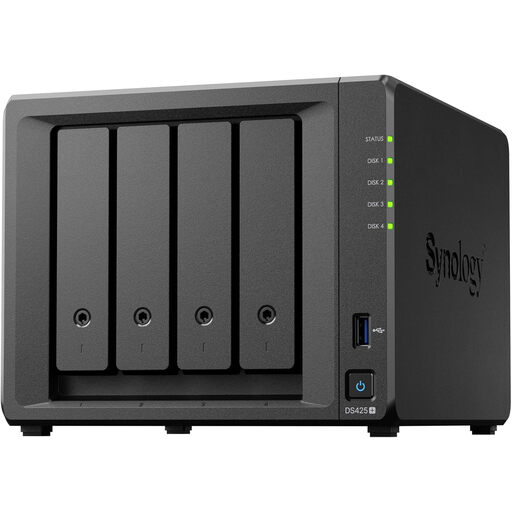
Synology DS425+ four-bay NAS
A local storage option for a team managing shared files and backups. It is a four-bay NAS; confirm which drives come with the chosen bundle, how your devices back up to it and where a separate off-site copy will be kept.
Joybuy
 No image available
DigiEra LPS2000M-3 1TB magnetic portable SSD, Pink
This USB-C portable SSD is an option if you can manage a separate copy yourself. Check whether 1TB accommodates the files and versions you need, and confirm the encryption, backup and restore arrangements before relying on it for business records.
Joybuy
Frequently asked questions
Can a drive kept in the office be my separate backup?
It can hold a backup copy, but it will not protect against losing the workplace if it stays there. The Information Commissioner’s Office advises keeping external storage elsewhere and encrypting and locking it away where possible; the National Cyber Security Centre advises disconnecting a backup device when it is not in use.
How do I check that a small-business backup will restore?
Restore representative files to a separate location and check that you can open the right versions with the available credentials or encryption key. Where a larger recovery matters to operations, practise that workflow too. The Information Commissioner’s Office identifies timely restoration of access and availability as part of security for personal data.
What should I check about a cloud-backup account?
Check who can reset access, administer backups, delete files and restore earlier versions, as well as what account-protection options the service offers. The National Cyber Security Centre advises protecting online backups with two-step verification and considering whether earlier versions remain recoverable after destructive changes.
Does UK GDPR require every small-business backup to be encrypted?
UK GDPR calls for security measures appropriate to the risk of processing personal data, rather than making one backup product or feature a complete compliance solution. The Information Commissioner’s Office identifies encryption as a measure to consider for stored personal information, alongside controls for access and recoverability.


