Dark-room mystery viewers
If you watch mainly after dark, dim interiors and night scenes may make black levels a priority. LG describes pixel-level black in its OLED evo G5 specifications, but assess the picture on the exact TV you are considering.


For a darkened home cinema, start by comparing OLED TVs if black levels in night scenes are your main concern. If you cannot consistently darken the room or want a particularly large screen, compare Mini LED models instead; either way, measure your seating distance and check the exact TV’s HDR formats and audio connections before choosing.
If you watch mainly after dark, dim interiors and night scenes may make black levels a priority. LG describes pixel-level black in its OLED evo G5 specifications, but assess the picture on the exact TV you are considering.
If the room remains partly lit, weigh screen size and local dimming alongside dark-room contrast. Sony lists Mini LED local dimming for BRAVIA 5, while TCL offers several sizes in its Q7C-UK range; features must be checked by model and size.
If you use a soundbar or AV receiver for dialogue and atmosphere, check the TV’s eARC/ARC port, your audio equipment and the space beneath the screen. Sony lists eARC/ARC for BRAVIA 5, not for every Sony TV.
Decide how much control you have over room light, then check screen size from your main seat. Treat sound-system and installation requirements as checks on the exact model, not assumptions based on its display technology.
| Concern | What to check | Who this matters to |
|---|---|---|
| Dark-scene detail | Compare the exact OLED or Mini LED model in lighting similar to your room; check the HDR formats used by your viewing services. | If clues in dim interiors are hard to follow, I would put shadow separation ahead of screen size. Around 36% of consumers would make this their primary concern. |
| Size and room light | Measure seating distance and available width; check the chosen size’s dimensions and how its screen handles room light. | When I cannot fully darken the room, I want a screen that fits both the seat and the space. Roughly 29% of consumers would prioritise size and room-light fit. |
| Dialogue and audio | Identify the TV’s eARC/ARC HDMI port and check compatibility with the intended soundbar or receiver. | If quiet dialogue carries the plot, I want my external audio equipment to connect as intended. About 21% of consumers would put audio integration first. |
| Setup and viewing | Check mounting dimensions and energy information; establish whether your planned viewing requires a TV Licence. | Before choosing a screen, I need it to fit the installation and my viewing plans. Around 14% of consumers would make these practical requirements their main priority. |
A larger TV also needs suitable seating distance and enough wall or stand space; poor placement can make viewing less comfortable.
Measure from your main seat to the proposed screen position. Use THX’s viewing-distance guidance as a starting point, then check the chosen TV’s width, stand footprint and mounting specification.
Audio return uses a designated connection, and the result also depends on the soundbar or receiver and playback settings.
Confirm which HDMI port on the exact TV provides eARC/ARC, then check the audio equipment’s connection and supported settings.
The display label alone does not tell you how a particular TV handles reflections, local dimming, HDR or processing.
Compare specifications for the exact size you intend to buy and, where possible, look for independent assessments under relevant viewing conditions.
Using an app rather than an aerial does not remove the UK TV Licence requirement for live programmes or BBC iPlayer.
Check the services you intend to use: GOV.UK and TV Licensing state that watching or recording live programmes, or using BBC iPlayer, requires a TV Licence.
An OLED route worth examining for a room used mainly after dark.
A Mini LED option for viewers checking both picture features and external-audio connections.
A QD-Mini LED range to examine when a larger screen is central to the room plan.
A Neo QLED Mini LED line to include when comparing LCD options for a room with some light.
These OLED- and Mini LED-route TVs cover screen sizes from 42 to 83 inches. Match the size to your seating position, then check the picture formats and audio connections needed for your setup.
 No image available
Consider this 83-inch option if a large image is a priority and your seating distance and available space suit it.
The product name specifies a 4K smart TV and a one-year warranty. Check the HDR formats required by your viewing services before buying.
 No image available
The 42-inch size is worth considering where a larger screen would not fit the seating position or installation space.
The product name identifies OLED, 4K, Dolby Vision and Dolby Atmos. If you plan to connect a soundbar or receiver, check the exact TV’s eARC/ARC connection.
 No image available
This 55-inch Mini LED option gives consumers comparing the mixed-light route a different screen size to assess against their seating distance.
The product name specifies VIDAA OS and a built-in subwoofer. For external audio, check whether the exact TV has the eARC/ARC connection you need.
 No image available
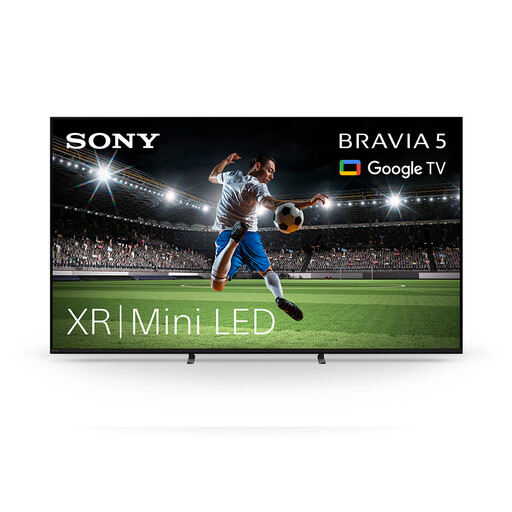
Consider this 55-inch Mini LED model if you want to assess a TV with specified local dimming and a connection for external audio.
Sony UK lists Dolby Vision and eARC/ARC for the matching BRAVIA 5 specification. Check the designated audio port, equipment compatibility and physical fit for your installation.
 No image available
The 75-inch screen makes seating distance and wall or stand space especially important to check.
The product name identifies QD-Mini LED and a 144Hz native refresh rate. Confirm this variant’s HDR formats and mounting dimensions, plus the intended sound system’s eARC compatibility.
Start with the distance from your main seat to the planned screen position, rather than choosing by diagonal size alone. THX suggests multiplying seating distance in inches by 0.835 as a starting point for screen size; also check the TV’s physical width, stand footprint and mounting height.
No, eARC is not needed to watch through the TV’s own speakers. If you intend to use a soundbar or AV receiver, check the exact TV’s eARC/ARC port and your audio equipment’s compatibility; Sony UK lists eARC/ARC for BRAVIA 5.
Check the energy label and product information sheet for the exact model and size. UK government guidance requires products within the energy-labelling rules to be supplied with an accurate printed label and a product information sheet.
In the UK, you need a TV Licence to watch or record programmes as they are broadcast, or to use BBC iPlayer, including for on-demand programmes. GOV.UK and TV Licensing distinguish those uses from watching only on-demand programmes on other services; the device you use does not change the live-TV requirement.