For detective series watched mainly in a dim room, start with OLED if deep blacks are your priority, then check how the exact TV preserves detail in shadows. For frequent daytime viewing, compare Mini LED models suited to brighter rooms instead; neither display label tells you how a particular set handles reflections, dialogue or the streaming apps you use. If subtitles or audio description are essential, check those features in your usual apps before choosing.
Who is this for?
Night-time mystery viewers
If you usually watch after dark, you may care most about distinguishing faces, clothing and clues against black backgrounds. LG and Panasonic describe the deep blacks possible with OLED; check shadow detail on the TV model you are considering.
Bright-living-room streamers
If you watch during the day or near strong room lighting, compare how individual TVs handle brightness and reflections. Samsung and Sony describe local dimming in their Mini LED ranges, but the viewing result depends on the model and room.
Subtitle and dialogue-first viewers
If you rely on subtitles or audio description to follow a plot, check the controls in the broadcaster and streaming apps you use. Ofcom identifies these as access services; their availability is not determined by the display panel.
What matters when choosing?
Choose the display route around your usual room lighting, then check the exact model’s dark-scene picture and the access features in your apps.
OLED TV
Consider it when: You mainly watch in controlled light and value deep blacks in night-time scenes; LG and Panasonic describe OLED’s self-lit pixels as relevant to that priority.
Keep in mind: Check the exact model’s brightness and shadow detail in your room rather than assuming every OLED suits strong daylight.
Mini LED TV
Consider it when: Daytime viewing or a bright living room is the greater concern; Samsung and Sony describe backlights controlled through local dimming in their Mini LED ranges.
Keep in mind: Dimming works by zones rather than individual pixels, so inspect the exact model’s dark-scene picture instead of relying on the technology name.
| Concern |
What to check |
Who this matters to |
| Detail in dark scenes |
Compare shadow detail using a familiar dark scene. Check the exact TV’s picture settings and whether its HDR formats match the programme and service. |
If clues or faces disappear into dark clothing and backgrounds, I want to follow the scene without losing those details. Roughly 50% of consumers put dark-scene visibility first. |
| Daytime visibility |
Assess the screen in lighting like your own room, including reflections from windows or lamps and the model’s local-dimming behaviour. |
When I watch in daylight, I need a picture I can make out despite the room lighting. Around 30% of consumers make bright-room visibility their primary concern. |
| Dialogue and access features |
Check subtitles and audio description in your usual apps, including subtitle controls and the TV’s audio settings or outputs. |
If I depend on dialogue or subtitles to catch a plot turn, I need the controls to work in the services I use. About 20% of consumers prioritise dialogue and accessibility. |
Buying pitfalls
-
Treating OLED, Mini LED or HDR as the whole picture specification
A display label cannot tell you how a particular TV shows shadow detail or which HDR formats it accepts. Dolby also notes that HDR displays differ in capability and processing.
Compare exact model numbers and check the supported HDR formats. If possible, view a familiar dark scene with the picture settings you would use at home.
-
Assuming the TV guarantees subtitles and audio description
Broadcasters and on-demand services supply these access features; the panel alone cannot provide a track that a programme or app does not offer.
Open your usual apps on the TV platform and check whether the programmes, subtitle controls and audio-description settings you need are available.
-
Comparing energy information for the wrong screen size
Energy information for one size is not a substitute for the information accompanying the size you intend to buy.
Check the energy label and product information sheet for the exact TV model and screen size alongside its picture features.
Brands to consider for these display types
LG
Its OLED range is relevant if you are comparing TVs for dark-room viewing.
- LG says its OLED pixels switch on and off independently without a backlight, supporting deep blacks.
- Check brightness, HDR formats and size for the specific model; a range-wide description does not settle its fit for a bright room.
Samsung
Its Neo QLED Mini LED range is relevant when you are investigating local dimming for a brighter room.
- Samsung describes a Mini LED backlight that adjusts brightness and contrast through local dimming.
- Check the exact model’s shadow detail, reflections, viewing angles and HDR support rather than assuming the range performs uniformly.
Sony
Its BRAVIA Mini LED range offers another local-dimming LCD route to examine.
- Sony describes its Mini LED backlight control as supporting bright highlights and detail in shadows.
- Those are Sony’s range claims; compare the specifications and dark-scene behaviour of the particular BRAVIA model.
Panasonic
Its OLED range is relevant if you want to compare OLED contrast and model-specific HDR support.
- Panasonic lists Dolby Vision, HLG, HDR10 and HDR10+ for its named Z80 OLED model.
- Check formats, audio features and the smart interface on the precise Panasonic model; the Z80 specification does not describe every TV in the range.
Joybuy TVs to consider
These TVs include Mini LED choices for comparing brighter-room viewing and a Direct LED option for checking streaming and HDR features. Compare each model’s dark-scene picture and app controls before deciding; none of these listings is an OLED choice.
 No image available
Hisense 55-inch U7Q Pro (55U7QTUK Pro) Mini LED 4K TV
Consider this Mini LED model if daytime viewing is a priority. The title identifies a 55-inch 4K TV with VIDAA OS.
Check its dark-scene dimming and the subtitle or audio-description controls in your usual apps before choosing it for detective series.
View on Joybuy
 No image available
TCL 75-inch Q6C (75Q6C) QD-Mini LED 4K Google TV
Consider this 75-inch QD-Mini LED TV if you want a large screen and are comparing models for daytime viewing. Its title identifies Google TV and a dimming series.
The title says up to 512 dimming zones, not a fixed count for this variant. Check the 75-inch model’s dimming behaviour and reflections.
View on Joybuy
 No image available
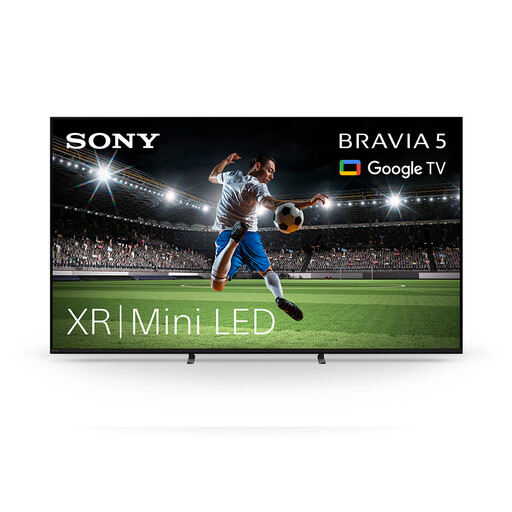
Sony 55-inch BRAVIA 5 (K55XR55BP) Mini LED 4K Google TV
This 55-inch Mini LED model is relevant if you are comparing TVs for a brighter room. Its title lists Dolby Vision, which matters only when the programme and service also offer that format.
Check dark-scene dimming, reflections and access features in the apps you use on Google TV.
View on Joybuy
 No image available
TCL 65-inch Q7C (65Q7C) QD-Mini LED 4K Google TV
Consider this 65-inch QD-Mini LED model when comparing larger TVs for daytime viewing. The title identifies Google TV and describes local dimming as reaching up to 2048 zones.
Confirm the zone count and HDR formats for this variant, then assess its handling of shadowed scenes; the stated maximum does not establish its picture performance.
View on Joybuy
 No image available
TCL 65-inch V6C (65V6C) Direct LED 4K Google TV
This 65-inch Direct LED model is an option to examine if Google TV and the title’s HDR features interest you; it is not identified as OLED or Mini LED.
Check shadow detail on the exact model and whether your services provide the HDR and access features you intend to use.
View on Joybuy
Frequently asked questions
Should I choose OLED or Mini LED for dark detective dramas?
Start with OLED if you mainly watch in controlled light and deep blacks matter most; consider Mini LED if daytime viewing in a bright room is the bigger priority. LG and Panasonic describe OLED’s self-lit pixels, while Samsung and Sony describe local dimming in their Mini LED ranges. Compare the exact TV’s shadow detail before deciding.
Is Dolby Vision essential for detective series?
No; prioritise it only if the series and streaming service offer Dolby Vision and the TV model supports it. Dolby says the format can preserve more detail in dark scenes, but the format cannot change a programme that is not supplied in Dolby Vision.
Will a new TV provide subtitles or audio description for every series?
No; those features also depend on the programme, broadcaster and streaming app. Check your usual services on the TV platform, including how easily you can find and adjust subtitles. Ofcom identifies subtitles and audio description as access services.
Which energy information should I compare?
Compare the energy label and product information sheet for the exact TV model and screen size you intend to buy. Do not use another size’s information or assume that the words OLED and Mini LED alone tell you how much energy a particular TV uses.
What should I do if a newly installed TV is faulty?
Contact the seller and explain the fault, keeping your order and model details to hand. The UK Consumer Rights Act 2015 explanatory notes describe repair or replacement as remedies for faulty goods; a manufacturer warranty is not the only route to raise the problem.


