Dark-scene atmosphere seekers
If you inspect moonlit paths, water, foliage shadows and lighting effects in a dark room, assess black levels and the exact monitor’s HDR certification before focusing on its maximum refresh rate.


Prioritise an OLED gaming monitor with VESA DisplayHDR True Black certification if judging moonlit paths, shadows and garden lighting is your main task in a dark room. Choose 4K when fine layout detail matters more and your device can run the resolution at your desired refresh rate; QHD high-refresh OLED, 4K Mini LED and Fast IPS offer different screen formats and workflow trade-offs. Check the exact model’s connections, variable-refresh-rate support and, for long sessions with static design tools, OLED-care and warranty terms.
If you inspect moonlit paths, water, foliage shadows and lighting effects in a dark room, assess black levels and the exact monitor’s HDR certification before focusing on its maximum refresh rate.
If you spend more time placing small objects, inspecting textures and working in menus than moving through the garden, compare resolution, screen size and adjustment options.
If you regularly pan or move through the garden, check refresh rate, stated pixel response and variable-refresh-rate compatibility with the device you use.
Choose the panel route around your main task, then check whether the screen format and your connected device support the way you intend to work and play.
Choose when: Dark garden scenes and shadow separation are your priority; VESA describes True Black as a standard for emissive displays suited to subdued lighting.
Consider: Long periods with static palettes or toolbars make the exact model’s panel-care features and warranty terms important.
Choose when: A large, detailed 4K canvas appeals alongside high-refresh gaming; Samsung lists these specifications for its 32-inch Odyssey Neo G8.
Consider: The Neo G8 has a 1000R curve, so check its fit on your desk and whether that shape suits your design view.
Choose when: A 27-inch QHD LCD format suits your workspace; ASUS lists its ROG Strix XG27ACS at 180Hz.
Consider: An HDR label on an LCD does not establish the same certification or black-level characteristics as a DisplayHDR True Black-certified emissive display.
| Concern | What to check | Who this matters to |
|---|---|---|
| Dark-scene contrast and HDR | Check the exact model for VESA DisplayHDR True Black certification and review its stated HDR conditions, rather than relying on an HDR label alone. | If I need to distinguish foliage shadows from a moonlit path, credible dark-scene performance comes before headline speed. Around 40% of consumers put that contrast and HDR need first. |
| Layout detail and workspace | Compare native resolution with screen size; check whether the stand and any screen curvature suit your desk position. | When I arrange small plants and objects, I want room to inspect the layout without losing sight of my tools. For roughly 40% of consumers, that detailed working canvas is the primary concern. |
| Smooth movement and compatibility | Confirm refresh rate at native resolution and variable-refresh-rate support across the monitor, connection and source device. | If I often pan through the garden, I care most about how the display works with my device as movement changes. Smooth, compatible navigation comes first for around 20% of consumers. |
VESA’s DisplayHDR True Black standard addresses black levels on emissive displays in subdued lighting; a generic HDR label does not establish that a particular monitor meets it.
Check the exact model’s certification and stated HDR conditions if dark garden scenes are central to your choice.
A monitor’s advertised mode is useful only if the connected device, port and cable support the resolution and refresh rate you intend to use.
Check the specifications of your graphics card or console against the monitor’s inputs and required connection mode before buying.
An incompatible connection could mean using a lower setting or changing a cable or other equipment.
Garden-design applications can leave palettes and toolbars in place for long sessions. ASUS says measures on its PG27AQDM are intended to reduce burn-in risk, not eliminate it.
Read the care settings, maintenance behaviour and warranty terms for the exact OLED model you are considering.
LG advises that unsuitable materials can be abrasive enough to damage a monitor screen.
Switch the monitor off and unplug it before cleaning; use a microfibre cloth that is damp rather than wet, and wipe gently.
The 27GS93QE-B is an LG example of a 27-inch QHD OLED gaming monitor with DisplayHDR True Black certification.
Dell’s AW3225QF is a larger 4K QD-OLED option for buyers considering both design detail and high refresh rate.
Samsung’s Odyssey Neo G8 illustrates a 32-inch 4K Mini LED route rather than an OLED route.
ASUS lists both a 27-inch OLED high-refresh model and a 27-inch Fast IPS QHD model, giving buyers two distinct panel routes to examine.
These monitors offer OLED options for dark-room viewing alongside a 27-inch Nano IPS choice for a 4K-focused workspace. Their screen sizes and shapes differ substantially, so choose the format and connection mode that suit your desk and device.
 No image available
Consider this OLED model if a 34-inch widescreen format fits the space where you design and explore your garden.
The product title specifies WQHD and 240Hz; check the exact resolution and available operating mode against your device.
For long sessions with static toolbars, check this model’s OLED-care settings and warranty terms.
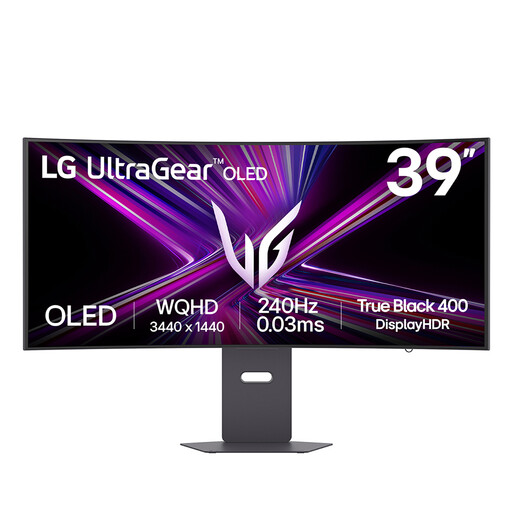 No image available
The 39-inch format is worth considering if you want a larger area for your garden layout and have room to position the screen comfortably.
The product title states QHD and 240Hz; confirm the native resolution, desk fit and supported mode before choosing it.
Check OLED-care behaviour and warranty terms if design tools will remain on screen for extended periods.
 No image available
Consider its broad layout space only if a 49-inch screen suits your desk, viewing position and design application.
The product title specifies a 32:9 format, 1800R curve, 240Hz and DisplayHDR 400 True Black; its Double Quad HD format is not 4K.
Check the model’s OLED-care settings and warranty terms for prolonged use with static interface elements.
 No image available
Choose this route to assess a 27-inch 4K workspace without choosing an OLED panel.
The product title specifies dual-mode 240Hz/480Hz operation, DisplayHDR 600, DisplayPort 2.1 and HDMI 2.1. Confirm which resolution applies to the mode you want and whether your device supports it.
DisplayHDR 600 should not be treated as DisplayHDR True Black certification when judging dark-scene priorities.
 No image available
This 27-inch OLED format suits a buyer weighing dark-room viewing and fast garden navigation against a larger design canvas.
The product title specifies QHD, 240Hz and a stated 0.03ms response time. Check the exact HDR certification and your device’s supported refresh mode.
Review OLED-care behaviour and warranty terms before using static palettes or toolbars for long sessions.
No: prioritise 4K if inspecting small objects and working across a detailed canvas matter most, provided your device supports the resolution and refresh rate you want. A QHD monitor remains an option when its panel characteristics or screen format better suit your dark-room work and navigation.
Check that the monitor, source device, ports and cable support 4K at 240Hz together. Dell identifies specific connection modes for the AW3225QF, so use the exact monitor and device specifications rather than assuming every 4K input can run its maximum refresh rate.
Switch it off and unplug it, then wipe gently with a microfibre cloth that is damp, not wet. LG advises against unsuitable cloths that could abrade the screen; follow the cleaning instructions for your exact model.
Use a suitable electrical-equipment collection or take-back route rather than putting the monitor in ordinary household waste. GOV.UK describes the UK WEEE framework as encouraging recovery, reuse and recycling; check your local council or a retailer for an available route.