What to check before choosing
In a light-controlled room, compare OLED’s pixel-level black control with the dark-scene behaviour of any LED-based model you are considering. Then check whether the picture format can reach the TV through your usual service and devices, and whether the screen fits the room.
| Concern |
What to check |
Who this matters to |
| Black level and shadow detail |
Confirm the display type on the exact model. For an LED-based TV, assess its dark-scene behaviour model by model rather than judging from the Mini LED label alone. |
When I watch space or deep-water footage with the lights down, I want dark areas to remain distinct. Around 33% of consumers put black level and shadow detail first. |
| HDR and streaming compatibility |
Match the TV’s listed HDR formats to your services and titles; check any streaming player or receiver in the playback chain. |
If I use an external player, I need the intended format to reach the screen, not merely appear on the TV’s feature list. For around 27% of consumers, format and source compatibility is the primary concern. |
| Screen size and installation |
Measure the viewing space and furniture or wall area. Confirm the exact variant’s supplied stand or bracket before planning its position. |
A larger screen only works for me if it fits my seating and has a suitable place to stand or mount. Room fit and installation come first for around 20% of consumers. |
| Narration and everyday use |
Consider dialogue at your normal listening level and the connections needed for any separate audio equipment; review the exact size’s energy information. |
I want to follow quiet explanations comfortably without assuming I need extra speakers. Around 20% of consumers primarily weigh narration and practical everyday use. |
OLED TV choices on Joybuy
These TVs are choices for the OLED side of a dark-room documentary setup, in sizes from 42 to 83 inches. Choose by room fit and the exact model’s stated formats; an LED-based TV remains a separate option if substantial daytime viewing is also important.
 No image available
Sony BRAVIA 8 K65XR80BP 65-inch OLED 4K TV
Consider this 65-inch option if the screen fits your dark-room viewing space and Dolby Vision is among the formats you intend to use.
The product name lists OLED, 4K, Google TV, Dolby Vision and Dolby Atmos. Confirm the stand or mounting arrangement for this exact variant; Dolby Vision playback also depends on the programme and devices you use.
View on Joybuy
 No image available
Sony BRAVIA A90 XR42A90K 42-inch OLED 4K TV
Consider the 42-inch size where available furniture or wall space limits the screen, after checking that it suits your viewing position.
The product name lists OLED, 4K, Google TV, Dolby Vision and Dolby Atmos. Confirm what is supplied for placement or mounting; the desired HDR format must also be available through your viewing service and devices.
View on Joybuy
 No image available
Sony BRAVIA A90 XR48A90K 48-inch OLED 4K TV
This 48-inch variant is another size to measure against your seating position and planned TV location.
The product name identifies an OLED 4K Google TV and lists Dolby Vision and Dolby Atmos. Check its supplied stand or mounting arrangement, and match Dolby Vision to the content and playback equipment you use.
View on Joybuy
 No image available
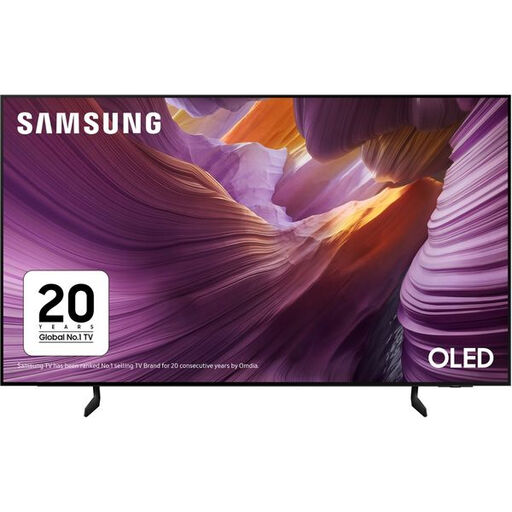
Samsung QE65S85FAE 65-inch 4K Smart TV
Consider this 65-inch screen for a dark-room setup only after checking that its exact model and display specification meet your needs.
The product name states a 65-inch 4K Smart TV. Check the model code carefully before ordering: the associated product descriptions also refer to QE65S85BAE. Confirm the HDR formats for the variant offered if a particular format matters to you.
View on Joybuy
 No image available
Samsung S85F QE83S85FAE 83-inch 4K Smart TV
Choose an 83-inch screen only if your seating position and intended installation can accommodate it safely.
The product name states 83 inches and 4K. Plan the placement against the stated approximately 1849 mm width and 33.9 kg weight with stand, and confirm the exact HDR formats if your documentaries require a particular one.
View on Joybuy
Frequently asked questions
Is OLED a sensible choice for science documentaries in a dark room?
Yes, if black backgrounds and contrast in dark scenes are your main priorities. Sony UK describes OLED pixels as individually controlled; compare an LED-based model separately if the TV will also see substantial daytime use, and judge its dark-scene behaviour by the particular model.
Do I need Dolby Vision for documentaries?
Only if the documentaries and services you use offer Dolby Vision and you want to watch in that format. Check the TV’s exact model specification and any connected player or receiver; Netflix says every device in the playback chain must support the desired quality.
What should I check before wall-mounting a TV?
Check the exact TV’s mounting requirements, what hardware is supplied and where cables will run before ordering. Follow the manufacturer’s instructions and use a suitable support solution; Electrical Safety First also advises keeping TVs away from moisture and heat.
Do I need a TV Licence to stream documentaries in the UK?
TV Licensing says you need licence coverage to watch live TV on streaming services or to use BBC iPlayer. If you only watch on-demand programmes elsewhere, check TV Licensing’s guidance against the particular services and viewing activities you use.
Should I compare energy information when choosing a screen size?
Yes. GOV.UK includes televisions among electronic displays covered by UK energy-information guidance. Compare the information for the exact size and variant you intend to buy, alongside room fit and installation needs.


