
24/7 Customer Support

Free returns

Same-day & Next-day Delivery

Quality Guaranteed

Unlock Your Welcome Offers: FREE Delivery | Up to 80% OFF | Free 30-day JoyPlus trial
Download the APP
Sifting through endless clearance pages and seasonal discount catalogues can make pinpointing dependable home gear surprisingly tricky. Whether you are kitting out a spare bedroom in a rental flat or looking for a lightweight laptop to manage household admin, true value goes beyond simply hunting down the lowest sticker price. Smart online shopping requires balancing upfront affordability against core hardware specifications, daily practicality, and ongoing convenience.
Making your budget stretch further comes down to understanding your practical requirements before heading to the checkout. Matching the item directly to your everyday environment helps you steer clear of underpowered hardware or awkward home gadgets that gather dust. This guide breaks down the essential criteria for evaluating affordable household and tech finds, followed by three dependable selections suited to varied daily tasks.
The sharpest price drop often masks older internal architecture or restrictive hardware configurations that struggle with modern web tasks. For portable electronics, acquiring low system memory or slow storage formats leads to frustrating stutter during routine browsing. Always check that base computing parts support modern web standards and security protocols rather than simply picking the lowest figure on the screen.
Discounted room appliances frequently compromise on filling access, water channel design, or filter maintenance. Humidifiers with narrow openings or delicate tanks prove awkward to clean under a standard kitchen tap, leading to mineral scale build-up or mould accumulation. Prioritising top-fill designs and modular aroma trays ensures simple routine hygiene without needing bespoke cleaning chemicals.
Shoppers often pick up portable computers without verifying the native operating environment required for their specific activities. A streamlined cloud-oriented operating platform is ideal for document writing, video streaming, and web shopping, whereas local productivity software, spreadsheets, and legacy utilities demand a traditional desktop operating system with expandable local solid-state storage.
Hardware components dictate how long a device remains practical for daily use. Evaluating processing cores, system memory type, and internal drive technology ensures smooth responsiveness across everyday applications.
Visual comfort is vital when working or watching content for hours at a time. Panel finish and pixel density directly influence eye strain in brightly lit living areas.
Room appliances must fit into everyday domestic routines without causing disruption or demanding continuous refills. Tank volume and decibel ratings determine living space suitability.
These three dependable choices combine robust construction with sensible pricing to meet everyday household and productivity needs.
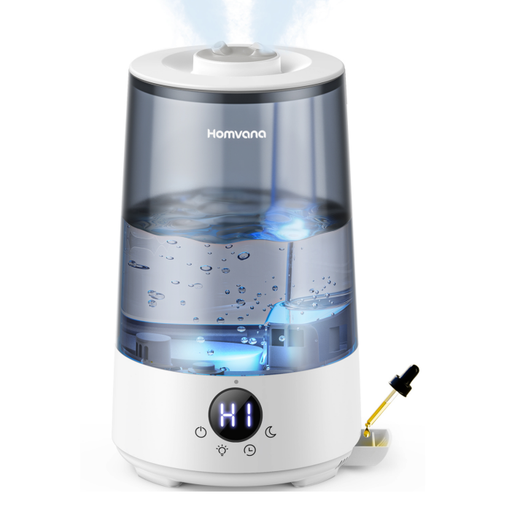
Why This Fits Their Persona: This grey mist humidifier features a generous 3.6-litre capacity capable of covering spaces between 24 and 35 square metres. It runs for up to 29 hours in sleep mode, keeping humidity steady throughout long evenings without constant top-ups. A quiet operational output of 16 dB ensures it operates unobtrusively in bedrooms or quiet home studies.
Constructed from BPA-free Polypropylene, the unit avoids flimsy, brittle plastics that degrade quickly under daily domestic use. The dedicated aroma tray prevents essential oils from being placed directly into the water reservoir, avoiding internal material erosion and pump blockages.
Its top-fill design simplifies cleaning and refilling under ordinary kitchen taps, while the 360-degree cool mist nozzle and 7-colour night light provide adaptable mist distribution and gentle ambient illumination.
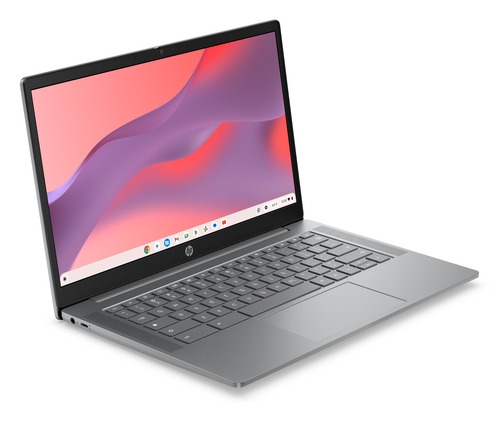
Why This Fits Their Persona: Powered by an 8-core MediaTek Kompanio 540 processor and 4GB of rapid LPDDR5 memory, this silver Chromebook provides fluid responsiveness for web browsing, streaming, and coursework. The 14-inch anti-glare HD screen measures 35.6 cm, balancing portability with readable workspace across kitchen counters or university desks.
It sidesteps the sluggish connectivity common in budget laptops by integrating modern Wi-Fi 6 technology, ensuring steady wireless performance on congested home broadband networks. Fast Charge capability pairs with the 47Wh battery to minimise downtime when you need to top up before heading out.
Running lightweight ChromeOS alongside 64GB of eMMC storage, this machine boots rapidly and maintains low energy consumption, offering an uncomplicated setup for web-centred daily tasks.
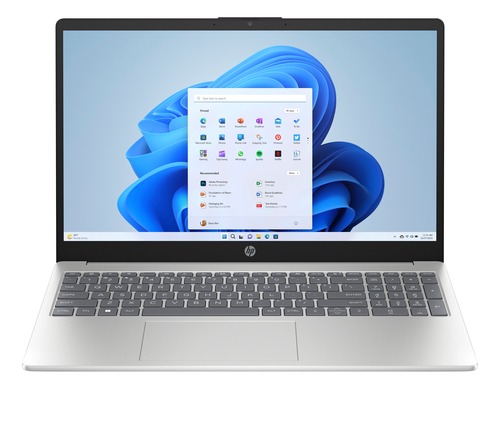
Why This Fits Their Persona: Equipped with an Intel Core i3-1315U processor and 8GB of DDR4 memory, this silver laptop capably handles standard office software, extensive browser tabs, and home finance spreadsheets. The 15.6-inch Full HD display spans 39.6 cm, giving you ample visual real estate for side-by-side document editing.
It avoids the bottleneck of slow mechanical hard drives or small flash memory by packing a generous 512GB PCIe NVMe solid-state drive, ensuring rapid boot times and ample local space for personal archives, photos, and project folders.
Pre-installed with Windows 11 Home and featuring Wi-Fi 6 wireless networking, it delivers broad desktop software compatibility and steady connectivity right out of the box.
Base your choice on the specific programs you run daily. A Chromebook suits web browsing, video meetings, and cloud document editing within a lightweight operating system. A Windows laptop is preferable if you require local desktop software, specialised utilities, or expansive offline storage for larger file libraries.
Place essential oils exclusively on the built-in aroma tray rather than putting drops directly into the main water tank. Adding concentrated oils directly to water can cause Polypropylene or internal valves to degrade over time, leading to leaks or residue build-up within the mist chamber.
Check that the device includes a standard UK three-pin plug or accepts USB charging standards common across domestic sockets. For network devices, ensure support for modern Wi-Fi protocols like 802.11ax so the unit connects seamlessly to standard UK broadband routers.