Start with the games, platform and communication setup the player needs, then test the connection at the gaming location before paying for more broadband or higher-spec hardware. In a shared home, latency, packet loss, upload performance and connection status matter alongside download speed; where it is practical, a wired Ethernet connection is a sensible first check.
Who this setup suits
Homes with players, streamers and remote workers
For homes where gaming competes with HD streaming, video calls, schoolwork or other connected devices, and where it helps to separate shared-bandwidth pressure from local Wi-Fi or multiplayer-quality problems. Ofcom identifies gaming, streaming and video calls as data-heavy activities.
Players dealing with lag or party-chat issues
For players whose console or PC connects but performs inconsistently online. Latency, packet loss, upload performance, NAT and local wireless conditions can be more useful checks than headline download speed alone, according to Microsoft Xbox Support and Ofcom guidance.
Families choosing a first or replacement setup
For buyers deciding between a console, gaming computer, headset and network improvement, including households that need to check platform-specific online-service costs and accessory compatibility.
Buying priorities
Choose the gaming route around the player’s platform and communication needs, then check whether the connection at the actual play location can support multiplayer use when the household is busy.
| Priority |
What to check |
Your needs |
| Shared connection and local reliability |
Check whether an Ethernet cable can safely reach the console or desk; test Wi-Fi where the player actually sits; compare results when others are streaming or on calls. |
I need online play to coexist with streaming, calls and other connected devices, rather than assuming a new gaming device will solve congestion. |
| Gameplay responsiveness |
Look beyond download speed at latency, packet loss, upload performance and NAT or connection status; use the platform’s network diagnostics where available. |
I want multiplayer sessions to feel responsive and stay connected, even when the advertised broadband rate looks high. |
| Voice communication |
Confirm microphone support, the audio connector or wireless method, and compatibility with the exact console, controller or computer. |
I need party or in-game chat without relying on TV speakers in a shared room. |
| Platform requirements |
Compare disc versus digital format, stated storage, game availability and the online-access requirements for the intended games. |
I want to use the player’s existing games and understand any platform or online-service requirements before choosing hardware. |
Common buying pitfalls
-
Buying on advertised download speed alone
Lag or unstable play can still occur when Wi-Fi has interference, devices compete for capacity, or multiplayer diagnostics show high latency, packet loss, upload or NAT problems.
Test the console or PC from its intended location at busy household times. Compare latency, packet loss, upload and connection status as well as download speed, and try Ethernet before replacing otherwise suitable gaming hardware.
-
Treating Wi-Fi bandwidth as proof of gaming quality
Microsoft Xbox Support notes that a high-bandwidth wireless connection can still have poor audio or video quality when latency or packet loss is significant.
If Wi-Fi is required, assess local signal quality and interference at the gaming location. Use a suitable 5 GHz network where supported, but test actual latency and packet loss rather than relying on the band alone.
-
Comparing consoles without checking format, storage and online access
Disc and digital hardware are not interchangeable, and storage can differ between variants. Sony states that paid PlayStation Plus is required for online multiplayer on the PS5 Disc Console and is sold separately.
List the player’s existing disc library, intended games, online access needs and likely installed-game storage before comparing exact console variants.
A paid online-service subscription or later storage expansion may be relevant to the chosen platform and games.
-
Replacing electrical equipment without planning disposal
A replacement console, PC, router or headset can leave the household with electrical waste that needs an appropriate take-back or recycling route.
Ask the retailer about like-for-like take-back when purchasing a replacement and check local-authority arrangements for items not covered by the retailer’s service.
Relevant brand references
PlayStation
Relevant for households considering a PS5 console and PlayStation Network or party-chat setup. PlayStation’s UK support documentation covers both Wi-Fi and wired LAN setup for PS5 and PS4.
- Sony’s PS5 Disc Console listing states that it includes a 1 TB SSD and a disc drive.
- Sony states that paid PlayStation Plus is required for online multiplayer on the PS5 Disc Console and is sold separately.
Xbox
Relevant for buyers comparing Xbox Series X and Series S models or using Xbox network diagnostics for multiplayer troubleshooting.
- Microsoft states that Series X has native 4K capability, a UHD Blu-ray drive and 1 TB or 2 TB SSD options.
- Microsoft states that Series S is disc-free, targets 1440p with 4K upscaling capability and has 512 GB or 1 TB SSD options.
- Xbox network tools can show download, upload, packet loss, latency and MTU, but they do not identify every possible cause of a connection problem.
Nintendo
Relevant for buyers considering Nintendo Switch 2 for online and local shared-home use, including portable play away from the main router location.
- Nintendo states that Switch 2 supports Wi-Fi 6, has a built-in microphone and includes a 3.5 mm audio jack.
- Nintendo states that wired LAN use is available in TV mode, so buyers should not assume it applies to handheld or tabletop play.
Joybuy product options
Joybuy product options for a shared-home online gaming setup, including a gaming laptop, local network equipment and communication accessories.
 No image available
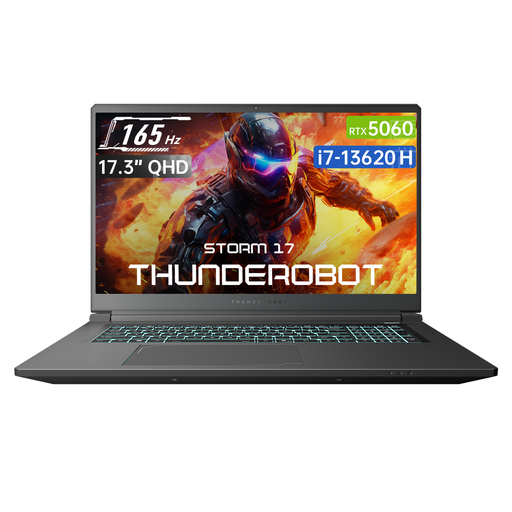
THUNDEROBOT Storm 17 5060 Gaming Laptop
For a fixed desk setup where a stated RJ-45 port can provide a practical wired connection option.
17.3-inch QHD 165Hz display, Core i7-13620H, GeForce RTX 5060 Laptop GPU, 16GB DDR5 RAM, 1TB SSD, HDMI and Wi-Fi 6. Use it on a hard, flat surface with the vents unobstructed, and check game, peripheral and voice-chat compatibility before buying.
Joybuy
 No image available
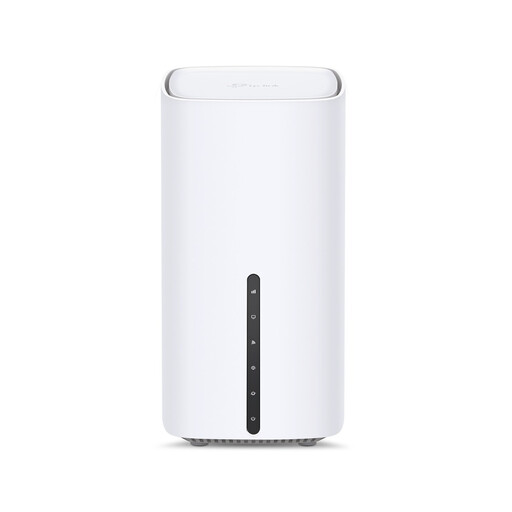
TP-Link Archer NX500 5G AX3000 Router
For a gaming location needing stated wired ports or local Wi-Fi coverage options after testing where the connection problem occurs.
5G/4G connectivity, 2.5Gbps WAN/LAN port, two Gigabit LAN ports, dual-band Wi-Fi 6, EasyMesh and QoS. Check home coverage, SIM-plan terms, signal quality and carrier compatibility; EasyMesh expansion needs separately obtained compatible devices.
Joybuy
 No image available
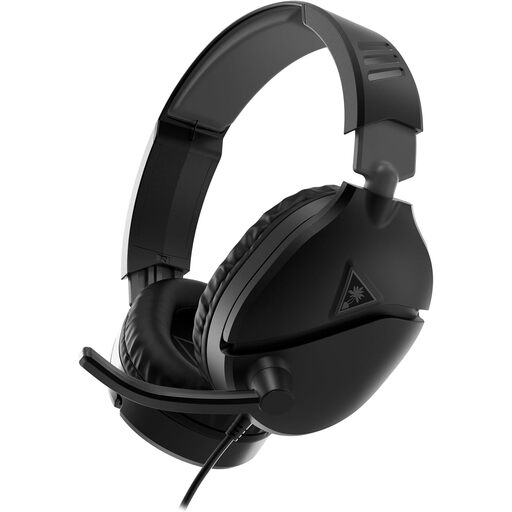
Turtle Beach Recon 70 Gaming Headset
For shared-room voice chat where a wired headset and flip-to-mute microphone suit the player’s setup.
40mm speakers, 2 m cable, PC splitter, flip-to-mute microphone and stated compatibility with PC, PlayStation, Xbox, Switch and mobile devices. Check the intended controller or device has a compatible 3.5 mm connection, and route the cable safely.
Joybuy
 No image available
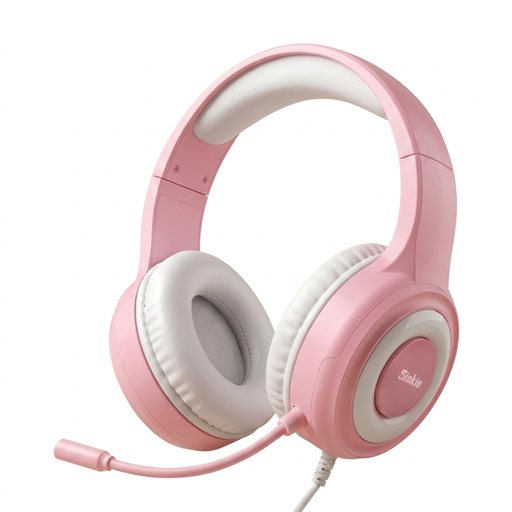
Siukie CH25 Wired Gaming Headset
For party or in-game chat in a shared room using the stated wired audio and microphone connections.
50mm drivers, wired over-ear design, USB lighting connection and 3.5 mm audio and microphone jacks. The USB plug is stated for lighting; check the exact controller or device supports the required 3.5 mm microphone connection.
Joybuy
 No image available
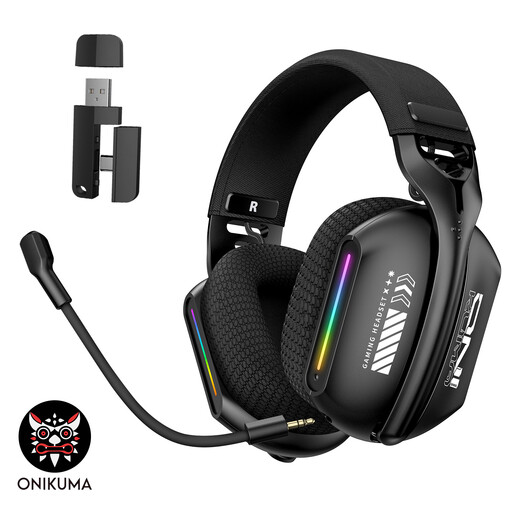
ONIKUMA GT808 Triple-Mode Wireless Headset
For PC or laptop gaming with voice chat where wired, Bluetooth 5.3 or 2.4GHz connection modes may suit a compatible setup.
2.4GHz wireless, Bluetooth 5.3, wired mode, stereo audio, rechargeable battery, adjustable microphone and memory-foam ear cushions. Confirm compatibility with the exact console, controller or dongle arrangement, and follow the supplied charging and volume-safety instructions.
Joybuy
Frequently asked questions
Is a faster broadband package enough to improve online gaming in a shared home?
Not necessarily. Ofcom identifies gaming, HD streaming and video calls as data-heavy activities that can compete on a shared connection. For multiplayer troubleshooting, also check latency, packet loss, upload performance and NAT or connection status at the gaming device.
Should a gaming console or PC use Ethernet instead of Wi-Fi?
Use Ethernet when it is practical to run the cable safely between the router and gaming location. Ofcom says a direct Ethernet connection can provide a faster, more reliable connection; if Wi-Fi is necessary, test it where the player actually uses the device because high bandwidth does not rule out latency or packet-loss problems.
Do consoles include everything needed for online multiplayer?
Do not assume so. Sony states that paid PlayStation Plus is required for online multiplayer on the PS5 Disc Console and is sold separately. Requirements can vary by platform, game and online service, so check the exact game’s access requirements before purchase.
What should a UK household do with old gaming equipment when replacing it?
Check the retailer’s take-back arrangements and local recycling options rather than putting electrical equipment in general waste. GOV.UK guidance covers retailer take-back of waste electrical items of the same type as a purchased item, subject to the relevant scheme arrangements.


