Choose a console or gaming computer only after confirming that your friends can play the exact game together on their chosen platforms. If the game already runs on your equipment, check the home connection before replacing hardware, and consider a headset when the group’s chosen voice-chat method is the sticking point. For a child’s setup, account and communication controls are part of the decision too.
Who is this setup for?
Friend-group organisers
You need to settle which game edition everyone will use, whether their platforms can join the same session, and how the group will talk before choosing a console or PC. Xbox Support says cross-network play is available in some games, not all of them.
Players dealing with interruptions
If you can already run the game but matches or calls keep dropping, investigate the household connection before changing gaming equipment. Ofcom recommends a direct Ethernet connection to the router where practical when seeking better broadband speeds.
Families arranging supervised play
When a child will play and communicate online, check the platform’s account, communication and playtime settings as well as the equipment. Nintendo notes that its Switch console-level parental controls apply to everyone using a shared console.
What should you check before buying?
Settle game and platform access first, then investigate connection and chat problems on the equipment you already have. If a child will join the group, establish the account and communication settings before enabling online features.
| Concern |
What to check |
Who this matters to |
| Playing the same game |
Confirm cross-network support for the exact game and editions, plus each player’s account permissions and any online membership requirement. |
If my friends use different platforms, I need to know we can enter the same match before choosing hardware. Around 33% of consumers would put game and platform matching first. |
| Connection reliability |
Test at different times and try a direct Ethernet connection where the device and room layout allow it. |
When matches or voice calls break up while other people use the home connection, I want to isolate the network problem before replacing my PC or console. For around 27% of consumers, connection reliability would be the primary concern. |
| Group voice chat |
Agree on in-game chat, platform party chat or Discord; check device support and any account linking. |
Once we can play together, I need a way to hear and speak to the group through the service it actually uses. Voice-chat compatibility would come first for around 20% of consumers. |
| Family controls |
Review child-account communication and playtime settings; check shared-console restrictions and any GameChat setup requirements. |
If a child will join online play, I need communication permissions that fit their account and the console the household shares. Around 20% of consumers would prioritise family controls. |
Purchasing mistakes to avoid
-
Replacing hardware before testing the connection
Room location or competing household use may affect a match or call even when the gaming device itself is suitable. Ofcom advises connecting a computer directly to the router by Ethernet for better broadband speeds where practical.
Compare the connection at different times, pause other demanding activity for a test and try Ethernet before deciding that a console, PC or headset needs replacing.
-
Assuming cross-play includes every platform and chat service
Xbox Support says some games allow play across console networks and, in some cases, PC. That does not establish support for your group’s particular game, editions or communication settings.
Check the game’s platform information and each player’s account permissions, then agree how the group will talk.
-
Choosing a console without checking multiplayer access
PlayStation says most PS4 and PS5 online multiplayer games require PlayStation Plus. Nintendo says Nintendo Switch Online is needed for online features in many compatible games, with exceptions for some free-to-play games; Xbox advertises online console multiplayer with Game Pass Essential.
Check the exact game’s requirements and the current platform membership terms before choosing the console.
-
Buying a headset before agreeing on voice chat
A microphone alone does not determine whether everyone can join the same conversation. PlayStation requires linked accounts for Discord voice chat on PS5, while Xbox offers Discord voice channels separately from Xbox party chat.
Ask whether the group uses in-game chat, party chat or Discord, then check that the headset and device work with that arrangement.
Relevant brands and services
PlayStation
A console ecosystem to consider when the group plays compatible PS4 or PS5 games.
- PlayStation says most PS4 and PS5 online multiplayer games require PlayStation Plus; check the exact game before arranging access.
- Discord voice chat on PS5 requires linked Discord and PlayStation accounts. PlayStation party chat and Discord voice chat cannot run simultaneously on PS5.
- The PlayStation Family app includes controls for online communication and playtime.
Xbox
A console and PC ecosystem for groups whose chosen games support their mix of devices.
- Xbox Support says some games support cross-network multiplayer across Xbox, other consoles and sometimes PC.
- Support depends on the game, while privacy settings can affect multiplayer and communication permissions.
- Xbox supports Discord voice channels after account linking; these are separate from Xbox party chat.
Nintendo
A console ecosystem for groups choosing compatible Switch or Switch 2 online games.
- Nintendo says many compatible games require Nintendo Switch Online for online features, while some free-to-play games do not.
- Nintendo says Switch console-level parental controls apply to everyone using the shared console.
- For an under-16 to use Switch 2 GameChat, Nintendo requires Parental Controls to be set up through its smart-device app first.
Discord
A voice-chat service to consider when the group has agreed to use it across supported devices.
- PlayStation and Xbox provide ways to join Discord voice chat through linked console accounts.
- Check the account setup and console-specific chat restrictions rather than assuming Discord works like a platform party chat.
- Discord describes Family Center as a way for connected families to see selected teen-account activity; platform account controls remain a separate consideration.
Joybuy products for the setup
These consoles, gaming PCs and headset cover different parts of an online setup. Choose among them according to the game your friends play, the equipment you already have and the group’s voice-chat method; test the home connection separately if interruptions are the problem.
 No image available
CyberPowerPC JOYB1004 gaming PC bundle, Ryzen 5 7500F and RTX 5060 8GB
Consider this bundle if you are assembling a PC setup rather than adding one accessory to an existing device.
The named configuration has 16GB DDR5, a 1TB NVMe SSD and Windows 11 Home; the bundle names a monitor, keyboard, mouse, headset and mousepad.
Confirm the supplied monitor and headset configuration, then check the chosen game’s PC requirements and your group’s chat method.
Joybuy
 No image available
Sony PlayStation 5 Disc Edition Slim
Consider the PS5 route when your friends play the same supported game on PlayStation, or the exact game confirms their cross-network arrangement.
This is the disc edition. PlayStation says most PS4 and PS5 online multiplayer games require PlayStation Plus, so check the game’s access and voice-chat requirements before buying.
Joybuy
 No image available
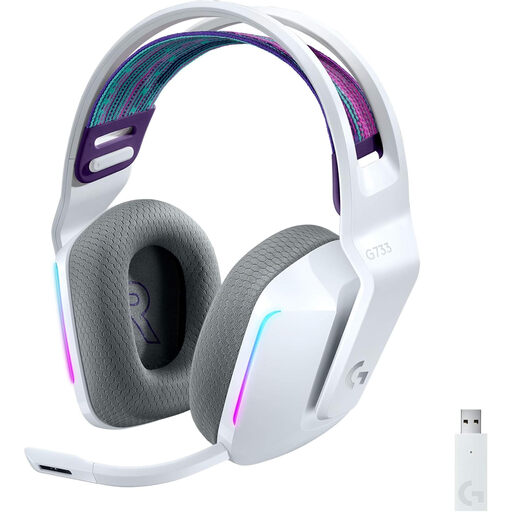
Logitech G G733 Lightspeed wireless gaming headset, white
Consider a headset when the existing console or PC runs the game but the group needs a more practical way to communicate.
This is a wireless headset. Confirm its connection with your exact device and whether the group uses in-game chat, platform party chat or Discord before choosing it.
Joybuy
 No image available
CyberPowerPC JOYB1010 gaming desktop, Core Ultra 7 265KF and RTX 5070 12GB
Consider this desktop if your group’s game supports PC and you plan to choose or use your own peripherals.
The named configuration has 32GB DDR5, a 1TB NVMe SSD and Windows 11 Home. A monitor, keyboard, mouse and headset are not included.
Check the game’s requirements and voice-chat route; if a wired connection matters, confirm the desktop’s Ethernet connectivity before buying.
Joybuy
 No image available
Nintendo Switch 2 Console (UK Version)
Consider the Switch 2 route when the exact game supports the way your friends intend to play together.
Nintendo says many compatible online games require Nintendo Switch Online, though some free-to-play games do not. If an under-16 will use GameChat, Nintendo requires Parental Controls to be set up through its smart-device app first.
Check the game’s cross-network and voice-chat arrangements for your group before choosing the console.
Joybuy
Frequently asked questions
Can friends on different consoles and PCs play together?
They can when the exact game supports their combination of platforms and editions. Xbox Support says some games allow cross-network play across Xbox, other consoles and sometimes PC; check the game’s information and every player’s account permissions rather than assuming that all multiplayer games do.
Does online multiplayer require a console membership?
It depends on the platform and game. PlayStation says most PS4 and PS5 online multiplayer games require PlayStation Plus, while Nintendo says Nintendo Switch Online is required for many compatible games but some free-to-play games are exceptions. Xbox advertises online console multiplayer with Game Pass Essential; check the current terms for the game you intend to play.
Should I change my gaming device if online calls or matches keep dropping?
Test the home connection before replacing a device that otherwise runs the game. Compare different times and rooms, reduce competing household use for a test and, where practical, try a direct Ethernet connection; Ofcom recommends Ethernet instead of Wi-Fi when seeking better broadband speeds.
What does an under-16 need before using Switch 2 GameChat?
Nintendo says Parental Controls must be set up through its smart-device app before an under-16 can use Switch 2 GameChat. The feature also needs a persistent internet connection, so check the household connection and the console’s account setup before arranging group chat.


