What to check before buying
Settle the game and platform first, then check the account and communication arrangements before choosing accessories for the room.
Games console
Consider it when: The child’s games and friends use the same console platform and play will mainly happen at home.
Allow for: Platform-specific accounts and online-access requirements; Nintendo says certain Switch and Switch 2 games require Nintendo Switch Online for online play.
Existing phone or tablet
Consider it when: The child already uses a supervised family device and the games their friends play are available on it.
Allow for: Family controls that depend on the account and device setup, plus game-specific chat and payment arrangements. Apple describes Screen Time within Family Sharing; Google describes Family Link controls for supported child devices.
PC
Consider it when: The required games or friendship group are PC-based and an adult can maintain the relevant device, store and game-account settings.
Allow for: More than one control layer. PlayStation says several of its console parental controls do not apply to PlayStation games played on PC.
| Concern |
What to check |
Who this matters to |
| Communication and child accounts |
Check child-account options for privacy, communication and purchases, then check the game’s own chat and friend settings. |
I want to know who can contact my child during online play without assuming the device makes that decision for me. Around 33% of consumers would put communication and account controls first. |
| Games and platform compatibility |
Confirm the exact game and edition, friends’ platforms, any needed cross-play and the requirements for online access. |
My child wants to keep playing particular games with friends, so a different platform may not serve the purpose of this purchase. Roughly 27% of consumers would make compatibility their primary concern. |
| Shared-space use |
Check headset connection and fit, whether a microphone is needed, and where equipment will be charged and stored. |
If gaming happens near other family members, I need voice chat and equipment to fit the room’s routine. About 20% of consumers would prioritise shared-space comfort and setup. |
| Ongoing spending |
Check online memberships, game purchases and how approval or spending settings work across the services used. |
I want to agree what the child can buy before connecting a payment method or starting an online service. Around 20% of consumers would put ongoing spending controls first. |
Joybuy products for home gaming
These consoles are relevant if the child’s games and friends use Xbox. The headset, charging dock and monitor are accessory choices to consider after checking their fit with the household’s devices and shared space.
 No image available
Xbox Series X Console 1TB, Black
Consider this console if the child’s required games and friends use Xbox. It is the black 1TB Series X variant; check the games’ online requirements and set up the child’s account and communication controls separately.
View on Joybuy
 No image available
Xbox Series S 1TB
Consider this Xbox console if it matches the child’s games and friendship group. The named variant has 1TB of storage; confirm the required game format and online access before choosing between console models.
View on Joybuy
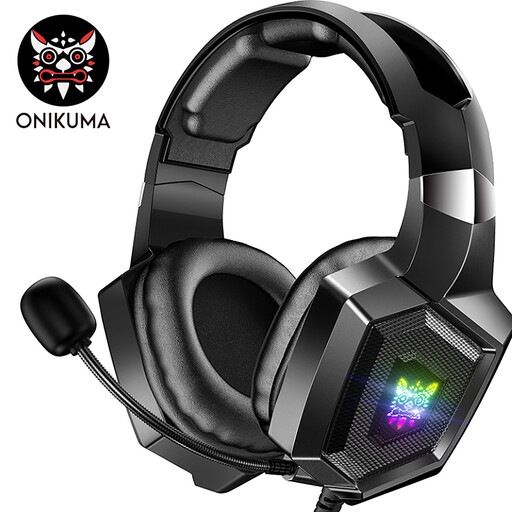 No image available
ONIKUMA K8 Wired Gaming Headset with Flexible Mic
Consider a headset where voice chat needs to work in a shared room. The K8 is named as a wired over-ear model with a flexible microphone and RGB lighting; check its audio and microphone connections against the exact device or controller. A headset does not replace account-level chat settings.
View on Joybuy
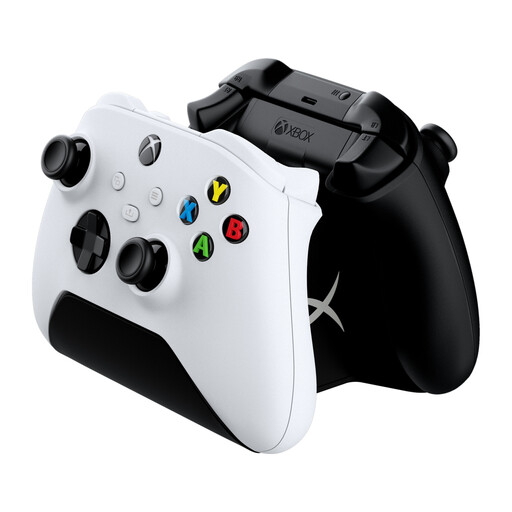 No image available
HyperX ChargePlay Dual for Xbox
Consider a charging dock if the household regularly uses Xbox controllers in a shared space. Confirm the exact controller model is compatible and choose a practical place to charge and store it.
View on Joybuy
 No image available
CRUA 32-Inch 1500R Curved Gaming Monitor, Black
Consider a dedicated screen if its size suits the intended space. This model is listed at 2560 × 1440 resolution and 165Hz, with HDMI and DisplayPort connections and VESA 100 × 100mm mounting; check which resolution and refresh-rate modes the child’s console or PC can use through the intended connection.
View on Joybuy
Frequently asked questions
Should I choose the console or the headset first?
Choose the game and platform before the headset. Confirm the games, where friends play and any online-access requirements, then check that the headset’s connection and microphone work with the chosen device.
Does my child need a separate account?
For PlayStation’s child-account controls and Apple’s managed Family Sharing route, set up a separate child account. PlayStation says each child needs one for its online services, while Apple uses a Child Account for managed Screen Time; check the equivalent setup on whichever platform the child will use.
Will parental controls manage every multiplayer interaction?
No. Platform settings can help manage communication and privacy, but games may have separate settings, and controls do not replace conversations and supervision. Nintendo’s guidance also advises parents to discuss unknown friend requests and suspicious activity with children.
What should I check when my child uses a gaming headset?
Check fit, the connection to the gaming device and the account’s voice-chat settings, then agree a volume routine. The World Health Organization advises keeping personal-device volume at no more than 60% of maximum and taking breaks from loud sound.
Does every Nintendo Switch game include online play without a membership?
No single answer applies to every game. Nintendo says certain Switch and Switch 2 games require Nintendo Switch Online for online play, so check the individual game’s current requirements for the multiplayer mode the child wants to use.


