What to check before buying
Start with the friend group and game requirements, then check communication controls and the home connection before choosing hardware.
| Priority |
What to check |
Your needs and respondent share |
| Joining friends |
Confirm the exact game title, edition and multiplayer mode. Check the publisher's supported platforms, cross-play rules and child-account multiplayer permissions. |
I want the player to join the friends they actually play with, not simply own a capable device. Ofcom reported that 72% of UK children aged 8–17 had gamed online in 2026; this measures online gaming use, not platform preference. |
| Voice and text chat |
Check whether voice chat is needed, how the headset connects and whether game and platform settings separately control voice, text, invitations and cross-network communication. |
I want conversations with known friends to be manageable, with clear options to mute, block and report unwanted contact. |
| Home connection |
Test the connection in the gaming room at busy times. Use Ethernet for a fixed console or PC where possible; check router placement before considering mesh Wi-Fi. |
I need games and voice chat to remain usable while other people stream or make video calls at home. |
| Age and spending controls |
Check the PEGI rating, enter the child's correct account age and set content, communication and purchase restrictions before linking games or services. |
I want the account settings, game rating and payment permissions to suit the child using the device. |
Joybuy product options
Joybuy product options for voice chat, home-network coverage, consoles and PC gaming in a household online-gaming setup.
 No image available
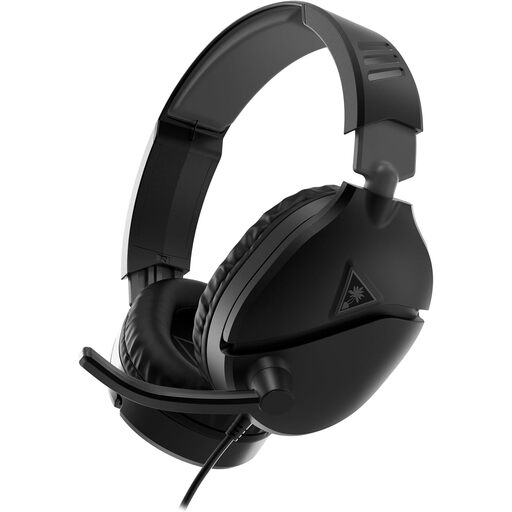
Turtle Beach Recon 70 Gaming Headset for PC/PS5
A wired voice-chat option for known friends in a shared room, provided game and platform communication controls are set first.
40 mm speakers, a 2 m 3.5 mm cable, flip-to-mute microphone and included PC splitter. Check 3.5 mm compatibility with the intended console, controller and chat service; route the cable to avoid strain or trip hazards.
View on Joybuy
 No image available
NETGEAR Orbi 370 RBE373 WiFi 7 Mesh System, 3-Pack
A three-unit option to consider for weak Wi-Fi coverage across several rooms, with wired connections available near each unit.
Dual-band BE3600, WiFi 7, main, IoT and guest networks, WPA3, and 2.5 Gbps ports on the router and satellites. It requires a high-speed connection and existing modem or gateway; coverage varies with placement, building materials and connected devices.
View on Joybuy
 No image available
TP-Link Deco BE22 BE3600 Whole Home Mesh Wi-Fi 7 System, 3-Pack
A mesh option for persistent dead zones or several rooms sharing one home network, after checking whether Ethernet can serve a fixed device.
Three units with WiFi 7, two 1 Gbps Ethernet ports per unit, wired or wireless backhaul, WPA3 and app-managed parental controls. Confirm that the EU-version power adapters and support arrangements suit a UK household.
View on Joybuy
 No image available
Sony PlayStation 5 Digital Edition Slim Console
A console route for friends using PlayStation or a game with confirmed cross-play on the intended mode.
Digital-only PS5 console with Ethernet, Wi-Fi 6, Bluetooth and headset support. It has no included disc drive; check the game edition, account permissions, subscription requirements, regional suitability and family settings before purchase.
View on Joybuy
 No image available
Lenovo LOQ Essential 15ARP11 Gaming Laptop
A PC gaming route for households whose games and friend group support PC play or publisher-confirmed cross-play.
AMD Ryzen 7 170, 16 GB RAM, 1 TB SSD, GeForce RTX 5050 laptop graphics, 15.6-inch 144 Hz FHD display, Wi-Fi 6, Gigabit Ethernet and a combined headset jack. Check game, account and PC-platform safety settings; the stated 2.30 kg weight may be less convenient for frequent carrying.
View on Joybuy
Frequently asked questions
Should the household choose a console or gaming PC first?
Start with the friends' platforms and the exact games they play. Choose a console when the regular group is on that ecosystem, or a PC or laptop when the game supports PC play and the group can join through the same platform or confirmed cross-play.
Does cross-play mean voice chat will work with every friend?
No. Cross-network play and voice or text communication can have separate permissions, and publishers may limit cross-play to particular platforms or modes. Check the game's current support guidance, account privacy settings and the child's communication permissions.
Is Ethernet better than Wi-Fi for a fixed gaming setup?
For a computer connected directly to the router, Ofcom says Ethernet should provide a faster, more reliable connection than Wi-Fi. It is particularly useful where gaming shares the home connection with streaming, video calls or other data-heavy activity.
When is a mesh Wi-Fi system worth considering?
Consider mesh when the gaming room has persistent weak coverage and router placement or a provider router upgrade has not solved it. Ofcom says mesh can improve signal strength and coverage, but it cannot outperform the household's broadband service.
Can a parent rely only on console parental controls?
No. Platform controls can manage content, playtime, communication and spending, but they may not apply to PC versions, linked services or game-specific social features. Review the game account, friend list, cross-play and chat settings as well.


