Choose a smartphone if your essential tasks mainly involve mobile apps, messages or security codes. A tablet may make touch-based reading more comfortable, while a laptop gives you a keyboard for longer forms; check the services you use before choosing, and retain access to a suitable camera phone if an identity-check journey requires one. The device also needs a workable connection and a setup you can use for your actual tasks.
Who is each setup for?
People managing apps and sign-ins
If routine tasks involve messages, security codes or an app-based identity check, concentrate on a phone you can unlock and on the requirements of each service. The Government Digital Service says its GOV.UK One Login app identity-check route requires access to a phone with a working camera.
People completing longer forms
A larger display and keyboard are worth considering for regular typing, reading and document uploads. Check whether your services work in a browser: NHS guidance says NHS App services can also be accessed through the NHS website.
People adapting the interface
If reading, navigation or typing takes extra effort, try the device’s built-in controls during setup. Google documents TalkBack spoken feedback on Android and dictation on Chromebook; Microsoft documents Narrator on Windows 11. Check the exact device and settings you intend to use.
What should you check before choosing?
Smartphone
Consider it when: Your recurring tasks use mobile apps, messages or a camera-phone step.
Trade-off: A small screen and on-screen keyboard may be awkward for lengthy forms.
Tablet
Consider it when: You prefer touch controls but want more screen space for reading and browser tasks.
Trade-off: A tablet does not replace the phone required when a GOV.UK One Login journey directs you to its identity-check app.
Laptop or Chromebook
Consider it when: You regularly type, upload documents or complete longer browser forms.
Trade-off: You may still need a separate compatible camera phone for a particular app-based identity-check journey.
| Priority |
What to check |
Your needs |
| Real tasks |
List the services and actions you use. Try a complete sign-in, form or booking on the intended setup before relying on it. |
I need to finish the tasks that matter to me, not just open their home pages. |
| Service access |
Check browser and app requirements separately. NHS guidance supports its app on Android 8+ and iOS 15+; the Government Digital Service says its One Login app identity-check route needs a phone with a working camera. |
If a service sends me to an app or a camera-phone check, I need a device that can complete that particular step. |
| Interface |
Try text and display controls, spoken feedback or dictation where available. Check whether touch controls or a physical keyboard make your regular tasks easier. |
Reading the screen and entering information should feel manageable for the tasks I do often. |
| Connection and support |
Establish how the device will get online. Set up essential apps or bookmarks, then practise tasks with a support route you can use again. |
I want to know what to do if the connection fails or I get stuck part-way through a service. |
What can make a setup harder to use?
-
Expecting a newer device to solve every access barrier
Ofcom identifies connectivity, skills and confidence as separate parts of digital inclusion. Citizens Advice also describes barriers people encounter when essential services move online. Changing hardware alone may leave the task unfinished.
Start with one or two essential tasks. Check the connection and available support, then practise those tasks on the proposed setup.
-
Overlooking an older phone’s operating system
NHS guidance supports its app on Android 8 or later and iOS 15 or later. A phone below an app’s required version may not provide the app route you planned to use.
Check the exact phone’s installed version and available updates against the requirements of each essential app before choosing it.
-
Planning a computer-only identity-check setup
According to the Government Digital Service, proving identity through the GOV.UK One Login app requires access to a phone with a working camera. A computer or tablet used for other tasks does not complete that particular app step.
Check whether your service directs you to the app and whether another identity-proofing method is offered.
-
Putting a passkey on a shared device
GOV.UK warns that someone who can unlock a shared device may be able to use its passkey. It also requires a screen lock for passkey use.
Use a personal, screen-locked device for a passkey and check which alternative sign-in methods the service offers.
Which platform features are worth checking?
Google
Android phones and tablets, as well as Chromebooks, are relevant if you want to try built-in reading or input controls.
- Google documents TalkBack spoken feedback for Android and dictation for Chromebook.
- Check feature availability and behaviour on the exact device and operating-system version; a platform feature does not establish how a particular service will work.
Apple
iPhone and iPad offer another phone or tablet route for people considering built-in interface controls.
- Apple describes Voice Control as a way to navigate its devices by speaking.
- Check the device and software requirements of each essential app or sign-in method rather than assuming every iPhone or iPad will suit the task.
Microsoft
Windows 11 is relevant to laptop users who want a keyboard for browser tasks alongside built-in interface controls.
- Microsoft documents Narrator for spoken navigation in Windows 11.
- A Windows feature does not guarantee that an individual website is easy to use; try the actual service on the intended setup.
Joybuy device options
These phones, tablet and Windows laptops represent different ways to handle apps, reading and browser forms. Check your essential services and sign-in steps against the device you choose.
 No image available
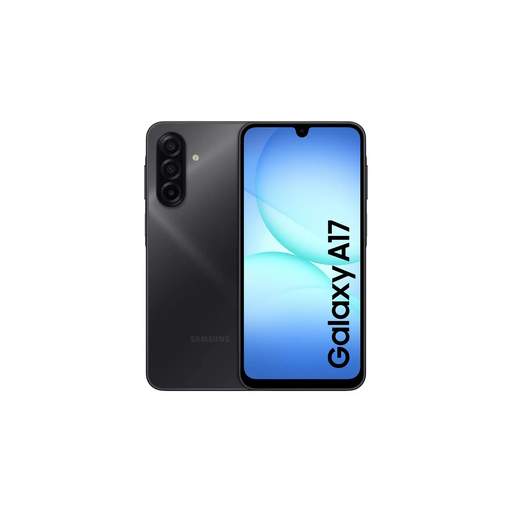
Samsung Galaxy A17 5G A176 Dual SIM, 4GB/128GB, Grey
A phone option for mobile-app and message tasks. The listed variant has 5G, Dual SIM, 4GB memory and 128GB storage. Check the operating-system version and each essential app’s requirements before choosing it; if an identity check calls for a camera phone, check the camera works.
Joybuy
 No image available
Xiaomi Pad 8, 8GB/128GB, Wi-Fi, Grey
A tablet option if you prefer touch interaction and more space for reading. The listed variant has 8GB memory, 128GB storage and Wi-Fi; plan for a workable Wi-Fi connection. Check keyboard inclusion if you type regularly, and retain access to a suitable phone if an identity-check journey requires one.
Joybuy
 No image available
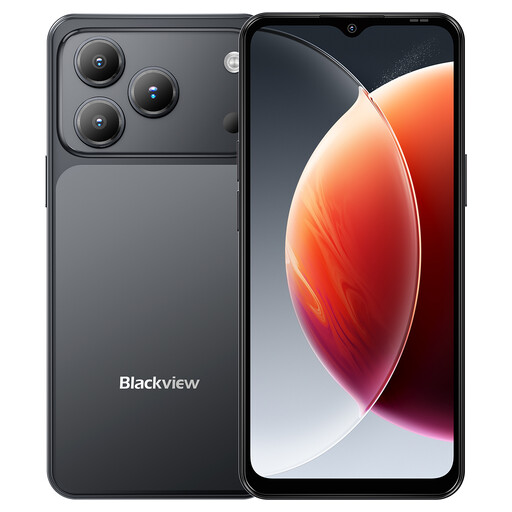
Blackview Wave 7C, Android 16, 4G Dual SIM, Black
Another phone option for app-based tasks. Its title lists a 6.56-inch display, 128GB storage and 16GB RAM described as 4GB RAM plus 12GB; do not treat that wording as 16GB of physical RAM. Check each service’s app requirements and the working camera needed for any phone-based identity-check step.
Joybuy
 No image available
HP OmniBook X Flip 16-as0004na, 16-inch touchscreen
A convertible Windows 11 Home laptop to consider for longer browser forms and touch interaction. Its title lists an Intel Core Ultra 5 226V, 16GB RAM and a 512GB SSD. Check the browser requirements of your services; a laptop does not replace the phone needed for a GOV.UK One Login app identity check.
Joybuy
 No image available
ASUS Vivobook 14 X1407QA-LY003W, Snapdragon X, Quiet Blue
A laptop option for people who regularly type in browser-based services. Its title lists 16GB RAM and a 512GB SSD. The display is non-touch, so consider whether keyboard-based navigation suits you; check your services’ browser requirements and any separate camera-phone identity-check step.
Joybuy
Common questions
Do I need a smartphone to use NHS App services?
No. NHS guidance says you can access NHS App services through the NHS website on a suitable browser without downloading the app. If you want the mobile app, NHS guidance supports Android 8 or later and iOS 15 or later; check the current requirements for your device and browser.
When might I need a camera phone for an online service?
You need access to a phone with a working camera if your identity-check journey directs you to the GOV.UK One Login app, according to the Government Digital Service. Check that the phone meets the app’s current requirements; its guidance also describes another identity-proofing method if you prefer not to use the app.
Should I use a shared device for a GOV.UK One Login passkey?
Use a personal device instead. GOV.UK warns that anyone able to unlock a shared device may be able to use its passkey, and says a screen lock is required for passkey use.
Should I try built-in controls before buying an accessory?
Yes, if reading, navigation or input is the difficulty you are trying to address. Google documents Android’s TalkBack and Chromebook dictation, while Microsoft documents Windows 11 Narrator. Try the relevant controls with a real task first, then decide whether an accessory would help with a problem that remains.


