Choose around the games and people you want to play with: confirm that your group can play together and establish how you will talk before buying a console, PC or accessory. A shared-room setup calls for attention to the display and compatible controllers; at a personal desk, headset and device connections may matter more. Cross-platform play and online-access requirements depend on the game and platform.
Who is this for?
Friends on different platforms
If your group uses different consoles or PCs, check the particular game’s cross-platform play and chat arrangements before choosing hardware. Xbox Support says cross-network play is available in some games, not all of them.
Families sharing a room
If several people will play around one display, consider the game’s local-player support, compatible controllers and how everyone will speak to remote friends. Nintendo UK Support describes voice chat through Switch 2 GameChat, subject to its connection and setup requirements.
Players at a desk
If you play on your own PC, laptop or console while talking to teammates, check the headset’s microphone and connection method for that device. Xbox Support notes that features of its Wireless Headset differ between connection modes.
What matters when choosing?
Settle the game and platform combination first, then plan for people playing in the same room, remote chat and the existing home connection.
| Concern |
What to check |
Who this matters to |
| Games and platforms |
Check each regular player’s platform against the exact game and edition. Confirm cross-platform play and any online-access requirement; Xbox Support says cross-network support varies by game. |
I need to join friends who may use different hardware, so playing the same title together comes before choosing a device. Roughly 36% of consumers put this compatibility need first. |
| Shared-room play |
Check the game’s local-player and controller support, plus the display inputs and where people will sit. |
When several of us play around one screen, I need enough usable controls and a way to include remote friends. For around 29% of consumers, that room setup is the primary concern. |
| Voice chat |
Match the headset’s connection and microphone functions to the device used for chat. Check whether chat runs through the game, console or a separate app. |
I want to speak with remote teammates or listen privately without choosing a headset that loses the functions I need. This is the leading need for roughly 21% of consumers. |
| Home connection |
Run the platform’s connection checks before selecting network accessories; check available wired ports if considering Ethernet. |
If online play or party chat keeps dropping out, I need to understand the connection before replacing other kit. Around 14% of consumers put connection reliability first. |
Mistakes to avoid
-
Buying a platform before checking the group’s games
A multiplayer label does not mean friends on different systems can join the same match. Xbox Support says cross-network play is game-dependent; console online access can also depend on the title and service.
List the games, editions and platforms your regular group uses, then check each game’s cross-platform and online-access requirements before choosing hardware.
Getting that combination wrong could mean needing another device, game version or online membership.
-
Assuming every wireless headset pairs the same way
Connection methods and available controls differ. PlayStation Support describes USB-adapter pairing for its listed wireless headsets, while Xbox Support describes different connection options and feature behaviour for the Xbox Wireless Headset.
Check the exact headset model, intended device, microphone support and functions available through the connection you plan to use.
A different connection may call for an adapter or cable, or for a different headset.
-
Expecting a new headset to fix every chat problem
Nintendo UK Support requires a persistent connection for Switch 2 GameChat, and Xbox Support identifies network address translation, or NAT, as a possible cause of party-chat connection or audio issues.
Test the existing connection and chat service before choosing a headset or network accessory. Check device placement and available wired connections if the network needs attention.
-
Overlooking younger players’ chat setup
Nintendo UK Support places age and setup conditions on Nintendo Switch App voice chat and Switch 2 GameChat. A planned way to speak with friends may not be available until those conditions are met.
For a younger player, check the relevant account, linked-device and guardian requirements before relying on either chat method.
Brands to consider for online play
PlayStation
Relevant when your group plays PS4 or PS5 games and you are choosing online access and console-compatible audio.
- PlayStation Support says its listed wireless headset models pair with PS5 or PS4 using a USB adapter.
- PlayStation Support says most PS4 and PS5 games need PlayStation Plus for online multiplayer, with exceptions depending on the game. The headset instructions do not establish identical support for third-party models.
Xbox
Relevant to groups using Xbox party chat or checking whether an Xbox game connects players across platforms.
- Xbox Support says some games support cross-network play, including with other consoles and, in some cases, PC.
- Support depends on the game. Xbox Support also describes connection-specific limits for the Xbox Wireless Headset, so its functions should be checked for the device you will use.
Nintendo
Relevant when your group’s games are on Switch or Switch 2 and you need to plan both online play and voice chat.
- Nintendo UK Support describes Switch 2 GameChat as a console-based way to speak with remote friends, subject to a persistent internet connection.
- Nintendo UK Support says many Switch and Switch 2 games require Nintendo Switch Online for cooperative or competitive online features, with some free-to-play exceptions. App-based chat and GameChat have separate account and age-related conditions.
Joybuy product choices
These products cover headsets for individual chat, controllers for a shared setup and a desktop PC bundle. Choose the game and platform arrangement first; an accessory cannot establish that a particular game supports cross-platform play.
 No image available
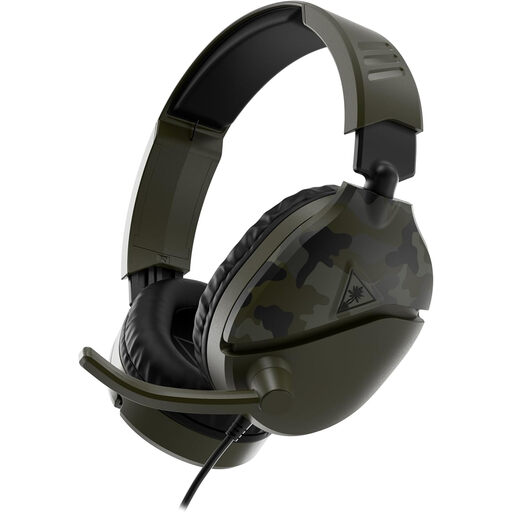
Turtle Beach Recon 70 Headset, Camo Green
Consider this headset for voice chat if you can connect it to the device you use with friends.
The named variant lists Xbox Series X|S, Xbox One, PS5, PS4, Nintendo Switch and PC. Check the connection and microphone functions for your particular setup.
View on Joybuy
 No image available
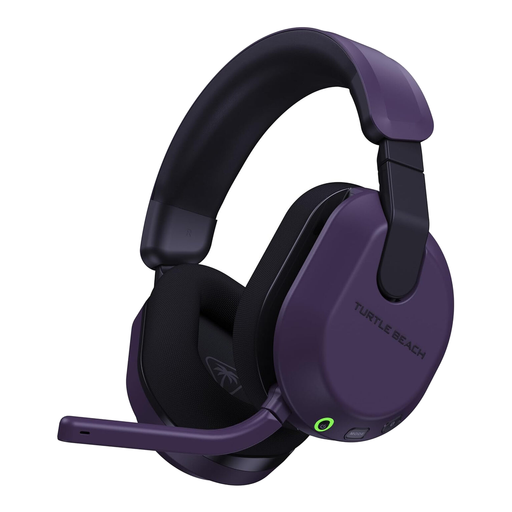
Turtle Beach Stealth 600 Gen3 Wireless Headset, Purple
Consider this wireless headset when planning voice chat on an Xbox or PC setup.
The named variant lists Xbox Series X|S, Xbox One and PC. Confirm how it connects to your chosen device and which chat functions work in that mode.
View on Joybuy
 No image available
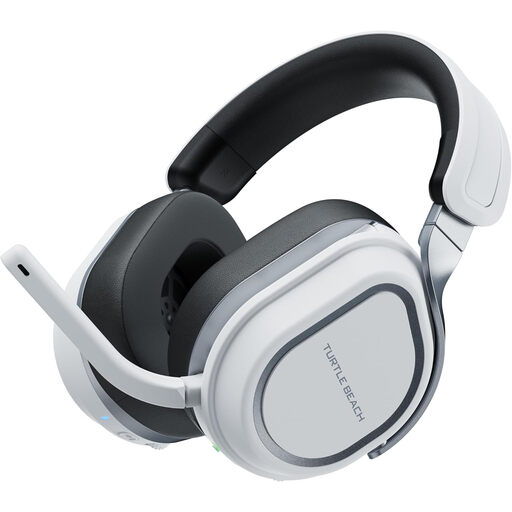
Turtle Beach Stealth 700 Gen 3 Wireless Headset, White
Consider this model if you need a voice-chat headset for a PlayStation or PC arrangement.
The named variant lists PS5, PS4 and PC. If you intend to use another platform as well, check its supported connection and chat functions for this exact variant.
View on Joybuy
 No image available
Lexip SteelPlay Twin Pads Controllers
A controller pair is worth considering when two people want to play together in the same room.
Before choosing these controllers, confirm support for your console and the game’s local-player mode; controllers alone do not establish online or cross-platform play.
View on Joybuy
 No image available
CyberPowerPC JOYB1004 Gaming PC Bundle
This bundle is an option for putting together a personal PC gaming station with a monitor and peripherals.
The named configuration includes an AMD Ryzen 5 7500F, NVIDIA GeForce RTX 5060 8GB, 16GB DDR5, 1TB NVMe SSD and Windows 11 Home, plus a monitor, keyboard, mouse, headset and mousepad. Check the exact monitor and headset configuration and your games’ requirements before buying.
View on Joybuy
Common questions
Can friends on different platforms always play together?
No. Xbox Support says only some games support cross-network play between platforms, sometimes including PC. Check the exact game and edition used by your group before choosing hardware.
Do console games need a subscription for online multiplayer?
Many do, but requirements vary by game and platform. PlayStation Support says most PS4 and PS5 online multiplayer games need PlayStation Plus; Xbox Support describes a Game Pass requirement with a free-to-play exception; and Nintendo UK Support says many Switch and Switch 2 games need Nintendo Switch Online for cooperative or competitive online features, with some free-to-play exceptions. Check the particular title before committing to a platform.
Will one Bluetooth headset offer the same features on a console and PC?
Not necessarily. Xbox Support says its Wireless Headset has different connection options across devices and that its game/chat balance dial does not work over Bluetooth. Check the exact headset’s supported connection, microphone and controls on each device you intend to use.
How should a family plan voice chat on Nintendo hardware?
Check the console and game’s chat method before choosing accessories. Nintendo UK Support says supported Nintendo Switch App voice-chat features need a linked account and device and are restricted to account holders aged 13 or over. Switch 2 GameChat uses the console’s built-in microphone but requires a persistent internet connection; users under 16 also need guardian setup.


