For opera recordings at a desk, start with a separated stereo pair if you have room to position both speakers around your listening spot; KEF describes this arrangement as creating a true-stereo soundstage for its LSX II system. A one-box speaker is a practical alternative when compact placement and app-led streaming matter more, but check computer connections, required accessories and available desk space before choosing.
Who these speakers suit
Listeners focused on a stereo stage
If you listen attentively from your desk, consider whether you can place separate left and right speakers around your seat. KEF describes the soundstage created by two speakers positioned apart for its LSX II system; the arrangement needs more space than one cabinet.
Computer-first listeners
If most recordings play from a laptop or desktop, identify a compatible audio input before choosing a speaker. Q Acoustics lists USB computer audio for the M20, while KEF lists a USB-C input for the LSX II LT.
Listeners who favour a clear desk
If one speaker position is easier to accommodate, app-led wireless playback may be more useful than a separated pair. Sonos lists Wi-Fi, Bluetooth and Trueplay for the Era 100, but an analogue source needs its separate Line-In Adapter.
What matters when choosing
Decide whether your desk can accommodate two separated speakers, then check the connection you will use most often. A compact streaming speaker changes the placement trade-off rather than simply replacing a stereo pair.
| Concern |
What to check |
Who this matters to |
| Stereo presentation |
Check whether there are two separate cabinets and whether you can sit roughly between them. |
If I want voices and instruments presented across a conventional stereo stage, I need space to position left and right speakers apart. Around 36% of consumers put stereo presentation first. |
| Desk and room fit |
Measure the usable space for each cabinet and plan where mains leads and speaker cables will run. |
A crowded work surface may leave me only one practical speaker position, even if I would otherwise consider a pair. For around 29% of consumers, usable desk space is the primary concern. |
| Computer and source connections |
Match your computer’s audio output to a confirmed speaker input, such as compatible USB, USB-C or analogue audio. |
When I play recordings from my work computer, I want a connection that fits the ports I use each day. Direct source compatibility comes first for around 21% of consumers. |
| Streaming and app control |
Check your preferred playback service and Wi-Fi setup; for analogue sources, check whether an adapter is required. |
If I switch between wireless devices and streaming services, simple app-led playback matters more to me than positioning two cabinets. Around 14% of consumers prioritise streaming convenience. |
Buying pitfalls
-
Expecting every “stereo” speaker to have the same layout
A single cabinet does not place left and right speakers apart in the way a conventional stereo pair does. KEF attributes the true-stereo soundstage of its LSX II system to two speakers positioned separately.
Check whether your desk allows two speaker positions and a listening spot between them. If it does not, choose a one-box layout for its placement convenience without assuming the same listening geometry.
-
Choosing speakers before checking the computer connection
USB, USB-C, analogue, Bluetooth and Wi-Fi are different connection routes; a socket or wireless feature alone does not establish compatibility with your computer.
List the outputs on the computer and any other source devices, then confirm a matching audio input on the speaker before buying.
-
Assuming analogue line-in needs only a cable
Sonos says an auxiliary source connects to the Era 100 through its Line-In Adapter, not a standard cable on its own.
If you plan to use an analogue source, check its output and the adapter needed for the speaker you choose.
An Era 100 analogue setup requires the separate Sonos Line-In Adapter.
-
Turning up long listening sessions to hear more detail
The World Health Organization says hearing risk rises with louder sound and longer exposure.
Keep listening levels sensible and take breaks during extended sessions rather than repeatedly increasing the volume.
Brands to consider
KEF
The LSX II LT is a compact active two-speaker option for a desk or small room.
- KEF lists USB-C, Bluetooth, HDMI ARC, streaming support and a subwoofer output for the LSX II LT.
- Check that you have room for both speakers and that you will use its available connections.
Q Acoustics
The M20 is a powered bookshelf pair for listeners who want computer audio without a separate amplifier.
- Q Acoustics lists USB computer audio up to 24-bit/192kHz, alongside Bluetooth and other physical inputs.
- Its bookshelf format calls for space for two cabinets; check their placement against your desk.
Sonos
The Era 100 is a one-box option for app-led playback in a compact desk setup.
- Sonos lists Wi-Fi, Bluetooth, AirPlay 2 and Trueplay tuning for the Era 100.
- Setup requires Wi-Fi and the Sonos app; analogue line-in requires a separate Line-In Adapter.
Joybuy products for this setup
These options cover desktop speakers, a single tabletop speaker and passive bookshelf models. The passive models need a compatible amplifier, so compare the whole setup as well as the space each speaker will occupy.
 No image available
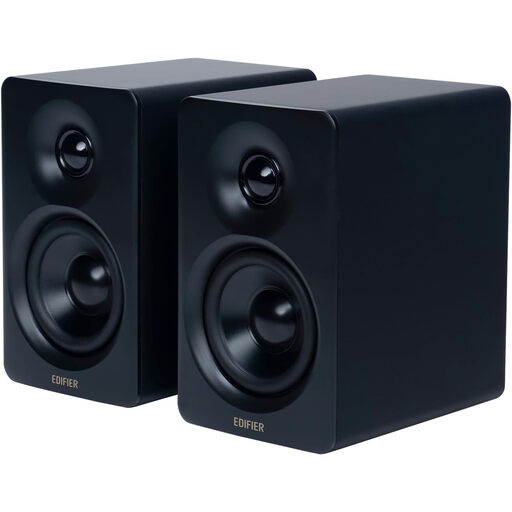
Edifier M60 desktop speakers, 66W RMS
Consider these for a desk where two speakers can be placed apart; check that your computer supports audio through the listed USB-C input.
The product title also lists Bluetooth 5.3 and AUX input.
View on Joybuy
 No image available
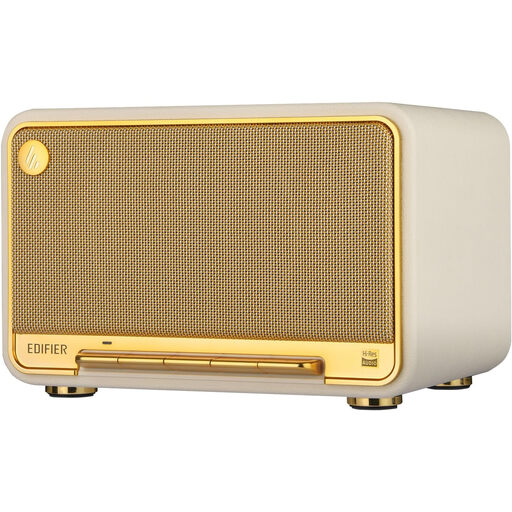
Edifier D32 tabletop wireless speaker, 60W RMS
Consider this single tabletop speaker if one placement position and wireless playback suit your office better than a separated pair.
The product title lists Bluetooth 5.3, AirPlay 2, USB-C and AUX inputs. Confirm that the supplied power equipment suits your location.
View on Joybuy
 No image available
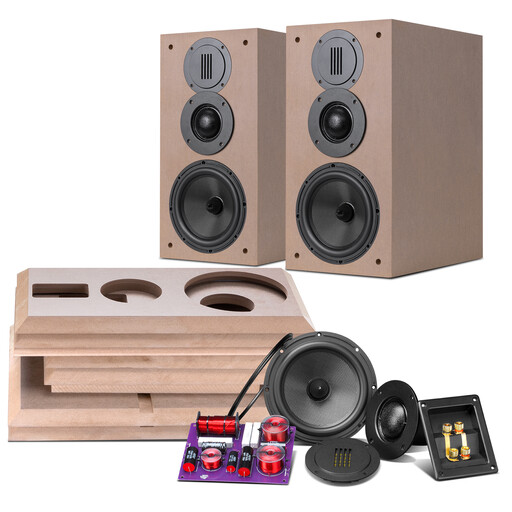
HiVi-Swans DIY3.1 passive bookshelf speakers, 6.5-inch, one pair
This listed pair is worth considering if you have room to separate bookshelf speakers and plan to use a compatible amplifier.
Check the amplifier requirements, package contents and cabinet dimensions before choosing it for a desk.
View on Joybuy
 No image available
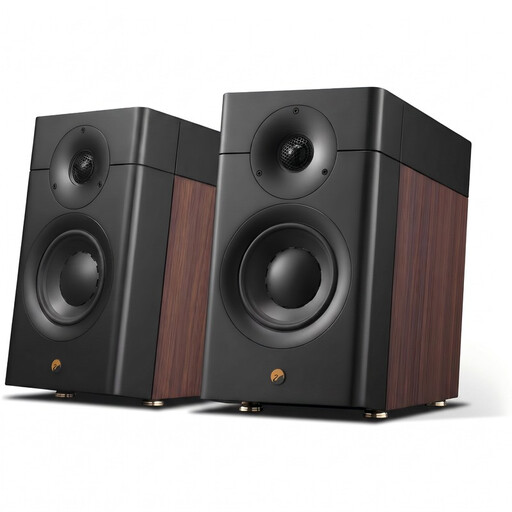
HiVi-Swans D3.1MKII passive bookshelf speaker, 8 Ohm
Consider this passive bookshelf model only if its amplifier requirements and physical size fit your planned setup.
The title specifies a 6.5-inch mid-bass driver, 28mm tweeter and rear bass reflex. Confirm the package quantity before planning a stereo pair.
View on Joybuy
Common questions
Is a speaker pair preferable to one wireless speaker for opera at a desk?
Start with a separated pair if a conventional stereo stage is your priority and your desk allows suitable placement. KEF describes the soundstage of its LSX II system in terms of two speakers positioned apart; a one-box speaker may be easier to accommodate when space or streaming convenience takes priority.
Should I connect my work computer by USB, Bluetooth or Wi-Fi?
Choose a connection that your computer and speaker both support. Q Acoustics lists USB computer audio up to 24-bit/192kHz for the M20, and KEF lists USB-C input for the LSX II LT; check your computer’s audio output rather than assuming any USB socket will work as intended.
Can I connect an analogue source directly to the Sonos Era 100?
An analogue source needs the separate Sonos Line-In Adapter to connect to an Era 100, according to Sonos. If your source is a turntable, also check whether its output requires a phono preamp.
Should I turn up quiet opera recordings for a long session?
Avoid using a sustained high volume as the answer to quiet passages. The World Health Organization says hearing risk depends on sound level and exposure duration, so keep the level sensible and take breaks during extended listening.


