First-time family historians
For a seated conversation with one relative, a compatible wired lavalier can keep the setup straightforward. Test where the phone or recorder will sit before the conversation begins.


Choose the recording route before the lavalier: a wired microphone suits a seated interview when its connector matches the phone or recorder, while a dedicated recorder keeps the recording separate from your phone. Choose wireless when movement or two separate voices justify the extra charging and setup. For an interview that cannot be repeated, test the complete setup, check whether local recording is available and make redundant copies afterwards.
For a seated conversation with one relative, a compatible wired lavalier can keep the setup straightforward. Test where the phone or recorder will sit before the conversation begins.
Repeated sessions call for a setup that can be tested consistently, alongside clear arrangements for consent, file transfer and backups. The Oral History Society stresses explaining how recordings will be stored and used over time.
When an interview takes place away from a fixed table, or interviewer and narrator need separate microphones, a two-transmitter system may fit the session. Check its recording and charging arrangements before relying on it.
Choose it when: One person will speak while seated and the phone has a compatible microphone input.
Trade-off: A simple connection still depends on the phone’s power, storage and recording app. RØDE specifies its smartLav+ for a compatible TRRS smartphone connection.
Choose it when: You want locally stored interview files on a device separate from your phone.
Trade-off: Confirm the lavalier’s plug and power requirements, and plan for recording media and file transfers. Zoom specifies a lavalier-ready 3.5 mm mic/line input on the H1essential.
Choose it when: The narrator needs to move or two people need separate microphones.
Trade-off: Charging and the wireless link become part of the interview setup; check whether the particular system also records locally. Sennheiser specifies local memory in each Profile Wireless clip-on microphone.
For an oral-history interview, identify the primary need that would decide your recording setup, then check the complete microphone-to-recording-device path.
| Concern | What to check | Who this matters to |
|---|---|---|
| Keeping the recording safe | Check where audio is stored, whether you can listen back and how you will transfer and back up the file. | If a narrator’s account cannot be recorded again, I need a tested capture path and a way to protect the file afterwards; around 33% of consumers put recording reliability first. |
| Device compatibility | Check the recording device’s input, the lavalier’s connector and power requirements, and any required adaptor. | I want to connect the microphone I buy to the device I already use without discovering that matching plug sizes conceal different standards; compatibility is the primary concern for around 27% of consumers. |
| Unobtrusive placement | Check the clip, wired cable length if applicable, and microphone placement with a short spoken test. | When rapport matters in a seated conversation, I want the microphone to stay out of the way without clothing rubbing against it; around 20% of consumers place discreet placement first. |
| Movement or two voices | Check the number of microphones and channels, charging needs and any local-recording option. | If we will move during the interview, or I need the interviewer and narrator recorded separately, a fixed single-microphone arrangement may not fit; roughly 20% of consumers prioritise that flexibility. |
A plug’s diameter does not establish its connection standard. RØDE specifies the smartLav+ for TRRS smartphone inputs and a TRRS-to-TRS adaptor for use with Wireless GO.
Identify the exact recording device and input before buying, then test the microphone, any adaptor and the recording app together.
An interview may be difficult to repeat if its audio is lost. The Oral History Association advises transferring the original recording and keeping redundant digital copies in different physical locations.
Make a short spoken test and listen back before the interview. Transfer the original file promptly afterwards and create separate backup copies.
DJI’s figures for Mic 2 depend on stated test conditions; its quoted maximum range assumes an unobstructed outdoor setting free of interference. That figure does not establish how a system will work in the interview room.
Charge the equipment, test it in the intended location and check local-recording options if a lost wireless link would put the interview at risk.
The Oral History Society advises explaining long-term storage and use to participants. Agreement to begin an interview should not be taken to settle every question about later access or publication.
Explain the project’s intended recording, storage and access arrangements before starting. Where consent is the chosen UK GDPR lawful basis for processing personal data, the Information Commissioner’s Office requires a positive opt-in; seek project-specific advice where needed.
The smartLav+ represents a wired route for a smartphone with a compatible TRRS microphone connection.
Profile Wireless is a two-channel clip-on system for interviews that need movement or separate microphones for two speakers.
DJI Mic 2 is a wireless clip-on option positioned by DJI for interviews.
The H1essential is a compact recorder to consider when pairing a compatible lavalier with a device separate from the phone.
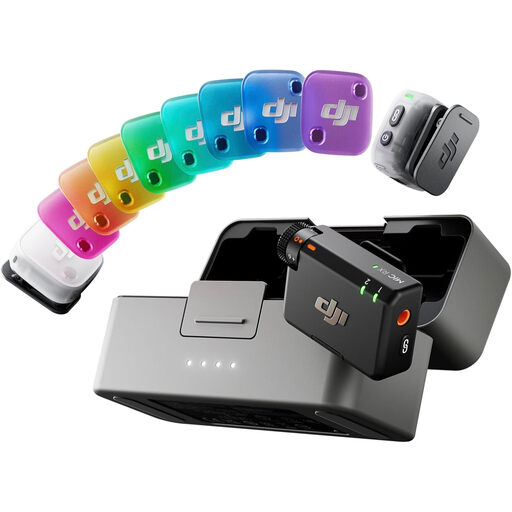
This two-transmitter wireless set is relevant when an interviewer and narrator each need a wearable microphone. Check its connection and recording options against your intended setup before depending on it for an interview.
 No image available
Consider this set when two speakers each need a wearable microphone. It includes two transmitters, one receiver and a charging case.
Before using it for an interview that cannot be repeated, confirm how the receiver connects to your recording device, whether you can monitor the audio and whether the transmitters can save a separate local recording.
Use a compatible wired lavalier for a seated interview when a cable will not get in the way. Wireless is worth considering when people need to move or two speakers need separate microphones, provided you can manage charging and test the recording setup in the intended location.
No: confirm the connector standard and the recording device’s input before buying. For example, RØDE specifies the smartLav+ for a compatible TRRS smartphone connection, while using it with Wireless GO requires a TRRS-to-TRS adaptor.
Transfer the original recording promptly and make redundant digital copies stored in different physical locations, as the Oral History Association advises. Keep the interview’s access and use arrangements with the project records where appropriate.
Do not assume it does: explain intended access and publication to the participant before recording. The appropriate UK GDPR lawful basis depends on how the project processes personal data; if consent is the chosen basis, the Information Commissioner’s Office requires a positive opt-in. The Oral History Society also advises explaining how recordings will be stored and used over time.