For a single speaker who can stay close to the microphone in a noisy home room, consider a dynamic USB microphone or a USB/XLR model; in a quiet room, a USB cardioid condenser offers a straightforward desktop setup. If interviewer and participant both need their own microphone input, consider two XLR microphones and an audio interface instead. Whichever route you choose, plan for close placement, headphone checks and the participant’s permission before recording.
Who is this for?
Interviewers working in a noisy or untreated room
If traffic, computer fans or hard surfaces affect your recording space, you need a setup that lets the speaker stay close to the microphone. Room preparation still matters: a focused pickup pattern cannot make the room silent.
First-time solo recorders
If one voice is your main focus, direct USB connection and headphone monitoring can make it easier to check the recording as it happens. Confirm that the microphone and your recording device work together.
Recorders of regular two-person interviews
If both interviewer and participant need dependable capture, separate microphones and inputs may suit the seating arrangement better than one centrally placed desk microphone. University of Leicester oral-history guidance advises considering two microphones when the interviewer’s voice is too quiet.
What matters when choosing?
Dynamic USB or USB/XLR
Consider when: A single speaker can stay close to the microphone in a room with persistent background noise.
Trade-off: Consistent close positioning matters, and one microphone will not give two speakers separate inputs.
USB cardioid condenser
Consider when: A quiet home room and one main speaker make a direct-to-computer desktop setup practical.
Trade-off: A cardioid pattern does not remove room echo; microphone distance and nearby sounds still matter.
Two XLR microphones and an interface
Consider when: Interviewer and participant regularly need separate microphone inputs.
Trade-off: This setup involves an interface, cables and more setup decisions than one USB microphone.
| Concern |
What to check |
Who this matters to |
| Room noise and echo |
Check whether close microphone placement is practical and how you can reduce noise and hard-surface reflections in the room. |
If household noise or echo competes with the interviewee’s voice, I need a position I can keep steady throughout the conversation. Around 31% of consumers put room control first. |
| Connection and monitoring |
Confirm compatibility with your recording device, the required cable and whether you can listen through wired headphones while recording. |
For a first solo recording, I want to hear problems before the interview ends without managing several separate devices. Simple connection and live monitoring come first for around 25% of consumers. |
| Two distinct voices |
Decide whether each speaker needs a microphone input; if so, check the interface’s input count and microphone connections. |
When both people speak regularly, I do not want one voice to be much farther from a shared desk microphone. Around 19% of consumers prioritise separate capture of both voices. |
| Permission and future use |
Prepare participant information and permission before recording, and plan how the recording will be monitored, stored and used. |
If the interview may be kept or shared, I need its intended use to be clear to the participant from the outset. Documenting that workflow is the primary concern for around 25% of consumers. |
Mistakes to avoid
-
Choosing by specifications but positioning the microphone too far away
University of Leicester oral-history guidance says a distant microphone can produce a recording that is too quiet and advises placing a table microphone near the interviewee.
Arrange the seating and stand so the speaker can remain consistently close, then make a short test recording before the interview.
Weak or echoey speech can take time to work with and may call for another recording session.
-
Expecting processing or a directional pattern to fix the room
Shure describes voice-isolation processing for its MV7+, but that feature is not a substitute for controlling traffic, appliances or room reflections.
Reduce noise at its source, choose the quietest practical room and listen through headphones during a test recording.
-
Using one desk microphone when both voices need dependable capture
If one speaker is much farther from the microphone, their voice may be too quiet. University of Leicester oral-history guidance suggests considering two microphones when the interviewer’s voice is insufficient.
For recurring two-person sessions, decide whether each voice needs its own input before choosing a single USB microphone.
Changing to a two-microphone XLR setup later may require an interface, cables and another stand.
-
Leaving permission and future use until after the interview
The Oral History Society advises obtaining permission before recording and documenting how an interview will be stored and used. Identifiable recordings may also involve personal-data obligations, depending on the project.
Explain the project’s purpose, intended recording use, storage and archive plans to the participant beforehand. For an organisational project, check the current Information Commissioner’s Office guidance that applies to its processing.
Unclear expectations can complicate later archiving, sharing or reuse.
Brands to consider for these microphone routes
Shure
The MV7+ is a close-spoken option for a home room where USB-C connection now and an XLR connection later both matter.
- Shure lists USB-C and XLR outputs, headphone monitoring and adjustable auto-level processing for the MV7+.
- Shure’s voice-isolation feature does not replace room preparation. Check the companion app’s compatibility requirements if you intend to use app-dependent controls.
RØDE
The NT-USB+ is a desktop USB condenser option for one main speaker in a quiet home room.
- RØDE lists a cardioid condenser capsule, USB-C connection, headphone monitoring, pop filter and desk stand.
- Its desktop format still calls for careful placement and room preparation; the microphone alone will not remove echo.
Audio-Technica
The AT2040USB and AT2020USB-X offer different USB microphone formats, so choose by room and recording arrangement rather than by brand alone.
- Audio-Technica describes the AT2040USB as a hypercardioid dynamic model with headphone monitoring, while the AT2020USB-X is a cardioid condenser model with direct monitoring.
- The two models’ capsule and pickup designs differ; do not assume their room-noise behaviour is interchangeable.
Sennheiser
The Profile USB is a single-speaker desktop condenser option for someone who wants controls on the microphone.
- Sennheiser lists a cardioid capsule, USB-C operation, gain, mix and volume controls, a headphone output and a table stand.
- One Profile USB microphone does not provide separate microphone inputs for a two-person interview.
Microphone options on Joybuy
These options cover close-spoken USB/XLR dynamic microphones and a wearable two-transmitter alternative. Choose according to where speakers can sit and which recording connections you need.
 No image available
FIFINE K688CT USB/XLR Dynamic Microphone Kit with Boom Arm
Consider this kit for one close-spoken interviewee when an adjustable boom arm helps maintain microphone position.
The listing specifies dynamic, unidirectional pickup, USB-C and XLR connections, headphone monitoring and a recommended speaking distance of 2–6 inches. It lists a boom arm, shock mount and windscreen; the desk clamp fits desks under 2 inches thick.
An XLR cable is not included, and XLR use requires an interface or mixer. The microphone’s mute, gain and headphone functions are stated to work over USB only.
Joybuy
 No image available
FIFINE AM8 USB/XLR Dynamic Microphone with Desktop Stand
Consider this desktop option for one speaker who can stay close to the microphone and wants to monitor a USB recording.
The listing specifies dynamic, unidirectional pickup, USB and XLR connections, a headphone jack and a recommended speaking distance of 2–6 inches. A desk stand and windscreen are listed.
An XLR cable and boom arm are not included. The description says the RGB lighting and function keys are inactive over XLR, so check which controls you need in your chosen connection mode.
Joybuy
 No image available
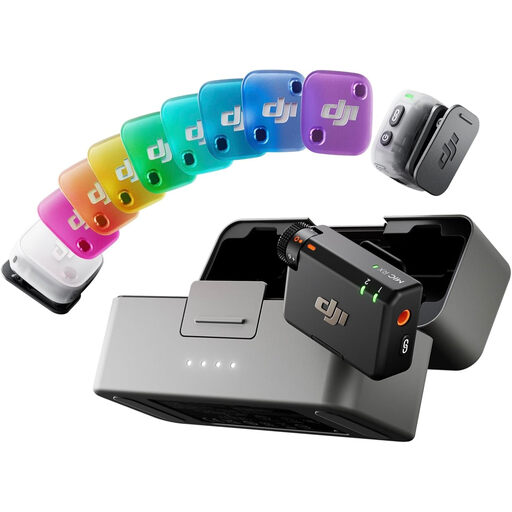
DJI Mic Mini 2 (2 TX + 1 RX + Charging Case)
Consider the wearable format if a participant cannot comfortably stay near a desk microphone.
The listed kit has two transmitters, one receiver and a charging case, with magnetic attachment for positioning a transmitter near a speaker.
Before choosing it for your recording setup, confirm the receiver’s connection to your device, whether you can monitor with headphones and whether the two voices can be recorded separately if that matters to your project.
Joybuy
Frequently asked questions
Can one desk microphone record both people in an oral-history interview?
It can be used for a one-to-one interview, but test both voices from their actual seats before the full session. University of Leicester oral-history guidance advises placing a table microphone near the interviewee and considering two microphones if the interviewer’s voice is too quiet.
Should I choose USB or XLR for interviews at home?
Choose a USB setup when one main voice and direct connection are your priorities; consider XLR microphones with an interface when both speakers need their own inputs. For example, Focusrite lists two XLR microphone inputs on the Scarlett 2i2 4th Gen. Check the connections and power requirements of the microphones you intend to use.
What should I do to prepare the room?
Choose a quiet room, reduce avoidable sounds and make a test recording from the planned speaking positions. Oral-history guidance also recommends keeping the microphone close to the interviewee; soft furnishings and careful table placement can help limit reflections and handling noise.
Do I need the participant’s permission before recording oral history in the UK?
Yes, obtain permission before recording as oral-history good practice: the Oral History Society advises documenting participation and how information will be stored and used. If your project processes an identifiable living person’s recording as personal data, the Information Commissioner’s Office says applicable privacy information must be provided; check its current guidance for your project’s circumstances, particularly before organisational sharing or archiving.


