Who is this for?

Interviewers dealing with flat noise

If traffic, appliances or neighbouring rooms are audible, you need to place the microphone near the interviewee and assess how much of the room it picks up. Audio-Technica’s close-microphone guidance and the University of Leicester’s oral-history guidance both make placement important.

First-time laptop recordists

If you want to record directly into a computer and listen as you go, check the exact model for USB connection and headphone monitoring. RØDE and Audio-Technica document both features on their respective PodMic USB and ATR2100x-USB models.

Mobile or two-person interviewers

If you cannot keep a desk microphone near each voice, consider microphone placement before choosing a recorder. The University of Leicester discusses close table-mic and tie-mic placement; Zoom documents an external lavalier input on the H1essential.

What matters when choosing?

Close USB/XLR dynamic microphone

Choose when: one main speaker can stay near the mic and you want direct laptop recording now, with an XLR connection available later.

Trade-off: the speaker must remain close and in front; Audio-Technica advises use within 200 mm for its dynamic USB approach.

XLR-only dynamic microphone

Choose when: you already have a suitable interface or recorder, or are setting up a system with separate microphones.

Trade-off: an XLR-only mic does not connect directly to a laptop; RØDE specifies an XLR cable and interface for computer recording with its PodMic.

Portable recorder with a close mic

Choose when: you need to move around or place a lavalier near a speaker instead of maintaining a fixed desk setup.

Trade-off: built-in recorder microphones do not replace close placement; check the external mic connection and how each voice will be captured.

ConcernWhat to checkWho this matters to
Room noise and echo Check directional pickup and whether a stand lets the interviewee speak close to the microphone. Test it in the intended room. If outside noise or room echo competes with the interviewee’s voice, I would put close placement ahead of convenience. Around 36% of consumers put noise and echo control first.
Simple, monitored recording Confirm USB compatibility with the recording device and a headphone output if you need to listen during the interview. For a one-off interview recorded on a laptop, I want to hear problems while I can still correct them. Direct connection and monitoring come first for roughly 29% of consumers.
Flexible placement Check the required microphone positions, the number of inputs and any lavalier connector compatibility. When two people sit apart or move between rooms, I need each voice captured close enough to remain audible. About 21% of consumers prioritise that placement flexibility.
Keeping the record Check WAV recording or export, storage and backups; plan documentation and an agreement for intended use. If the interview will be kept or shared, I need both a usable audio file and a clear record of its permitted use. That is the primary concern for around 14% of consumers.

Mistakes to avoid

  • Expecting an XLR-only mic to plug into a laptop

    RØDE specifies an XLR cable and audio interface for computer recording with its XLR-only PodMic.

    Choose a model with USB if direct computer connection is essential, or arrange the complete XLR setup before the interview.

    The separate interface and cable also add equipment to connect and manage.

  • Putting one mic in the middle of a noisy room

    Directional pickup cannot compensate for every sound reaching a distant microphone. The University of Leicester advises placing table microphones near the interviewee and reducing noise in the room.

    Make a test recording with the mic close to the speaker; where practical, move away from noise sources, close windows and use soft furnishings to reduce echo.

  • Treating recording settings as noise cancellation

    Zoom documents 32-bit-float recording and a Lo Cut function on the H1essential, but neither feature establishes that household voices, traffic or room echo will be removed.

    Use those settings for the recording workflow, and address unwanted sound through room choice and microphone placement.

  • Skipping the test take and recording agreement

    The University of Leicester advises practising with equipment. For oral-history projects, the National Lottery Heritage Fund also identifies agreements, documentation and archiving as responsibilities.

    Listen to a short take on headphones before the full interview, and clarify how a recording intended for sharing or archiving may be used.

Relevant brands for reference

RØDE

The PodMic USB offers USB and XLR connections with headphone monitoring; the separate PodMic is an XLR-only option.

  • RØDE describes the PodMic’s tight cardioid pattern as rejecting room noise in less-than-ideal surroundings; treat that as the brand’s design claim, not a promise for a particular flat.
  • Computer recording with the XLR-only PodMic requires an XLR cable and interface, according to RØDE.

Audio-Technica

The ATR2100x-USB is a dynamic cardioid speech microphone with USB and XLR outputs and direct headphone monitoring.

  • Audio-Technica says its cardioid pattern reduces side and rear pickup.
  • Audio-Technica’s close-use guidance calls for the speaker to remain within 200 mm, making a single distant position a poor match for that setup.

Shure

The SM58 is a cardioid dynamic microphone for a recording setup with a suitable XLR input.

  • Shure specifies a cardioid pattern intended to isolate the main sound source, along with a shock mount and pop filter.
  • The SM58 is not presented by Shure as a direct USB computer microphone.

Zoom

The H1essential provides a portable-recorder route with built-in XY microphones and an input documented for an external lavalier.

  • Zoom documents 32-bit-float WAV recording, a Lo Cut function and direct monitoring for the H1essential.
  • Those workflow features are not a substitute for positioning a microphone near the interviewee in a noisy room.

Joybuy microphone choices

These choices cover fixed-position USB/XLR microphones for a nearby speaker and wearable wireless systems for more flexible interview placement. Check how each option connects to your recording device before choosing.

FIFINE K688CT microphone kit with boom arm

FIFINE K688CT USB/XLR Dynamic Microphone Kit with Boom Arm

Consider this kit if a boom arm will let you position the mic near one seated interviewee.

The product name specifies USB/XLR connections, a headphone jack and gain and mute controls. For XLR recording, arrange a compatible interface or mixer and an XLR cable; the listing says the cable is not included. Check that the clamp fits your desk, which the listing limits to under 2 inches thick.

View on Joybuy

FIFINE AM8 desktop microphone

FIFINE AM8 USB/XLR Dynamic Microphone with Desktop Stand

Consider a desktop setup if the interviewee can remain close to the mic throughout the conversation.

The product name specifies USB/XLR connections, a headphone jack, mute control and a desktop stand. The listing recommends a 2–6-inch recording distance; it also says the XLR cable is not included and its listed monitoring and controls work only in USB mode.

View on Joybuy
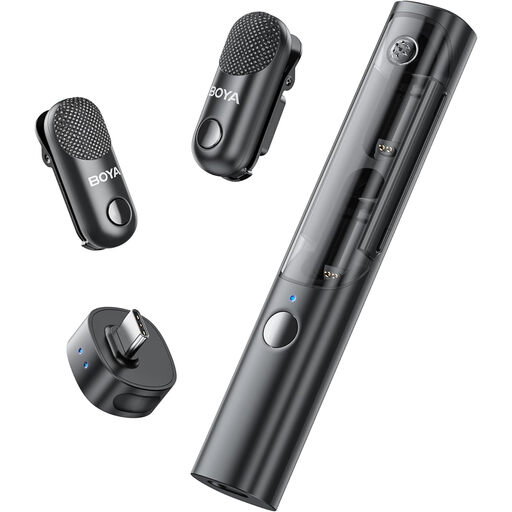
BOYA Magic-05 wireless lavalier microphone set

BOYA Magic-05 USB-C Wireless Lavalier Set, 2 TX + 1 RX

Consider a wearable mic arrangement when close placement matters more than keeping both speakers beside a desk microphone.

The named bundle includes two transmitters, one receiver and a charging case. Confirm the receiver connection, recording-app compatibility and monitoring method for your intended device; do not rely on the product’s noise-cancellation wording as a result for your flat.

View on Joybuy
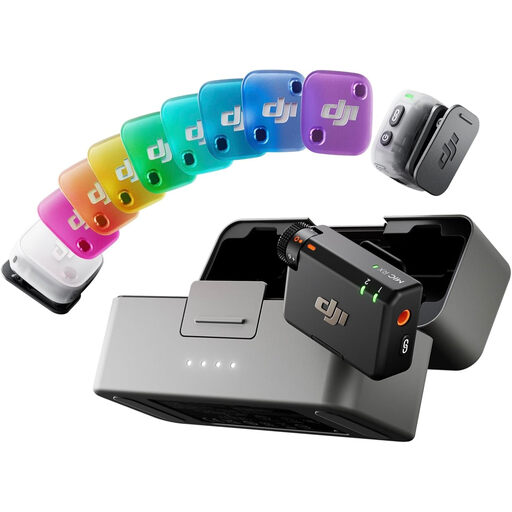
DJI Mic Mini 2 wireless microphone set

DJI Mic Mini 2, 2 TX + 1 RX + Charging Case

The two-transmitter bundle is worth considering when an interviewer and interviewee each need close microphone placement.

Check the receiver’s connection to your intended recording device and whether that setup permits live monitoring. The listed Bluetooth phone connection alone does not establish compatibility with every phone, computer or recording app.

View on Joybuy

Questions about recording

Should I choose a dynamic microphone for a noisy flat?

A close-positioned cardioid dynamic mic is a sensible starting point for one speaker who can stay in front of it. Audio-Technica says this arrangement can be forgiving of constant noise and reflective surfaces, provided the speaker stays within 200 mm; it does not eliminate sounds already reaching the microphone.

Will a cardioid mic remove traffic or neighbour noise?

No. Directional pickup can reduce sound arriving from some directions, but it cannot make the flat silent. The University of Leicester advises choosing the quietest available place, moving away from noise sources and closing windows where practical.

Do I need an audio interface to record on a laptop?

Not if the exact microphone supports direct USB recording with your laptop. RØDE and Audio-Technica specify USB output on the PodMic USB and ATR2100x-USB; RØDE says its separate, XLR-only PodMic needs an XLR cable and interface for computer recording.

How do I capture both interviewer and interviewee?

Place a table mic near the interviewee rather than halfway across a noisy room, and consider two microphones if the interviewer would otherwise be too quiet. The University of Leicester also discusses tie microphones for noisy or echo-prone rooms; check placement and clothing rustle before recording.

What should a UK oral-history project agree before recording?

If the interview will be shared or archived, clarify its intended use and document the recording agreement before starting. The National Lottery Heritage Fund identifies agreements, copyright, data protection and archiving among project responsibilities. If an organisation uses consent as its UK GDPR lawful basis, the Information Commissioner’s Office advises that consent must be specific and informed; check the appropriate basis for the project’s actual use.