Who needs which setup?
The deciding constraint may be how you set up and review the camera, not just how you power it.
Households without a smartphone
Check initial setup, account access, live viewing and playback separately. Reolink lists Argus PT Ultra for initial setup through its desktop Client. By contrast, eufy’s SoloCam S340 instructions use a phone app, and TP-Link says its Tapo app is available on iOS and Android, not computers.
Households monitoring an unpowered outdoor spot
A battery camera with solar assistance may suit a shed, garden, gate or drive without a mains socket. Check Wi-Fi at the mounting point and find an unobstructed position for the panel; a good camera angle does not necessarily provide good sunlight.
Households needing continuous recording
If footage between motion events matters, check for an explicitly supported continuous-recording mode. Reolink says charging alone does not establish that capability for a battery camera; its wired RLC-810A supports continuous, scheduled and motion-triggered recording, provided a PoE cable route can be installed.
What should you check before choosing?
Start with the functions you must perform without a phone, then test whether the intended position can support the camera’s power, connection and recording needs.
| Priority |
What to check |
Your needs |
| Computer access |
Check initial setup, account verification, live view, playback and settings for the exact model. A web viewer may still depend on phone-led setup: eufy says its app remains necessary for those steps on its supported systems. |
I need to get the camera running and review recordings on a computer, without borrowing a smartphone just to activate it. |
| Power and sunlight |
Check battery operation, compatible panel placement and seasonal shade. Reolink warns that obstacles such as trees and buildings can substantially reduce its panels’ charging performance. |
The camera position has no mains socket, so I need a workable charging position as well as a useful view. |
| Wi-Fi reach |
Test the connection at the intended mounting point and check the exact camera’s supported Wi-Fi bands against your network. Do this before fixing the mount. |
I want to reach the camera reliably from indoors, even if the shed or gate is some distance from the router. |
| Storage and recording |
Check where footage is saved, whether storage media or other equipment is needed, and whether recording is motion-led or continuous. Reolink says continuous recording depends on camera hardware; its PoE RLC-810A specifies continuous and scheduled modes. |
I need to know whether event clips are enough, or whether gaps between detections would make a wired recording route more appropriate. |
| Privacy-aware placement |
Aim the camera at the area you need and check any privacy-mask function for the exact model. The UK Information Commissioner’s Office says data protection law applies when domestic CCTV captures another person’s property, a public area or communal space. |
I want to monitor my property without unnecessarily capturing neighbours or passers-by. |
Relevant brand references
These examples illustrate different setup and recording routes; features must still be checked against the particular model.
Reolink
Relevant where desktop setup or a wired continuous-recording route is important.
- Reolink’s Client instructions list Argus PT Ultra for initial setup of a battery Wi-Fi camera through a computer.
- The wired RLC-810A supports continuous, scheduled and motion-triggered recording, according to Reolink.
- Check playback and recording modes for the exact battery model. Reolink says charging does not, by itself, enable continuous recording.
eufy
Relevant to households that can use a phone for setup but also want to consider subsequent PC viewing.
- Eufy describes SoloCam S340 as a solar-powered camera with local storage and provides PC-viewing guidance for compatible cameras.
- Eufy says its app remains required for initial setup and account verification; SoloCam S340 pairing instructions use a phone.
Tapo
Relevant when phone-based setup is acceptable and local storage is a priority.
- TP-Link lists the solar-powered Tapo C460 KIT with local microSD storage support up to 512GB.
- TP-Link says the Tapo app is available for iOS and Android, not computers. Its PC streaming guidance covers supported wired cameras; it does not establish computer-only operation for C460 KIT.
Joybuy product options
This solar-assisted outdoor kit is an option to examine for a location without a mains socket. If you cannot use a smartphone, confirm setup, live viewing and playback for this exact model before choosing it.
 No image available
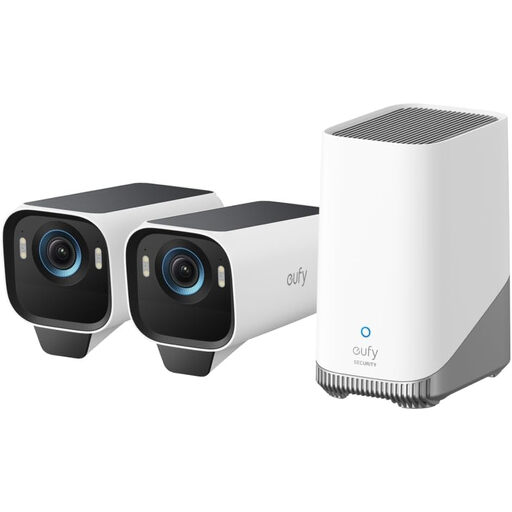
eufy Security eufyCam S3 Pro 2-Cam Kit with solar panel
For outdoor monitoring without a mains socket, this wireless two-camera kit lists a solar panel, 4K capture and expandable local storage. Check what storage expansion requires and whether this exact kit supports the computer-based setup, live viewing and playback you need. Test Wi-Fi and sunlight at the intended positions before mounting it.
View on Joybuy
Common questions
Can I set up an outdoor battery camera without a smartphone?
Yes, if the exact model has documented computer-based setup. Reolink’s Client instructions list Argus PT Ultra for initial setup through a computer. Check live viewing, playback and settings separately for the model you intend to buy; a desktop viewer alone does not establish phone-free setup.
Will a solar panel remove the need to check the battery?
No. Reolink advises placing its panels away from obstructions such as trees and buildings because shade reduces charging performance. Check the panel’s position through the seasons and follow the chosen camera’s charging guidance.
Does a solar-powered camera record continuously?
Not necessarily. Reolink says continuous recording depends on camera hardware, even when it is charging. Check the battery model’s stated recording modes; if 24/7 footage is essential and a cable route is feasible, Reolink specifies continuous recording for its wired PoE RLC-810A.
What if my camera also captures a neighbour’s property or the street?
In the UK, the Information Commissioner’s Office says data protection law applies when domestic CCTV captures another person’s property, a public area or communal space. Aim the camera at your own property where possible and consider privacy controls for unavoidable areas. The ICO says its home-CCTV guidance is under review, so check its current wording before installation.


