Overhead technique teachers
If pupils need to follow hand placement, folds and work on small book components, prioritise a stable position above the bench and a view that can show the necessary detail.


For a main overhead shot that must show both the workbench and small bookbinding details, choose an interchangeable-lens camera if you can provide a secure mount and select a lens for the available height. A compact camera is easier to move between secondary angles, but check whether its fixed view works for the lesson; either way, plan how to capture clear speech without unnecessarily recording other people in the workshop.
If pupils need to follow hand placement, folds and work on small book components, prioritise a stable position above the bench and a view that can show the necessary detail.
When tools, conversations or other makers may enter the recording, plan both the presenter’s audio and the boundaries of the frame before setting up.
If you must set up, present and pack down alone, consider whether you can see the screen from the camera’s mounted position and manage the support, microphone and other accessories yourself.
Choose when: The main shot must move between a broad view of the bench and closer views of the work.
Allow for: Lens selection and a support rated for the complete overhead setup.
Choose when: You chiefly need a camera for introductions, moving footage or a second workshop angle.
Allow for: A fixed view that may not fit the full bench and fine details from one overhead position.
| Concern | What to check | Who this matters to |
|---|---|---|
| Overhead framing and detail | Measure the mounting height and check the exact lens’s view and focusing distance. Confirm the support’s load limit for the complete setup. | If I need pupils to see both the working area and precise hand movements, framing is my first decision. Around 33% of consumers would put overhead coverage and detail first. |
| Spoken instruction | Check microphone compatibility and whether you can monitor or review speech recorded during normal workshop activity. | When I explain a technique over other workshop sounds, I need my words to remain understandable. Voice clarity would come first for around 25% of consumers. |
| Recording and editing | Confirm the exact resolution, frame-rate mode and card requirements for the footage you intend to record. | If I plan to slow a quick movement or work further on the footage, the available recording mode shapes my choice. Around 25% of consumers would prioritise that workflow. |
| Solo setup | Consider the complete kit you must carry and whether you can see and operate the screen once the camera is mounted. | When I am teaching and filming without help, I want a setup I can position and manage myself. Ease of setup would be the primary concern for around 17% of consumers. |
The recording modes are not identical: Canon lists 4K/60p for the EOS R50 V, Sony lists up to 4K/60p for the ZV-E10 II, and Panasonic lists 4K/30p for the G100D. None of those figures tells you whether the chosen lens will frame your bench.
Decide how you will use the footage, then check the selected mode, its card requirements and the camera-and-lens view from your mounting height.
An overhead teaching shot also depends on the lens, mounting hardware and any microphone attached to the rig. A camera specification does not establish the safe load limit of a separate support.
Check the support manufacturer’s limit against the combined mounted equipment and make sure the arrangement can be secured above the work surface.
A camera mounted above the bench records from that position, while voices and activity elsewhere in the room may also enter the recording. Microphone connections and monitoring options differ by model.
Record a short rehearsal during normal workshop activity. If the explanation is hard to follow, check a compatible closer microphone and how you will power and monitor it.
The Information Commissioner’s Office describes personal data as information relating to an identified or identifiable person. The Intellectual Property Office also explains that copyright exceptions apply only in specific situations; an educational purpose is not a general permission to reuse material.
Agree a filming process with the workshop operator, frame out other workers where possible, and check permission or licensing for material you intend to include.
The EOS R50 V is an interchangeable-lens option for a planned overhead lesson setup.
The ZV-E10 II offers an interchangeable-lens route when framing choices and recording modes matter.
The LUMIX G100D is a compact interchangeable-lens option for a lesson kit.
The Osmo Pocket 3 suits moving footage and secondary workshop angles when a compact camera is useful.
These choices include interchangeable-lens kits to assess for a main overhead shot and compact cameras to consider for simpler or secondary angles. For each one, check the view from your own bench height and plan a separate workshop audio test.
 No image available
Consider this kit if you want to adjust the framing of an overhead lesson; check whether the included lens covers both your full bench and the details you intend to show.
The product name specifies an APS-C interchangeable-lens camera, a 16–50 mm f/3.5–5.6 lens and 4K/60p recording. Check the complete load against your overhead support’s limit and rehearse the audio in the workshop.
 No image available
The included zoom lens gives you a range of views to assess for a fixed teaching shot. Check the full-bench composition and close details at the intended mounting height rather than relying on the lens range alone.
This is an interchangeable-lens kit with a 16–50 mm power zoom lens. Confirm the recording mode you intend to use and test speech during a workshop rehearsal.
 No image available
Consider this compact gimbal camera for an introduction, a moving shot or a second angle. If it will film the main overhead view, test whether the fixed lens shows the work clearly from a securely mounted position.
DJI specifies a 20 mm-equivalent fixed lens and a 0.2 m minimum focus distance for the Osmo Pocket 3. Its three-axis stabilisation does not replace a secure overhead mount.
 No image available
A fixed-lens camera removes the lens-selection step, but check whether its view can cover your work area and the small details you plan to teach from the available position.
The product name identifies a 1-inch sensor and an ultra-wide lens. Confirm the required recording mode and your intended microphone setup before choosing it for a shared-workshop lesson.
 No image available
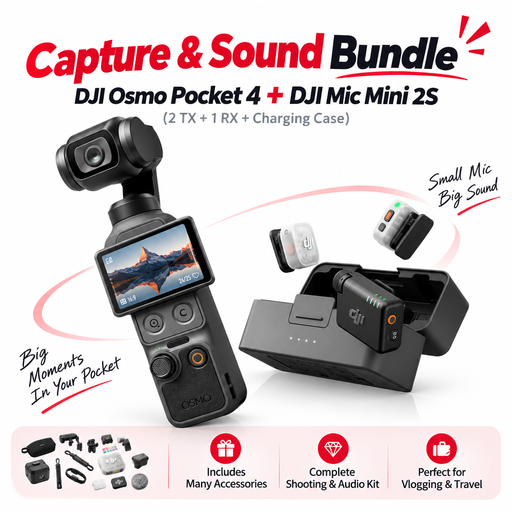
If a compact camera and separate voice-capture equipment suit your lesson plan, check that this exact camera and microphone bundle work together as intended. Also confirm its lens view, close focusing and recording modes against your planned shots.
The product name identifies a bundle with two microphone transmitters, one receiver and a charging case. A secure overhead support remains necessary if you intend to use the camera above the bench.
Rehearse at the real overhead height with the complete camera setup. Review a short recording to see whether the full working area and smallest important detail are visible, hands obscure any key action, the support is secure and spoken instructions remain clear during normal workshop activity.
No; card requirements depend on the camera and selected recording mode. Panasonic specifies UHS-I UHS Speed Class 3 compatibility for the G100D, while DJI recommends V30-capable cards for the Osmo Pocket 3. Check the manual for the exact model and mode rather than choosing by capacity alone.
Agree the filming process with the workshop operator and decide how to keep people outside the intended shot and audio where possible. The Information Commissioner’s Office defines personal data as information relating to an identified or identifiable person, so consider whether the footage could identify someone before recording or publishing it.
An instructional purpose does not automatically permit reuse of third-party material. The Intellectual Property Office says copyright exceptions apply in specific situations; assess the particular material and intended use, and seek permission or an appropriate licence where needed.