For a fixed overhead brush lettering lesson, choose a camera and support together: the lens must frame the whole writing area, and the assembled camera must stay secure while you film. A 4K/30p camera can suit a normally paced portfolio lesson; consider 4K/60p if you plan slow-motion inserts or a more involved editing workflow.
Who is filming?
Overhead lesson makers
You need the page, hand and pen tip to remain in frame throughout a top-down lesson. Start with a support that can hold the assembled camera and lens, then check whether you can see the camera screen from your position at the desk. SCAN UK advises matching a support’s payload rating to the heaviest camera-and-lens combination.
Detail-led portfolio creators
You may want to crop closer to a pen stroke or add slow-motion inserts. Sony UK lists 4K/60p for the ZV-E10 II, and Canon UK lists it for the EOS R50 V. Those modes are worth considering if you will use the extra editing options and can accommodate an interchangeable-lens workflow.
Simple set-up creators
You want to record and narrate a normally paced lesson without building a more involved video workflow. A 4K/30p camera can fit that plan if its lens frames the paper, its audio arrangement works in your room and you have a secure overhead support.
What matters when choosing a camera?
Plan the overhead position before settling on a camera body: desk height, page size and the combined weight of the camera and lens determine what framing and support you need. Then decide whether your finished lesson calls for 4K/60p or a simpler recording workflow.
| Concern |
What to check |
Who this matters to |
| Stable overhead framing |
Check the support’s payload rating against the assembled camera and lens. Make sure it reaches over the paper and leaves the screen practical to view. |
If my pen tip or part of the page falls outside the shot, the lesson will be difficult to follow. Around 42% of consumers put secure overhead framing first. |
| Detail and editing options |
Check whether the lens frames the page at your mounting height and whether you will use the camera’s selected 4K/60p mode. |
I want to crop into lettering details or make slow-motion inserts without changing the main shot. For around 33% of consumers, editing flexibility is the primary need. |
| Manageable recording and sound |
Confirm the lens and audio equipment included, the intended charging arrangement and the memory card required for your recording mode. |
I need to set up, narrate and transfer a full lesson without an unnecessarily involved routine. A straightforward recording workflow comes first for around 25% of consumers. |
Mistakes to avoid
-
Choosing the camera before planning the overhead rig
A camera cannot give you a consistent top-down lesson shot if its support cannot securely hold the assembled kit or reach the centre of the writing area.
Measure the paper and desk, choose a lens that can frame them at the available height, and check the support’s payload rating against the full camera-and-lens set-up.
The filming arrangement may also call for an overhead arm, quick-release plate, lighting, microphone and memory card.
-
Treating a body-only camera and a lens kit as equivalent
A body-only interchangeable-lens camera still needs a compatible lens before it can film the lesson. Canon UK lists the EOS R50 V body separately from lens-kit configurations.
Check the contents of each configuration, including the lens and the equipment needed for your intended audio and mounting set-up.
-
Choosing 4K/60p without a plan to use it
Higher-frame-rate recording can be useful for slow-motion inserts, but it is not required for a normally paced, fixed overhead lesson. Sony UK and Canon UK list 4K/60p options; Panasonic UK & Ireland lists 4K/30p for the LUMIX G100D.
Decide how you will edit and deliver the lesson before selecting a recording mode. If you expect to use 4K/60p, also check the camera’s card requirements and your editing workflow.
-
Assuming the narration will sound clear in your room
Echo, ventilation and the distance between you and the camera can affect spoken instruction, regardless of the camera’s audio features.
Record a full test lesson in the intended room. If the narration is unclear, check which external microphone arrangement is compatible with your camera and listen to a new test recording.
Relevant camera brands
Sony
The ZV-E10 II is relevant if you want an APS-C camera with a choice of E-mount lenses for desk-based filming.
- Sony UK specifies 4K/60p recording and E-mount lens compatibility for the ZV-E10 II.
- A kit lens still needs to frame your whole page at the height your overhead support allows; check the exact kit contents.
Canon
The EOS R50 and EOS R50 V offer different recording routes for this task rather than interchangeable versions of the same kit.
- Canon UK lists 4K/30p and a vari-angle touchscreen for the EOS R50; it lists 4K/60p and Canon Log 3 for the video-oriented EOS R50 V.
- Confirm whether an EOS R50 V offer includes a lens, and check that lens against your overhead working distance.
Panasonic
The LUMIX G100D with a 12–32mm lens is a compact Micro Four Thirds option for a normally paced lesson.
- Panasonic UK & Ireland lists 4K/30p recording and USB Type-C charging for the G100D.
- Its listed 4K mode is 30p, so choose another route if 4K/60p recording is central to your editing plan.
Joybuy cameras for lesson filming
These camera choices cover interchangeable-lens kits and compact video cameras that could be considered for a lettering lesson. For each one, check page framing and secure overhead mounting before treating its video features as a reason to buy.
 No image available
Sony Alpha ZV-E10 II K with 16–50 mm f/3.5–5.6 Power Zoom kit lens
Consider this interchangeable-lens kit if you intend to use 4K/60p footage for lettering close-ups or slow-motion inserts. The listed kit has a 16–50 mm lens; check whether it frames the full page at your overhead height and whether your support holds the assembled kit securely.
The listing says a memory card is not included. Check the card requirements for the recording mode you plan to use.
View on Joybuy
 No image available
Sony ZV-E10K with 16–50 mm Power Zoom lens
This interchangeable-lens kit is an option for a normally paced lesson if its lens can frame your writing area. Check the assembled camera-and-lens weight against your overhead support’s payload rating, and test your intended narration set-up in the room.
View on Joybuy
 No image available
Sony ZV-1F compact vlog camera with 1-inch sensor
Consider this compact camera if its fixed lens can include the whole writing area from your available mounting position. Check the composition before buying: unlike an interchangeable-lens kit, changing lenses is not a way to adjust this model’s framing. Confirm that your overhead mount can hold it securely.
View on Joybuy
 No image available
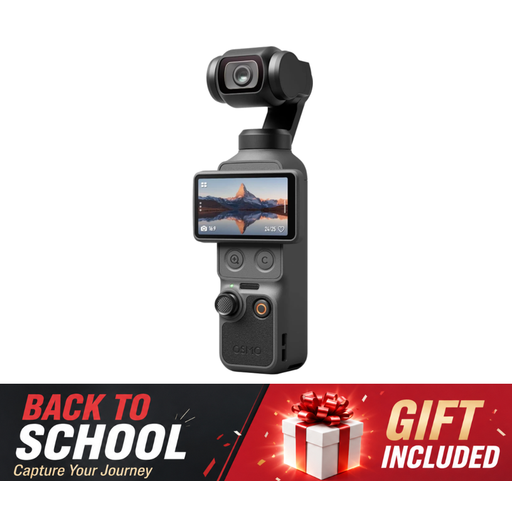
DJI Osmo Pocket 4 Standard Combo
This pocket gimbal camera is worth considering for close-up inserts only after you have worked out how to position it for the shot. For a full overhead lesson, confirm that a compatible mount can hold it securely above the desk and that its audio arrangement suits spoken instruction. Check the exact recording mode if slow motion is part of your plan.
View on Joybuy
 No image available
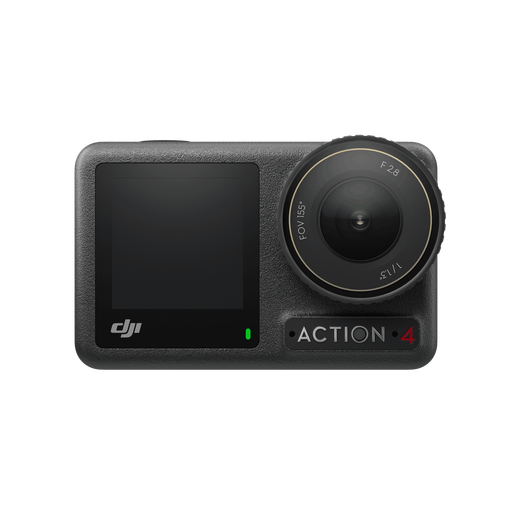
DJI Osmo Action 4 Adventure Combo
Before choosing this action camera for a fixed lesson, check that a compatible mount holds it securely and that its wide view can frame the page without unwanted surroundings. The listing specifies a 155° field of view and 4K/120 fps recording; confirm which mode fits your intended footage and what microphone equipment you would need.
View on Joybuy
Questions about filming lettering lessons
Do I need 4K/60p for a brush lettering lesson?
No: 4K/30p can suit a normally paced lesson filmed from a fixed overhead position. Consider 4K/60p if you intend to make slow-motion inserts or use its higher frame rate in editing. Sony UK lists 4K/60p for the ZV-E10 II and Canon UK lists it for the EOS R50 V; Canon UK lists 4K/30p for the EOS R50, as does Panasonic UK & Ireland for the LUMIX G100D.
Can stabilisation replace an overhead camera support?
No. A fixed top-down lesson needs a support that can securely hold the assembled camera and lens over the paper. Check its payload rating and reach; stabilisation is a separate consideration if you also plan handheld footage.
Can I add background music to a public UK portfolio lesson?
Use music only when you have the rights needed for your intended online publication. GOV.UK advises that a licence may be needed to use copyright music online. Check the terms of any music licence, obtain permission where needed, or use music you created and have the rights to publish.
What if students or clients appear in my lesson video?
If you film identifiable people while acting as a business or organisation, consider your data-protection responsibilities before publishing. The Information Commissioner’s Office provides guidance on video processing under UK data-protection rules; check its current guidance against your filming and publication circumstances. A camera angle that excludes other people can also help you keep the lesson focused on the lettering.


