What matters when choosing?
Start with the repair area and the space your hands need beneath the camera. Then check how you will monitor focus, secure the setup and edit the footage.
| Concern |
What to check |
Who this matters to |
| Stitch detail |
Check the exact lens’s minimum focusing distance and magnification, then test the frame at your planned overhead height. |
If small stitches and fabric edges must be readable, I need a close view without losing room to work beneath the camera. Roughly 36% of consumers would put that detail first. |
| Solo focus and framing |
Check screen position and focus controls; make a short recording of the actual repair before filming the lesson. |
With both hands on the repair, I need to know the work stays in focus when I cannot adjust the camera. Around 29% of consumers would make solo operation their primary concern. |
| Editing options |
Match the intended recording mode to your editing software, storage and recording media. |
If I plan to slow down a step or work on colour between clips, I need footage my editing setup can handle. Approximately 21% of consumers would prioritise editing flexibility. |
| Manageable setup |
Check the combined camera-and-lens size and how securely the camera can be mounted above the work. |
When the work area must be cleared after filming, I want equipment I can set up and pack away without giving up stable framing. Roughly 14% of consumers would put that practical setup first. |
Joybuy product choices
These cameras offer different ways to film a craft lesson, from interchangeable-lens setups to compact fixed-lens models. Check close framing and secure overhead mounting for the particular camera you choose; video modes and a movable screen do not establish either on their own.
 No image available
Sony Alpha ZV-E10 II K with 16–50 mm power zoom kit lens
Consider this interchangeable-lens kit if you want to monitor a solo lesson and use its listed recording options in the edit. The product title specifies APS-C, 4K/60p and 10-bit 4:2:2 recording. Sony states that the E PZ 16-50mm II lens focuses from 0.25 m at wide angle and 0.30 m at telephoto; test the resulting view of your repair before choosing an overhead height.
View on Joybuy
 No image available
DJI Osmo Pocket 3 Creator Combo
This compact camera may suit a lesson that includes shots away from the overhead position. Its product title lists 4K/120fps video, 3-axis stabilisation and a microphone in the Creator Combo. Before relying on it for stitches, check how closely its fixed lens frames a repair sample and how you can mount the camera securely above the table.
View on Joybuy
 No image available
Sony A6700 APS-C camera with 16–50mm lens
Consider this interchangeable-lens kit if solo framing and the listed video modes fit your portfolio workflow. The product title identifies an APS-C camera supplied with a 16–50mm lens. Confirm the supplied lens’s close-focus specification and test focus on the textile itself; autofocus aimed at other subjects does not establish how clearly a needle or thread will appear.
View on Joybuy
 No image available
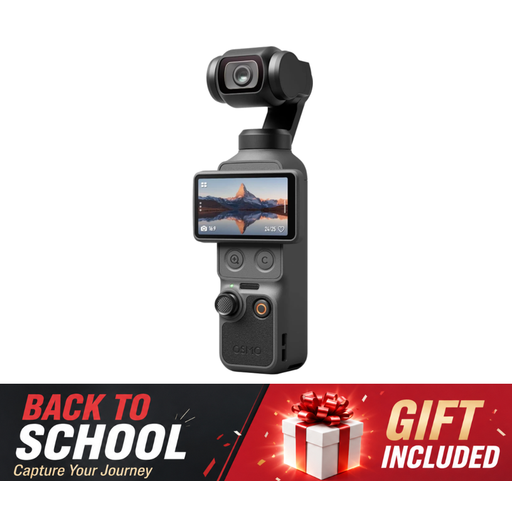
DJI Osmo Pocket 4 Standard Combo
This pocket-format camera is an option to investigate if you want a rotatable screen while recording alone. Its product title lists a 2-inch rotatable screen, 3-axis stabilisation and 107 GB of built-in storage. Check the fixed lens’s close framing on your repair piece and identify a secure overhead mounting arrangement before treating it as the main lesson camera.
View on Joybuy
 No image available
Sony ZV-1F compact camera
Consider this fixed-lens camera if a compact setup and self-monitoring matter more to you than changing lenses. Its product title identifies a 1-inch sensor and an ultra-wide lens intended for selfie shooting. Check whether that lens can fill the frame with small textile details at a safe, workable overhead distance.
View on Joybuy
Common questions
Is a 4K camera enough to show textile repairs clearly?
No: the lens must also focus at a distance that leaves you room to work while showing the stitches clearly. Test the repair piece under the intended lighting and overhead position, with both hands in the frame. Canon specifies a 15 cm minimum focusing distance for its RF-S 18-45mm lens; Sony specifies 0.25 m to 0.30 m for its E PZ 16-50mm II, depending on zoom position.
Should I prioritise stabilisation for an overhead lesson?
Prioritise a secure fixed mount for the main overhead shot. Stabilisation may help with handheld inserts, but it does not secure the camera or keep the repair in the same position across takes. Panasonic specifies 5-axis Hybrid I.S. for the G100D, with 4-axis compensation in 4K recording; that does not remove the need for a suitable mount.
Do I need 4K/60p or log recording for a craft portfolio?
Choose those modes if your planned edit calls for them and your storage and software can handle the footage. Canon lists 4K/60p and Canon Log 3 for the EOS R50 V, while Sony lists 4K/60p and 10-bit 4:2:2 for the ZV-E10 II. Panasonic specifies 4K/30p for the G100D, which may meet the needs of a straightforward lesson without the same recording-mode options.
Can I publish a UK portfolio lesson featuring other people or background music?
Check the permissions and circumstances before publishing. Information Commissioner’s Office guidance describes a personal or household activity position for information shared with friends and family rather than the public, without a professional or commercial link; do not assume it applies to a public portfolio. The Intellectual Property Office says most uses of copyright material require permission unless a specific exception applies, so check any music, imagery or patterns you did not create and obtain appropriate permissions where needed.


