Overhead tutorial makers
You need a repeatable view of the paper, palette and working hand, with the support kept out of shot. The camera's field of view must work at a mounting height that your support can hold safely.


Start with the overhead setup: the camera and support need to frame the full painting area from the available height and stay safely in position while you work. An interchangeable-lens camera gives you more ways to adjust framing; a fixed-lens camera involves fewer lens decisions, provided its view fits your table. A pocket gimbal camera makes more sense if you also want moving shots, but its stabilisation does not replace a secure overhead mount.
You need a repeatable view of the paper, palette and working hand, with the support kept out of shot. The camera's field of view must work at a mounting height that your support can hold safely.
You want room to adjust footage when pale washes and pigment tones matter to the finished video. Recording options are worth considering alongside consistent lighting, exposure and white balance.
You want to position the camera, see the composition and start a repeatable filming routine without making many lens choices. You still need to plan the overhead support, recording media and power arrangement.
Measure the painting area and available lens-to-paper distance before choosing a lens or fixed-lens camera. Then decide how you will monitor the downward-facing view and whether your editing plans call for particular recording modes.
| Concern | What to check | Who this matters to |
|---|---|---|
| Overhead framing and support | Check whether the lens shows the full work area at your mounting height. Compare the complete rig, including lens and mounting accessories, with the support's declared Safety Payload. | If the paper or palette falls outside the shot, I cannot make the tutorial I planned; around 42% of consumers put reliable overhead coverage and support first. |
| Setup and monitoring | Check that you can see the screen when the camera faces downwards, and confirm the recording media and charging arrangement for the package you choose. | For a recurring series, I want to check the composition and start recording without rebuilding the setup each time; roughly 33% of consumers make that straightforward routine their primary need. |
| Colour and editing flexibility | Check the exact model's normal recording modes and formats if you plan to grade footage. Test your paints and paper under the lighting you intend to use. | When I edit close views of washes and brushwork, I want footage that fits my colour workflow; about 25% of consumers place that editing flexibility first. |
A recording specification cannot tell you whether a lens will fit the whole sheet into the frame from your available height. An offset arm must also safely carry the complete camera setup.
Measure the work area and lens-to-paper distance, then check the proposed camera-and-lens combination and the support's declared Safety Payload. Manfrotto distinguishes Safety Payload from a maximum-load figure that may not account for safety parameters.
An unsuitable arm, head or mounting plate can mean changing the support after choosing the camera.
For the DJI Osmo Pocket 3, DJI lists 4K/120fps as a slow-motion mode and normal 4K recording up to 60fps. Panasonic lists the LUMIX G100D at 4K/30p. Those figures describe different models and modes, not the result you will see in a finished painting tutorial.
Decide on your delivery frame rate, then check the exact camera's ordinary recording mode, media requirements and editing workflow.
DJI says the Osmo Pocket 3 has no built-in storage and uses a microSD card. Canon's UK listing says a USB-C charger is not included with the PowerShot V1.
Check the contents of the exact camera package and plan compatible recording media, charging equipment and an overhead mount before committing to a setup.
These models illustrate different ways to build the filming setup; the deciding test is whether the chosen camera, lens and support work at your table.
The ZV-E10 II represents an APS-C interchangeable-lens route for creators who may need to change the overhead view.
The PowerShot V1 represents a fixed-lens camera with some zoom adjustment for a repeatable desk position.
The Osmo Pocket 3 represents a pocket gimbal route for filming at the table and taking occasional moving shots.
The LUMIX G100D kit represents another interchangeable-lens route, supplied with a 12–32mm lens in Panasonic's UK kit listing.
These choices include interchangeable-lens kits, a fixed-lens compact and a pocket gimbal camera. For any of them, check the view from your measured mounting height and choose a support suited to the complete setup.
 No image available
Consider this kit if you want zoom adjustment at the table and the option to choose another compatible lens later. Its product title specifies an APS-C camera, 4K/60p video and 10-bit 4:2:2 recording. Check whether the supplied lens covers your full work area and arrange compatible recording media.
 No image available
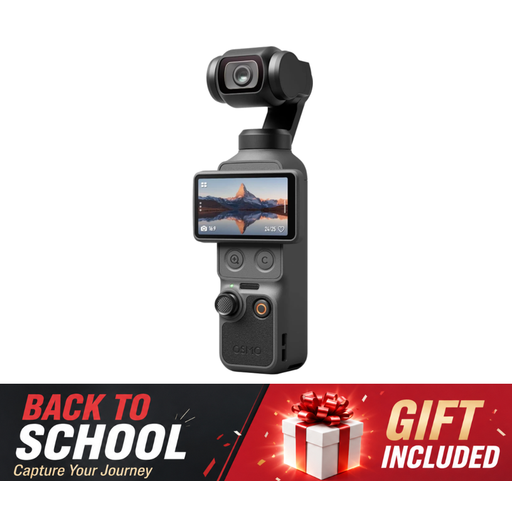
Consider this pocket gimbal camera if you also plan to film away from the fixed painting position. Its product title specifies a 1-inch CMOS sensor, three-axis stabilisation, 107 GB built-in storage and a 2-inch rotatable screen. Check its normal video modes and whether its view and mounting arrangement suit your overhead shot; specifications for the Osmo Pocket 3 do not establish those details for this model.
 No image available
The supplied zoom gives you a way to adjust composition without moving the overhead support. Check that it frames the full paper at your available height, and confirm the recording mode and package contents you need.
 No image available
This interchangeable-lens kit is worth considering if you want to adjust the shot with the supplied zoom and keep other lens choices open. Test full-sheet framing at your mounting distance, and check the exact recording mode and included accessories before buying.
 No image available
A fixed-lens compact may suit a filming position you expect to keep the same. The product title identifies a 1-inch sensor and an ultra-wide lens; check the actual view from your overhead height, because you cannot swap the lens if the composition does not work.
Measure the work area and the distance from the proposed lens position to the paper, then check the view with the exact lens or fixed-lens camera you intend to use. Also allow room for your hand and palette, and make sure the support stays out of frame. For an offset mount, check the complete rig against the support's declared Safety Payload.
Not necessarily for a mainly static overhead demonstration. Choose a higher frame rate when smoother motion or slowed footage is part of your plan, and check whether the figure refers to normal video or slow motion: DJI lists normal 4K recording up to 60fps for the Osmo Pocket 3, with 4K/120fps under slow motion, while Panasonic lists the LUMIX G100D at 4K/30p.
Check the exact model and package rather than assuming they are included. DJI says the Osmo Pocket 3 has no built-in storage and uses a microSD card; Canon's UK PowerShot V1 listing says a USB-C charger is not included. Those package details do not establish what comes with a different model or bundle.
You can plan to publish footage of your own original work, but check the rights to any other artwork or protected material that appears in it. GOV.UK explains that copyright protects original work and restricts use by others without permission. Keep identifiable contributors and material you do not own out of the shot unless you have addressed the relevant permissions and privacy requirements.