Overhead tutorial makers
You need the sheet, palette and hands to stay in a fixed frame above a small desk. Lens width, a screen you can see from beside the desk and secure mounting matter more than handheld filming features.


Choose around the fixed overhead view: the camera needs to frame your paper and hands from the available height, let you check the shot beside the desk and focus at the distance you plan to use for brushwork. A close-focusing compact gives you more flexibility for detail, while a pocket camera is easier to store but may need more distance from the painting. Neither choice will correct uneven or colour-cast lighting.
You need the sheet, palette and hands to stay in a fixed frame above a small desk. Lens width, a screen you can see from beside the desk and secure mounting matter more than handheld filming features.
You want to show brushwork, paint edges or pigment mixing as well as the whole page. Check how closely the camera can focus before planning a tighter shot.
You need room to paint when filming is over and may want both horizontal and vertical clips. A compact camera helps with storage, but it still needs a suitable support for an overhead view.
Set the camera position and decide how much of the desk must appear before comparing recording modes. Then check close focus, lighting and the equipment needed to keep that position secure.
| Concern | What to check | Who this matters to |
|---|---|---|
| Overhead framing | Measure the planned camera-to-paper distance. Check the wide-end view, screen visibility and the support's attachment and payload. | When the paper, hands and palette must fit above a cramped desk, I need to check the frame without shifting the mount; around 29% of consumers put overhead framing first. |
| Paper and paint colour | Plan even light without strong glare or mixed colour casts; check whether the camera offers a white-balance setting you can use. | If my washes look different on camera, I need more consistent illumination before extra video modes; roughly 29% of consumers make colour and lighting their primary concern. |
| Compact workflow | Check storage media, power, body size and whether the camera supports your intended recording orientation. | When I must clear the desk after painting, I want a camera and recording routine that are easy to put away; around 24% of consumers prioritise that simpler workflow. |
| Detail and longer tutorials | Compare minimum focus distance at the planned height, recording modes, card compatibility and audio connections. | For close brushwork or a narrated session, I need to know the camera will focus where I place it and suit the recording routine; approximately 18% of consumers put those needs first. |
A gimbal can steady a moving camera, but a painting demonstration needs a secure, repeatable position above the desk.
Measure the desk and clearance, then check the support maker's attachment method and payload against the complete camera setup. Test its stability before placing water or artwork underneath.
An overhead arm, tripod or desk-mounted support may be needed separately.
Uneven light, glare and colour casts can change how paper and paint appear, regardless of the camera's recording mode.
Arrange even illumination, avoid mixing noticeably different light colours and set white balance deliberately under the light you will use.
Controlling light may require additional equipment and space around the desk.
A wide view does not mean a camera will focus on a brush held close to its lens. DJI specifies a 0.2 m minimum for Osmo Pocket 3, while Canon specifies 0.05 m for PowerShot V1 and Sony approximately 5 cm for ZV-1 II.
Mark your intended lens-to-paper distance and compare it with the exact model's focus specification before planning close-up shots.
A recording setup also depends on suitable storage, power, support and lighting. Do not assume an accessory is included because the camera can use it.
Check the contents of the exact retail package and the required card, charging and mounting arrangements before deciding how you will film.
Canon's PowerShot V1 and PowerShot V10 illustrate different fixed-lens approaches to a small filming setup.
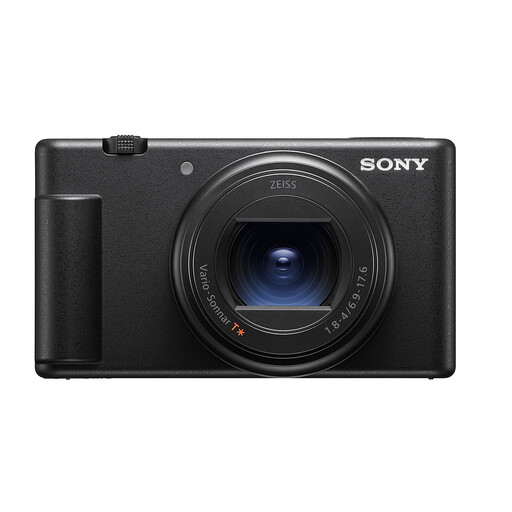
The ZV-1 II is a compact option to examine where the camera has to sit fairly close above the workspace.
Osmo Pocket 3 offers a small camera format for a setup that must be stored between sessions.
These Sony compact and interchangeable-lens cameras and the DJI pocket camera offer different ways to film a student-room desk. Compare their framing and focus needs against your planned overhead position rather than choosing by camera format alone.
 No image available
Consider this compact camera if the overhead position is close to the desk but you also want to reframe for brushwork. Sony specifies an 18–50 mm equivalent lens, approximately 5 cm minimum focus distance and 4K recording up to 30p for the ZV-1 II.
Check that your chosen support can hold the complete camera securely at the height needed to include the painting area.
 No image available
Consider the ZV-1F's wide-angle lens if the camera must sit close above a small desk. Before planning shots of fine brushwork, check its minimum focus distance against your intended lens-to-paper distance.
Confirm the attachment and payload of the overhead support you intend to use.
 No image available
The included 16–50 mm power zoom lens gives you a way to change composition without changing lenses during a painting session. Check the kit lens's field of view and minimum focus distance at your planned overhead height.
Allow for the complete camera-and-lens configuration when choosing a support and storage space.
 No image available
This pocket camera suits a filming setup that must be put away between sessions. DJI specifies a 179 g camera body and a minimum focus distance of 0.2 m; keep the lens at least that far from brushwork you need in focus.
The Creator Combo name identifies this bundle, but its gimbal does not establish safe overhead mounting. Check the package contents and support arrangement for the complete setup.
No, not necessarily: 4K can leave more room to crop an overhead view when editing, but it also increases storage and editing demands. Check the mode you would actually use; Canon lists 4K 60p for PowerShot V1, Sony lists up to 4K 30p for ZV-1 II, and DJI lists up to 4K 60 fps in normal video for Osmo Pocket 3.
Uneven light, glare or a colour cast can change how the paper and paint appear before camera specifications become the main issue. Beyond Print recommends even light without a colour cast for recording artwork; check the desk under the lighting you intend to use and set the camera's white balance accordingly.
Check the support's stated payload, attachment method and clearance for the complete camera setup, then test its stability away from water and artwork. Also compare your planned lens-to-paper distance with the camera's minimum focus distance: DJI specifies 0.2 m for Osmo Pocket 3, Canon 0.05 m for PowerShot V1 and Sony approximately 5 cm for ZV-1 II.
A change-of-mind cancellation and a remedy for a faulty camera are different matters. GOV.UK explains that UK customers have a limited cancellation period for eligible distance purchases; check the applicable deadline, conditions and return procedure before using the camera, and do not assume a retailer's voluntary policy replaces statutory rights concerning faulty goods.