What matters when choosing?
Match the controller to the host device and game first, count usable player inputs next, then choose a connection method that suits the room.
| Concern | What to check | Who this matters to |
|---|
| Device and game compatibility |
Confirm the console or PC, the game’s supported controller types and its local-player mode. |
I need the controller to work in the actual game, not just connect to the device; around 42% of consumers put this compatibility question first. |
| Inputs for guests |
Check the game’s player limit and whether it accepts single Joy-Con, paired Joy-Con or full-size controllers. |
When inviting several people, I need a playable input for each guest rather than a certain number of boxes; roughly 33% of consumers prioritise guest capacity. |
| Connection and setup |
Check the supported wireless or USB method, charging arrangements and any feature limits tied to the connection. |
I want guests to start playing from the sofa without discovering that my audio or connection choice changes the plan; about 25% of consumers put setup practicality first. |
Controllers to consider on Joybuy
These controllers cover Switch, PS5 and Xbox or PC setups. Choose by the device running your party game, then confirm that game’s controller arrangement and local-player rules before adding guest inputs.
 No image available
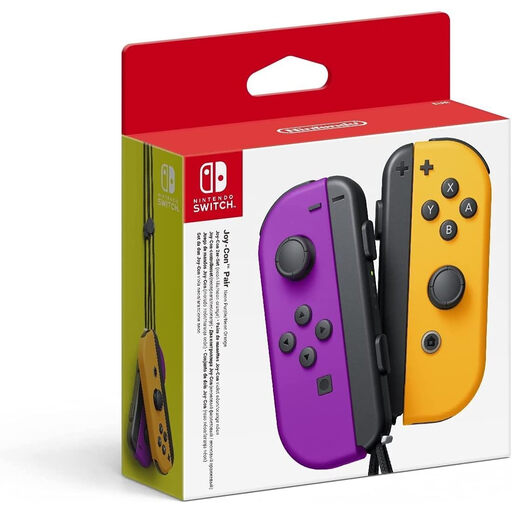
Nintendo Joy-Con Pair – Neon Purple/Neon Orange
Consider this pair for a Switch party game that permits the Joy-Con arrangement you need. Check whether guests can use one Joy-Con each or must use paired controllers; a Joy-Con Grip is sold separately if you want that holding arrangement.
View on Joybuy
 No image available
Lexip SteelPlay Twin Pads Controllers
Consider these twin pads for a Switch setup after checking that the chosen game accepts this third-party controller and the separate-controller arrangement you intend to use.
View on Joybuy
 No image available
Sony DualSense Wireless Controller – HYPERPOP Remix Green
This PS5 controller may also suit a compatible PC, Mac or mobile party game. Check the game’s local-player support; PlayStation says haptic feedback on PC requires USB and game support.
View on Joybuy
 No image available
Turtle Beach Rematch Wireless Controller for Nintendo Switch – Invincible Mario
Consider this full-size controller where the Switch party game accepts its controller type, rather than assuming it can provide two player inputs. The listing states that it does not include a C Button for Switch 2.
View on Joybuy
 No image available
Microsoft Xbox Elite Wireless Controller Series 2 – Xbox One/Series X/S/PC
Consider this controller for a compatible Xbox or PC party game after checking its local-player support. It has interchangeable small parts that present a choking hazard; keep them away from young children.
View on Joybuy
Frequently asked questions
How many extra controllers do I need for a party game?
Buy enough for the game’s permitted local players and controller arrangements, rather than counting packs alone. Nintendo UK says up to eight wireless controllers can usually pair with a Switch, but controller type and active features can change the limit; wireless left and right Joy-Con count separately.
Will Bluetooth headphones affect a Nintendo Switch party?
Yes. Nintendo UK says a connected Bluetooth audio device limits the Switch to no more than two wireless controllers. For a larger wireless group, disconnect Bluetooth audio and use another supported audio arrangement.
Can I use a DualSense wirelessly with a PC?
Yes, PlayStation lists Bluetooth as an option for supported Windows PCs, provided the chosen game accepts the controller. If haptic feedback matters, PlayStation says it requires USB and game support on PC; adaptive triggers also require game support.
Can a 2.4 GHz PC controller replace a console controller?
Only if the particular controller explicitly supports that console and the game accepts its input. For example, 8BitDo specifies the Ultimate 2C Wireless for Windows through 2.4 GHz or a wired connection and for Android through Bluetooth; those specifications alone do not establish console support.


