What matters when choosing?
Choose the games and the number of people you want to play with before comparing consoles. That makes controller requirements, access to the TV and existing games easier to judge.
Nintendo Switch 2
Consider it when: You want to move between the shared TV and a tabletop setup for casual sessions.
Check first: Two detachable Joy-Con 2 controllers come with the standard console, but each game sets its own local-player and controller requirements.
PlayStation 5
Consider it when: The flat already has PlayStation games or wants specific PS5 couch co-op or competitive titles.
Check first: A standard PS5 Digital Edition has no disc drive; for two-controller play, compare the contents of the chosen bundle.
Xbox Series S
Consider it when: Housemates already use Xbox digital games and want to stay with that platform.
Check first: Microsoft describes Series S as disc-free, and the compared standard configuration includes one controller.
| Concern |
What to check |
Who this matters to |
| Ready for local play |
Count the included controllers and check whether the intended game supports the group’s local-player count. |
I want two people to start a game without borrowing another controller, so the game must work with what we have on hand. Around 36% of consumers put immediate same-room readiness first. |
| TV or tabletop play |
Decide whether the shared TV will be free and whether tabletop play suits the expected group size. |
When someone else is using the TV, I still want the option of a small local session elsewhere in the flat. Around 21% of consumers prioritise that flexibility. |
| Existing games |
List games the household owns, then check their platform, format and local-play modes. |
We already have games we want to use together, and changing platform would leave those purchases out of the plan. Keeping access to an existing library comes first for around 29% of consumers. |
| Complete setup |
Check the controllers and game format you need, plus the correct storage-expansion type if you plan to add storage. |
I need the console and accessories to work with the games our flat plans to keep, including any physical discs. Around 14% of consumers put these setup and format requirements first. |
Joybuy product choices
These choices include Switch 2 configurations for TV or tabletop play and PS5 configurations for households choosing between disc and digital games. For any of them, check the intended party game’s local mode and the contents of the exact package.
 No image available
Nintendo Switch 2 Console + Nintendo Switch Sports Resort
Consider this bundle if you want a Switch 2 and a game together for sessions that may move between the TV and tabletop play. Check the included game’s local-player mode and controller requirements before planning a group session.
View on Joybuy
 No image available
Nintendo Switch 2 Console (UK Version)
This console is worth considering when access to the shared TV varies and tabletop play would be useful. Confirm the package contents and your chosen game’s controller requirements if you want two people to start playing immediately.
Switch 2 game-storage expansion requires a compatible microSD Express card.
View on Joybuy
 No image available
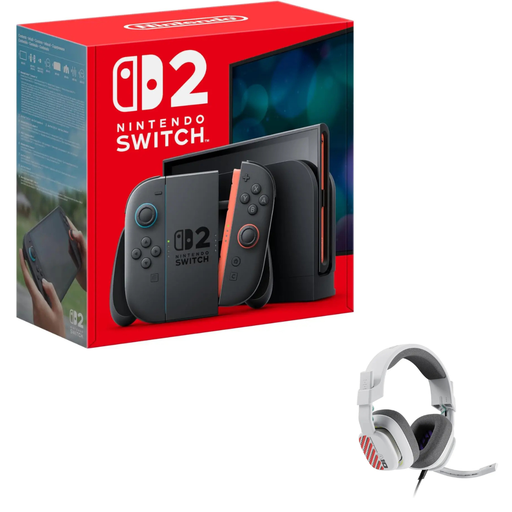
Nintendo Switch 2 Console + LOGITECH ASTRO A10 Gaming Headset Gen 2, White
This configuration pairs a Switch 2 with a wired headset, while the console offers TV and tabletop play. If the aim is a two-person mini-game session, confirm the complete bundle contents and the intended game’s local controller requirements; the headset does not establish local-play support.
View on Joybuy
 No image available
PlayStation 5 Disc Edition Console + Marvel’s Wolverine Bundle
The disc-capable PS5 suits a PlayStation household that intends to use physical games. One DualSense controller is specified for this bundle, so plan for the controllers required by your party game rather than assuming the bundled title fills that role.
Check the bundled game’s age rating if younger guests may be present.
View on Joybuy
 No image available
Sony PlayStation 5 Digital Edition, Slim Version
Consider this PS5 if the household plans to use digital PlayStation games rather than discs. The Digital Edition has no disc drive, and this configuration lists one DualSense controller; check what else your chosen local game needs.
View on Joybuy
Common questions
Will we need another controller for party mini-games?
That depends on the game’s local mode and the controllers in your chosen package. Nintendo’s standard Switch 2 includes a pair of detachable Joy-Con 2 controllers; the standard PS5 Digital Edition and Microsoft’s compared Xbox Series S configuration each include one controller. Check whether the game lets each player use a detachable controller or requires a full controller.
Can PS5 Digital Edition or Xbox Series S play borrowed game discs?
No: PS5 Digital Edition has no disc drive, and Xbox Series S is disc-free, according to PlayStation and Microsoft. If the flat plans to use physical games, choose a console configuration that accepts the discs you intend to play.
What should we check about storage?
Check both the games you plan to keep installed and the console’s compatible expansion format. Nintendo specifies microSD Express cards for Switch 2 game-storage expansion, while Microsoft identifies a dedicated Storage Expansion Card for equivalent-performance expansion on Xbox Series X|S.
Do age ratings matter for party games with younger guests?
Yes. The Games Rating Authority states that PEGI 12, 16 and 18 ratings on games supplied physically are legally enforceable in the UK when those games are sold or rented to underage customers. Check the exact game’s rating and content descriptors; its age rating does not tell you how many people can play locally.
What should we check when buying a used console?
Check the console model, controllers, supplied power equipment and any known faults before committing. Ask the seller about their terms, and retain the listing and proof of purchase so you have a record of what was described and supplied.


