Choose extra controllers for the console and the exact party game you plan to play, then check how many people that game mode allows on one system. Nintendo says a Switch can pair up to eight wireless controllers in most circumstances, but a game may allow fewer local players; PlayStation says a PS5 can use up to four controllers at once. Individual Joy-Con suit supported Switch games that use them, while full-size controllers may suit button-based games or compatible play across other devices.
Who needs extra controllers?
Switch party hosts adding player inputs
If guests will play a Switch game that accepts individual Joy-Con or motion controls, check the game’s local player limit and controller requirements before buying enough for everyone. Nintendo distinguishes how many controllers a console can pair from how many players a particular game mode supports.
PS5 or Xbox households hosting local games
Additional controllers make sense when the chosen game supports more people playing together. PlayStation says a PS5 can use up to four controllers simultaneously; for Xbox, check the player limit of the particular game rather than assuming one limit applies to every title.
Players who use more than one device
If controllers will also be used for compatible PC or mobile games, check both connection methods and feature support. Sony lists Bluetooth and USB connections for DualSense on compatible devices, but some features depend on the device, connection and game.
What should you check before buying?
Start with the game’s accepted controllers and local player count, then decide how many simultaneous inputs you need and which controls guests will use.
| Concern | What to check | Who this matters to |
|---|
| Game compatibility |
Confirm the console generation, accepted controller type and local player limit for the exact game mode. |
If I am buying extras for a game we have chosen, they need to work with that game before their other features matter. Around 36% of consumers put platform and game compatibility first. |
| Simultaneous players |
Count active players, then check both the console’s controller limit and the game mode’s player limit. |
When more guests attend than can play at once, I need to know whether to add controllers or plan turns. Enough simultaneous inputs are the primary concern for around 29% of consumers. |
| Controls for guests |
Check whether the game accepts a single Joy-Con, uses motion input or works with a full-size button controller. |
I want guests to use controls that fit the mini-games rather than buy features those games do not use. Around 21% of consumers put the control arrangement first. |
| Use on other devices |
Check the connection method and supported features on each intended console, computer or mobile device. |
If the controllers will be used after the party on other devices, I care whether the games and features I want will work there. Cross-device reuse comes first for around 14% of consumers. |
Mistakes to avoid
-
Buying to the console’s pairing limit
Nintendo says a Switch can pair up to eight wireless controllers in most circumstances, but Super Mario Party Jamboree lists one to four players on one console for its cited offline modes.
Check the player count for the mode you will actually use before deciding how many controllers to buy.
Otherwise, extra controllers may sit unused while guests take turns.
-
Overlooking Bluetooth audio on Switch
Nintendo says connecting a Bluetooth audio device limits a Switch to no more than two wireless controllers.
If three or more people need wireless controllers, check the complete controller and audio arrangement before the party.
You may need a different audio arrangement to keep the planned number of wireless inputs.
-
Assuming every mini-game uses the same inputs
Nintendo says each Joy-Con can work as a standalone controller, while Mario Party Superstars uses button controls for all its mini-games. Motion capability alone therefore does not decide which controller to choose.
Check whether your chosen game accepts individual Joy-Con, a full-size controller or a particular motion-control arrangement.
-
Equating device compatibility with full feature support
Sony lists DualSense use on compatible devices beyond PS5, but features vary by device and game; haptic feedback on PC requires USB when supported by the game.
Check the connection and the specific features you intend to use on each device.
Relevant controller brands
Nintendo
Relevant to Switch parties where the selected game accepts individual Joy-Con or motion input.
- Nintendo says each Joy-Con can act as a standalone controller and has motion sensors.
- The game’s local player limit still applies. Nintendo also says Bluetooth audio limits the Switch to two wireless controllers.
PlayStation
Relevant to PS5 households adding DualSense controllers for supported local games.
- PlayStation says up to four controllers can be used with a PS5 at once.
- On compatible computers and mobile devices, DualSense features depend on the device, connection and game.
Xbox
Relevant to Xbox and Windows PC setups that may also use controllers with compatible mobile games.
- Microsoft lists Xbox Wireless Controller compatibility with Xbox consoles, Windows PC, Android and iOS.
- Check local multiplayer support and controller requirements for each game; device compatibility does not establish its player limit.
8BitDo
A third-party reference for Switch players considering a full-size controller with motion input.
- 8BitDo lists six-axis motion control for its Ultimate 2C Bluetooth Controller.
- Check the exact variant, supported Switch firmware and your game’s controller requirements before choosing it.
Controllers for different setups
These choices cover Switch, PS5 and Xbox controller setups. Choose for the console you own, then confirm that your party game and mode accept the controller and the number of local players you have planned.
 No image available
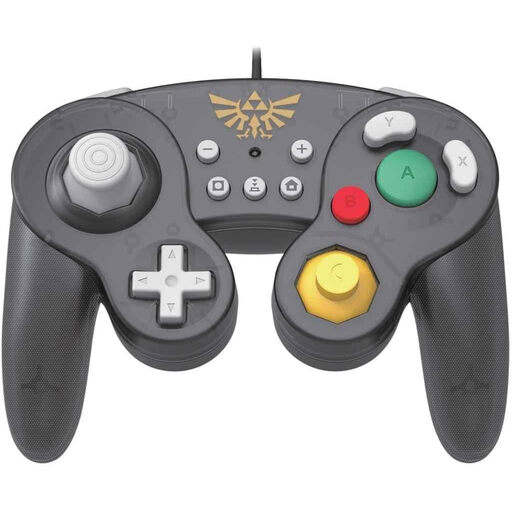
HORI Battle Pad GameCube Style Controller – Zelda (Switch)
Consider this GameCube-style Switch controller for a button-based party game if that game accepts it. Check the game’s supported controller types and local player count before adding one for each player.
View on Joybuy
 No image available
Sony DualSense Wireless Controller – HYPERPOP Remix Green (PS5)
For a supported PS5 local game, an additional DualSense can give another player a controller; PlayStation says a PS5 uses up to four controllers at once. It can also connect to compatible computers and mobile devices, although features vary by device and game, and PC haptic feedback requires USB in supported games.
View on Joybuy
 No image available
Xbox Wireless Controller – Robot White
Consider it for an Xbox party game if the title supports another local player. Microsoft also lists Xbox Wireless Controller compatibility with Windows PC, Android and iOS; check the chosen game’s player count and requirements on each device.
View on Joybuy
 No image available
Turtle Beach Rematch Wireless Controller – Invincible Mario (Nintendo Switch)
This full-size wireless Switch controller is an option when your chosen party game accepts it. Check the game’s controller requirements and local player limit, as well as any functions you need on your Switch model.
View on Joybuy
Frequently asked questions
Will eight Switch controllers let eight people play every party game together?
No. Nintendo says a Switch can pair up to eight wireless controllers in most circumstances, but the game and mode determine how many people can play on one console. Super Mario Party Jamboree, for example, lists one to four players for its cited offline modes on one console.
Does Bluetooth audio affect a Switch party setup?
Yes. Nintendo says a Switch connected to a Bluetooth audio device can connect no more than two wireless controllers. If three or more players need wireless controllers, check the audio arrangement before playing.
Does each party-game player need a controller?
Each player needs one when the particular game requires it. Nintendo says Super Mario Party multiplayer requires one compatible controller per player; check the requirements of your chosen title and mode before counting how many extras to buy.
Can I use a DualSense controller on a PC after a PS5 party?
Yes, with compatible PC games and devices: Sony lists USB and Bluetooth connection options for DualSense. Feature support is more limited than the connection options alone suggest; PC haptic feedback requires USB and support from the game.


