Switch flat-party hosts
If your games run on Nintendo Switch, individual Joy-Con may give two people an input from one pair when the game supports that arrangement. Nintendo Store UK describes this use for supported two-player games.


Choose for the device hosting the game and the game’s supported inputs before choosing a controller for its extra features. A Joy-Con pair can serve two people in supported Switch games, while Xbox Wireless Controller and DualSense suit their respective console setups and compatible games on other devices. Check the game’s local-player limit and plan how many controllers must be ready at once; some party games use players’ phones instead.
If your games run on Nintendo Switch, individual Joy-Con may give two people an input from one pair when the game supports that arrangement. Nintendo Store UK describes this use for supported two-player games.
If your household alternates between Xbox and Windows PC, with occasional compatible mobile games, you may want a controller that can move between those devices. Xbox lists those platforms for its standard Xbox Wireless Controller; each game still needs to support it.
If friends join only now and then, establish whether they need gamepads at all. Jackbox Games, for example, has players join with a room code and use their phones as controllers.
Start with the host device and the particular game, then work out how many people can play locally and how you will keep their inputs ready.
Choose when: A Switch game supports individual Joy-Con and two people need to share a pair.
Bear in mind: Nintendo says controller limits vary with the setup; Bluetooth audio restricts a Switch to two wireless controllers.
Choose when: Games are hosted on Xbox or compatible Windows PC or mobile devices.
Bear in mind: The standard controller uses AA batteries or a compatible rechargeable pack; rechargeable AA cells charge outside it.
Choose when: Games run on PS5, or the intended PC or mobile game confirms DualSense support.
Bear in mind: PlayStation says some controller features vary by game, device and connection outside PS5.
Choose when: The planned game is designed for players to join on their phones, as Jackbox games are.
Bear in mind: Phones do not replace gamepads in games that require physical controllers.
| Concern | What to check | Who this matters to |
|---|---|---|
| Game compatibility | Confirm the host device and the game’s accepted input types before choosing a controller family. | If I host on different devices, I need an input the chosen game will actually recognise. Around 34% of consumers put host-and-game compatibility first. |
| Inputs for everyone | Check the game’s local-player limit and how many controllers the intended console setup permits. | When friends play together, I need each simultaneous player to have a workable input, not just a controller the console can pair. Roughly 33% of consumers make player capacity their primary concern. |
| Power routine | Check the controller’s battery or charging arrangement and what must be ready before play. | For an impromptu game night, I want the controllers to be ready without searching for charged batteries. About 20% of consumers prioritise keeping inputs powered. |
| Easy participation | Find out whether the game uses gamepads, individual Joy-Con or players’ phones. | If guests play only occasionally, I want them to join without arranging more gamepads than the game needs. Around 13% of consumers put simple participation first. |
A controller useful on one host device may not be accepted by the planned game; phone-controlled games may not need an extra gamepad at all.
Identify the host device, check the game’s supported inputs and local-player limit, then choose the controller type and quantity.
Nintendo UK Support says a Switch can generally pair up to eight wireless controllers, subject to controller type and features. That pairing ceiling does not establish a game’s local-player limit. PlayStation’s limit of four simultaneous PS5 controllers is likewise a console limit.
Check the game’s own local multiplayer rules as well as the console setup.
Nintendo UK Support says a Switch can pair no more than two wireless controllers while a Bluetooth audio device is connected.
If your setup needs a third wireless controller, disconnect Bluetooth audio and check the intended controller arrangement before guests arrive.
Xbox Support says a standard Xbox Wireless Controller can use AA batteries or a compatible rechargeable pack, but rechargeable AA cells do not charge inside the controller.
Agree how the household will keep batteries ready, and use an appropriate external charger if you choose rechargeable AA cells.
Relevant to parties hosted on Nintendo Switch when the chosen game supports the intended Joy-Con arrangement.
Relevant to Xbox-hosted games and compatible Windows PC, iOS or Android games.
Relevant to PS5-hosted games and compatible games on other devices using DualSense.
These controllers cover Switch, Xbox and PS5 game nights, with PC or mobile use where the particular device and game support it. Choose by your host setup rather than treating them as interchangeable.
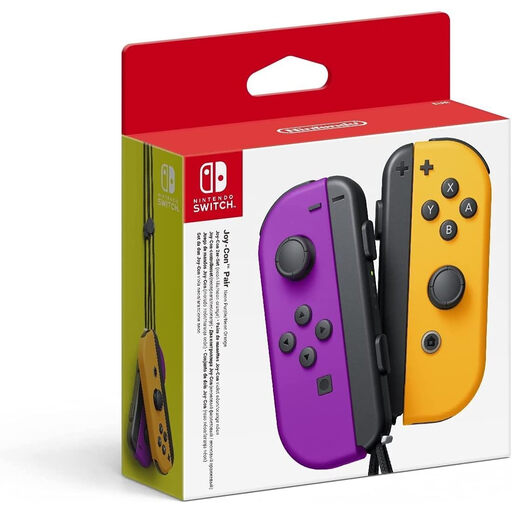 No image available
Consider this pair when your Switch party game supports one Joy-Con per player; Nintendo says a pair can be shared for supported two-player games.
Confirm the game’s controller types and local-player limit before relying on two separate inputs.
 No image available
Consider this controller for an Xbox-hosted game or compatible Windows PC or mobile play, after checking the game accepts it.
Xbox says its standard wireless controller uses AA batteries or a compatible rechargeable pack; rechargeable AA cells must be charged outside the controller.
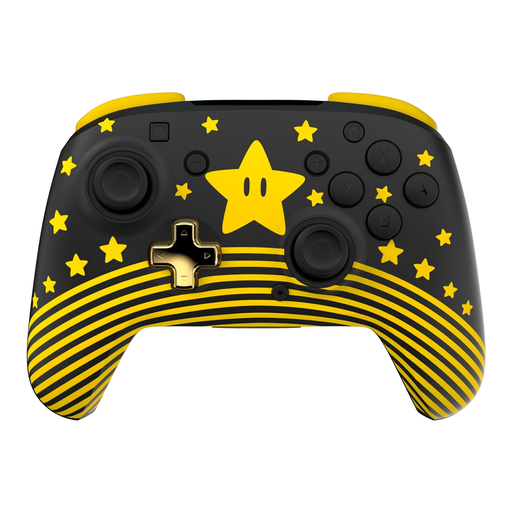 No image available
Consider this single wireless gamepad for a Switch-hosted mini-game that accepts its controller type, rather than for a game night that depends on sharing individual Joy-Con.
Check the game’s local-player and input requirements before deciding how many controllers you need.
 No image available
Consider this DualSense for a PS5-hosted game, or for a compatible PC game that supports the controller.
PlayStation says PS5 can use up to four controllers at once, but the game sets its own local-player limit; some DualSense features also vary outside PS5.
No: in supported Switch games, one left and one right Joy-Con can serve two players, according to Nintendo Store UK. Check the particular game’s accepted controller types and local-player limit; a game designed for phone participation may need no extra gamepads.
Not if the setup needs more than two wireless controllers. Nintendo UK Support says a Switch can pair no more than two while a Bluetooth audio device is connected, so disconnect Bluetooth audio before connecting a third wireless controller.
It can work with a compatible PC and game, using a supported connection. PlayStation notes that some DualSense features may vary by device, game or connection, so check the game’s controller requirements rather than assuming PS5 feature support carries over.
Yes, but they must be charged outside the standard Xbox Wireless Controller. Xbox Support lists AA batteries and a compatible rechargeable pack as power options; arrange a suitable external charger if you choose rechargeable AA cells.