For PC-first RPG play, start with a controller that explicitly supports your Windows connection method and check that your games accept gamepad input. An Xbox-layout controller offers a straightforward route; consider extra inputs or adjustable controls if you will use them for recurring actions. DualSense is worth considering if you also play on PS5, but its PC haptics require USB and supported games.
Who these choices suit
Windows RPG desktop players
If you play mainly at a Windows PC, start with documented PC compatibility, a connection you can use at your desk and gamepad support in your priority RPGs. Xbox and 8BitDo both describe Windows-compatible controller routes.
Players who use recurring shortcuts
If you frequently change bindings or want additional physical inputs, compare the controls you would actually map. 8BitDo lists extra inputs on the Ultimate 2C, while Xbox describes adjustable controls on the Elite Series 2 – Core.
PC and PS5 players
DualSense offers a route across PC and PS5. If its tactile features are part of the appeal, check the individual PC game: PlayStation says haptics require USB on PC and feature support varies by game.
What matters when choosing
Check the games and PC connection first, then decide whether extra controls, PS5 use or fewer interruptions during long sessions matter most to you.
| Concern |
What to check |
Who this matters to |
| PC compatibility and connection |
Confirm Windows support for the connection mode you intend to use, then check each RPG for gamepad input. |
I want to sit down at my PC and use the connection I have chosen without finding that it is meant for another device. Around 37% of consumers put compatible desk play first. |
| Extra inputs and control settings |
Look for inputs you will use for recurring actions, and check how they are mapped. |
If I regularly change RPG bindings, additional buttons or adjustable controls matter more to me than a conventional layout. Around 27% of consumers prioritise that flexibility. |
| PC and PS5 features |
Check the particular PC game's feature support; PlayStation says PC haptics require USB. |
I play on PS5 too and would value DualSense effects where my PC games support them, even if that means using a cable. Around 18% of consumers place this crossover use first. |
| Long-session convenience |
Consider grip and weight in person where possible, plus the charging or battery arrangement for your chosen connection. |
When I settle in for a long session, I care most about how the controller feels and whether its power arrangement fits my routine. Around 18% of consumers make session convenience their primary concern. |
Buying pitfalls
-
Assuming every RPG accepts gamepad input
Steam notes that gamepad-only input styles work only with games that support gamepads. A PC-compatible controller cannot by itself add that support to a game.
Check the store page or input settings for each RPG you particularly want to play.
-
Choosing DualSense for PC effects without checking the conditions
PlayStation says PC haptics require USB, while haptics and adaptive triggers depend on support in the game.
Check the game's feature notice and be prepared to use USB if PC haptics matter to you.
-
Treating stated battery life as a guaranteed session length
8BitDo describes its battery-life figures as laboratory results, with different figures for different connection modes.
Choose the connection you intend to use before comparing battery claims, and consider how you will continue playing when power runs low.
-
Putting an old controller in household rubbish
UK government guidance says electrical products and batteries should not go in household rubbish.
Use an appropriate electrical-waste or battery collection point when disposing of a controller or its batteries.
Brands to consider
Xbox
A Windows-compatible Xbox-layout route, from the standard Xbox Wireless Controller to the more configurable Elite Wireless Controller Series 2 – Core.
- Microsoft lists Windows PC support, Bluetooth and button mapping for the standard controller.
- The Elite Core's adjustable sticks and trigger locks are relevant only if you expect to use that extra control tuning.
8BitDo
The Ultimate 2C Wireless Controller is a PC-oriented option for a desk setup that uses a 2.4 GHz connection or a cable.
- 8BitDo lists Hall Effect sticks and triggers, extra R4/L4 inputs and on-controller mapping for this model.
- Its listed Bluetooth mode is for Android; use its specified 2.4 GHz or wired mode for Windows rather than assuming Bluetooth-on-Windows support.
PlayStation
DualSense is a route for players who also use PS5 or prefer its layout for compatible PC games.
- PlayStation documents USB and Bluetooth PC connectivity for DualSense.
- On PC, haptics require USB, and both haptics and adaptive triggers depend on the game.
Joybuy controllers for PC play
These controllers are listed for PC gaming and cover wired or wireless desk setups, from a standard Xbox layout to models aimed at configurable controls. Choose the connection and layout you want, then check gamepad support in your RPGs.
 No image available
Microsoft Xbox One S Elite Wireless Controller Series 2 (Xbox One/Xbox Series X/S/PC)
Consider this Series 2 controller for PC desk play if adjustable controls would help with recurring RPG actions. The listed platforms are Xbox One, Xbox Series X/S and PC; confirm the precise bundle and its interchangeable parts before ordering.
View on Joybuy
 No image available
Turtle Beach PDP Victrix Pro BFG Wireless Controller – Black (Xbox and Windows 10/11 PC)
For a Windows desk setup where you want to tailor the control layout, check which modules and connection accessories you would use. The listed platforms include Xbox Series X|S, Xbox One and Windows 10/11 PC; customising its modular layout takes setup.
View on Joybuy
 No image available
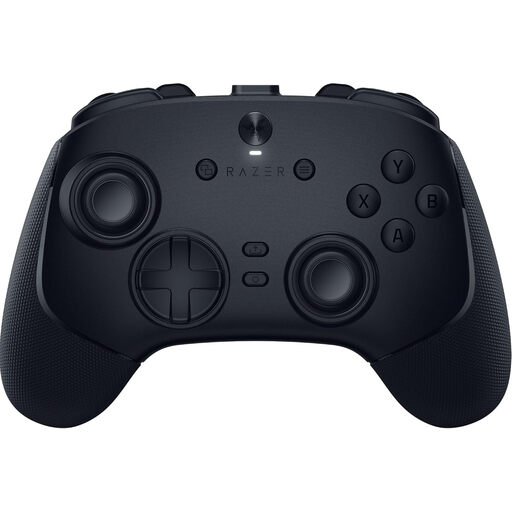
Razer Wolverine V3 Pro Wireless Controller (PC)
If remappable inputs matter for your RPG bindings, check this PC controller's configuration options against the actions you use. Confirm the wireless connection requirements and whether the accessories you need are included.
View on Joybuy
 No image available
Turtle Beach Afterglow Ignite Time wired RGB controller – Time Machine (Xbox and PC)
A wired controller can suit a fixed desk if you do not need to play wirelessly. This is the Time Machine variant listed for Xbox and PC; plan where the cable will run during play.
View on Joybuy
 No image available
Xbox Wireless Controller – Robot White
For conventional Windows PC gamepad play, this standard Xbox controller offers a wireless route; check that your RPG accepts gamepad input. The listing specifies two AA batteries, so consider whether that power arrangement suits you.
View on Joybuy
Common questions
Will any PC controller work with every science-fiction RPG?
No: PC compatibility does not guarantee that an individual game accepts gamepad input. Steam notes that gamepad-only input styles work only with games that support gamepads, so check the store page or input settings for the RPGs you plan to play.
Will DualSense haptics and adaptive triggers work wirelessly on PC?
Do not count on wireless access to those features. PlayStation says PC haptics require USB, and both haptics and adaptive triggers depend on support in the specific game; check its compatibility information before choosing DualSense for those effects.
What if my controller configuration does not work in a Steam game?
Start by checking whether the game supports the input style selected in your configuration. Steam notes that gamepad-only input styles require a game with gamepad support; changing controller hardware alone will not add that support.
How should I dispose of an old rechargeable controller in the UK?
Take electrical products and batteries to an appropriate collection point rather than putting them in household rubbish, as UK government guidance advises. Check your local collection arrangements for the controller and its battery.


