Start with the games you plan to play, your available space and a budget for the whole setup, not just the PC. A pre-built bundle reduces assembly and separate purchasing decisions; building your own gives you more control but requires component-by-component compatibility checks. Whichever route you take, match the monitor’s resolution, refresh rate and connections to the PC, then choose controls that suit your games.
Who each setup approach suits
Buyers who want a complete setup with fewer separate choices
If you would rather not assemble components, compare the exact contents of a pre-built bundle with the monitor and peripherals you need. CyberPowerPC UK lists bundles containing a PC, monitor, keyboard, mouse and headset, but the contents of the particular bundle still matter.
Players choosing the PC and display together
Let your intended games guide the PC specification and display target. Start with what you want to play; check the shortlisted PC’s video outputs alongside the exact monitor’s resolution, refresh rate and inputs.
Console-to-PC players who prefer a controller
Check controller support for each intended game before making a gamepad your main input device. PlayStation describes USB and Bluetooth connections for DualSense controllers on supported devices, but connection support does not establish that every game supports the same features.
What to check before buying
Choose between a ready-made PC and a self-build route first, then plan the display and controls as part of the same setup.
Pre-built PC or bundle
Choose when: You want to avoid assembling the PC and can check the exact equipment and support supplied by the seller.
Trade-off: A bundle reduces separate purchases but gives you less control over its included display and peripherals.
Self-built PC
Choose when: Selecting individual components matters more to you than avoiding assembly work.
Trade-off: You take responsibility for compatibility checks, assembly and troubleshooting across the parts you select.
| Concern |
What to check |
Who this matters to |
| Complete setup |
List the PC, monitor, keyboard, mouse and any audio device you need. Check what is included and whether it fits your space and total budget. |
If I am starting without equipment, I need the computer, display and controls to fit one purchase plan. About 36% of consumers put that complete-setup need first. |
| PC and monitor match |
Compare the PC’s video outputs with the monitor’s inputs, native resolution, refresh rate and required cable. |
When I choose games to play, I want a display target that makes sense alongside the PC I am buying. For about 29% of consumers, matching the PC and monitor is the primary concern. |
| Self-build compatibility |
Check the exact CPU socket, motherboard BIOS support, memory type, graphics-card clearance and power connections. |
If I build the PC myself, I need parts that work and fit together before I order them. Component compatibility and control over the build come first for about 21% of consumers. |
| Controls and comfort |
Check game controller support, keyboard layout, mouse fit and headset connection against your preferred way of playing. |
I may prefer a controller or need a mouse and headset that suit how I play and communicate. About 14% of consumers place those control and comfort needs first. |
Common setup mistakes
-
Planning for the PC tower alone
A tower does not by itself provide the display and controls needed to start playing. A bundle may cover several items, but its contents depend on the particular listing.
Make an itemised whole-setup plan and separate included equipment from anything you will need to choose yourself.
A separately needed monitor or peripheral also has to fit within the total budget.
-
Treating a monitor label as a game-performance promise
A stated refresh rate or Adaptive-Sync feature does not establish what a particular PC will deliver in a particular game. VESA’s Adaptive-Sync Display certification applies to displays certified under its defined test programme, not to every display using similar wording.
Check the exact monitor’s resolution, refresh rate and inputs against the PC’s outputs and the connection you intend to use.
-
Assuming self-build parts work together automatically
Even parts in the same platform family can have conditions. AMD says a 600-series AM5 motherboard may need a BIOS update for a Ryzen 8000 or 9000 processor.
Check each exact part and motherboard BIOS revision, as well as memory support, power connections and physical clearance, before ordering.
An update or a part that does not fit can delay assembly and add troubleshooting work.
-
Assuming every PC game handles a controller alike
A controller’s ability to connect to a PC does not establish support for it, or for all its features, in every game.
Check the intended game’s controller information and keep a keyboard and mouse available for setup and other tasks.
Brands to consider
AMD
Relevant when planning a self-build around the Socket AM5 processor and motherboard platform.
- AMD describes AM5 processor support and platform features that can help you narrow the parts to check.
- Platform membership does not confirm that your exact CPU, board, memory, cooler and case work together. AMD notes a possible BIOS-update requirement for Ryzen 8000 or 9000 processors on 600-series boards.
MSI
Relevant when comparing gaming monitors by their stated display and connection specifications.
- MSI publishes model-specific specifications such as resolution, refresh rate and inputs.
- Check the exact monitor’s panel, stand and connections rather than applying one model’s features to the whole range.
CORSAIR
Relevant when choosing a peripheral bundle or selecting a keyboard, mouse and headset separately.
- CORSAIR lists bundles with combinations of peripherals as well as separate headset options.
- Check the included keyboard layout, required connections and headset fit against what you actually need.
Logitech G
Relevant when comparing input devices for your preferred controls and desk arrangement.
- Its catalogue includes gaming mice, keyboards and headsets with different control options.
- The range itself does not establish comfort: compare the exact mouse shape, dimensions, connection and buttons.
Ready-made PCs and laptops on Joybuy
These ready-made options include a desktop bundle, gaming laptops and a tower. Check the equipment supplied with each one before deciding how it fits your first setup; a self-build calls for a separate parts-compatibility plan.
 No image available
CyberPowerPC JOYB1004 bundle, Ryzen 5 7500F, RTX 5060 8GB
Consider this pre-built option if you want to choose the PC and several starting peripherals together. The product name lists a monitor, keyboard, mouse, headset and mousepad, alongside 16GB DDR5 memory and a 1TB NVMe SSD.
Confirm the supplied monitor’s exact model, inputs and refresh rate before treating the bundle as a match for your planned games.
Joybuy
 No image available
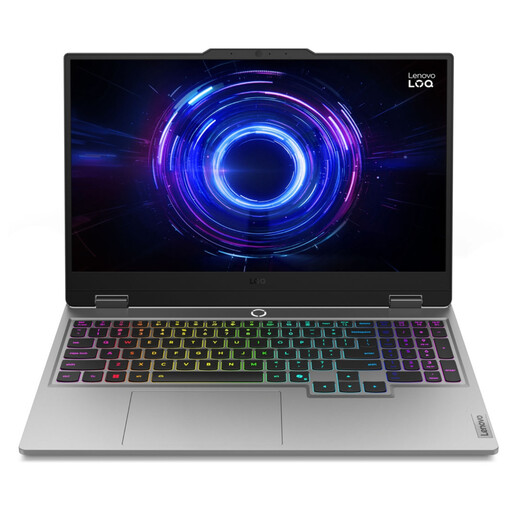
LOQ 15IRX10 i5-13450HX, 24GB, 1TB, W11H
This laptop route puts the computer and display in one device. Its product name identifies an i5-13450HX configuration with 24GB memory and 1TB storage.
Confirm which listed variant, 83JE0017NT or 83JE000JUK, will be supplied and whether you need to choose a mouse or headset separately.
Joybuy
 No image available
Lenovo LOQ Essential 15ARP11, Ryzen 7 170, RTX 5050
Consider this laptop if you want a built-in display rather than choosing a separate monitor at the outset. Its product name specifies a 15.6-inch FHD 144Hz display, 16GB RAM and a 1TB SSD.
Check its exact configuration against your intended games and decide whether you need a separate mouse or headset.
Joybuy
 No image available
Stormforce Exobook 16-inch QHD+, Ultra 9, 32GB, 4TB, 5080
This laptop is an option if you want the computer and display together and are comparing the listed memory and storage. Its product name specifies a 16-inch QHD+ display, 32GB memory and 4TB storage.
Check the complete configuration against your intended games and confirm which external controls or audio equipment you will need.
Joybuy
 No image available
Lenovo Legion T7 34IAS10, Core Ultra 7 265K, RTX 5070 Ti
Consider this pre-built tower if you prefer to choose your display and controls around a desktop PC. Its product name lists 32GB RAM and a 1TB SSD.
Confirm what equipment comes with the tower, then check the graphics-card outputs against the monitor inputs and display target you choose.
Joybuy
Questions about your first setup
Should I choose my games before choosing a PC?
Yes. Start with what you want to play; compare each shortlisted PC’s full specification with the games’ current published requirements rather than relying on a general gaming label.
Can I choose the monitor separately from the PC?
Yes, provided you check them together before buying. Match the PC’s video outputs to the monitor’s inputs and connection requirements, then assess its native resolution and refresh rate against your intended games. A variable-refresh claim should be checked for the exact monitor and connection.
Can I use a PlayStation DualSense controller with a PC?
PlayStation describes USB and Bluetooth connections for DualSense controllers on supported devices. Check the individual game’s controller support and the connection requirements; PC connectivity alone does not establish identical features in every game.


