Navigating the world of computer peripherals can be surprisingly complex. A PC mouse, once a simple point-and-click device, now comes in countless shapes, sizes and connection types. Whether you are an IT manager outfitting an entire office, a student looking for a reliable study companion or a professional aiming to reduce wrist strain, finding the right tool is key to comfort and productivity.
This guide is designed to cut through the clutter. We will walk you through the essential features to consider, from connection types to ergonomic designs, helping you make an informed choice for your specific needs.
A Practical Guide to Selecting Your Next PC Mouse
Before you add a mouse to your basket, it helps to understand the main differences between the available options. Here are a few key points to consider.
1. Wired vs. Wireless: Which Connection is for You?
The first major decision is whether to go with a wired or wireless model. Each has distinct advantages.
- Wired Mouse: A wired mouse connects directly to your computer via a USB mouse cable. This connection offers a stable, lag-free signal and never needs batteries, making it a highly reliable choice for a permanent desk setup. It is a simple, plug-and-play solution that is ready to go straight out of the box.
- Wireless Mouse: For those who value a clean, cable-free workspace or need portability, a wireless mouse is ideal. They typically connect in one of two ways: via a 2.4GHz USB dongle or directly through Bluetooth. A Bluetooth mouse is particularly useful as a mouse for laptop or tablet, as it connects without using up a valuable USB port.
2. Ergonomics: Prioritising Comfort and Health
If you spend hours at your computer each day, the shape of your mouse matters. An uncomfortable grip can lead to wrist and forearm strain over time.
- Ambidextrous Mouse: These mice have a symmetrical design, making them comfortable for both left- and right-handed users. Many compact and standard models feature this versatile shape.
- Ergonomic Mouse: Designed to fit the natural contour of your hand, these mice reduce muscle tension. A vertical mouse is a popular type of ergonomic mouse that promotes a "handshake" posture. This keeps your forearm in a neutral position, which can help alleviate the pressure associated with traditional mice.
3. Key Features: DPI, Buttons and Portability
Beyond the basics, a few other specifications can influence your experience.
- DPI (Dots Per Inch): This measures the mouse's sensitivity. For a typical office mouse, a resolution between 800 and 1600 DPI provides smooth and accurate cursor control for everyday tasks.
- Buttons: While a standard three-button layout (left-click, right-click and scroll wheel) is sufficient for most, some models offer additional buttons, often for forward/back navigation, which can speed up browsing.
- Portability: If you work on the go, a compact and lightweight travel mouse is a practical choice. Look for models designed for easy packing that offer durable construction.
Recommended PC Mice to Consider
Based on functionality, user comfort and overall value, here are our recommendations for different needs and work styles.
For Dependable, Everyday Use
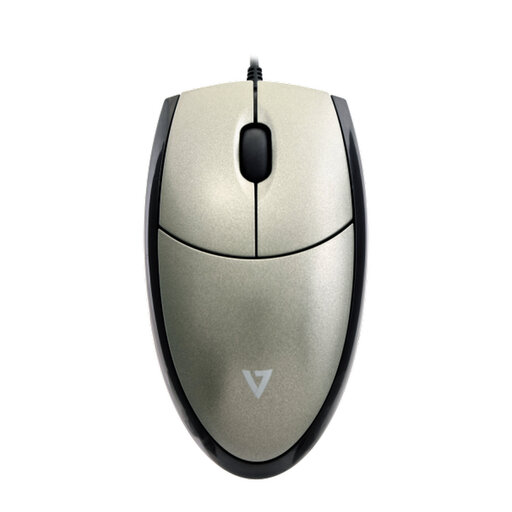
V7 MV3000 Full-Sized USB Optical Mouse
- Why It Stands Out: The MV3000 is a straightforward and reliable workhorse. It delivers consistent performance without unnecessary complications, making it a go-to choice for productivity.
- Pros:
- Plug-and-play setup via a 1.6m USB cable.
- No batteries required, ensuring uninterrupted use.
- Full-sized universal design provides a comfortable grip.
- 1000 DPI optical sensor for precise and smooth tracking.
- Who is it for?: Office professionals, students and IT procurement managers seeking a cost-effective and durable wired mouse for daily desktop use.
For All-Day Comfort and Wrist Support
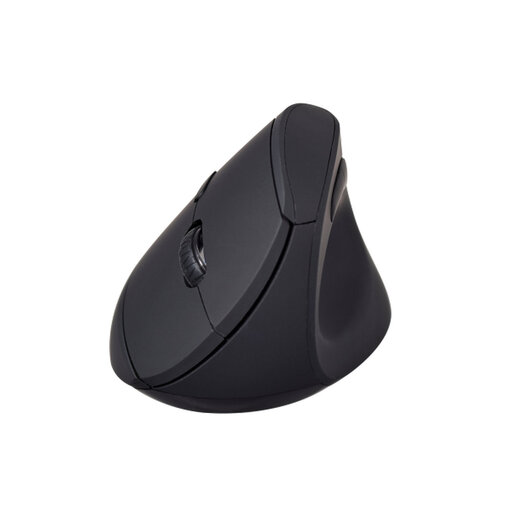
V7 MW500BT Bluetooth Vertical Ergonomic Mouse
- Why It Stands Out: This mouse is engineered for comfort. Its vertical "handshake" grip is designed to reduce muscular strain in the wrist and forearm, making it an excellent choice for anyone spending long hours at their desk.
- Pros:
- Vertical ergonomic design promotes a natural hand posture.
- Dual-mode wireless connectivity (Bluetooth or 2.4GHz).
- Adjustable cursor speed with 800, 1200 and 1600 DPI settings.
- 6-button layout, including forward/back buttons for efficient navigation.
- Who is it for?: Health-conscious professionals, designers and home users who experience discomfort with standard mice and want to invest in a more comfortable, long-term solution.
For Portability and Travel
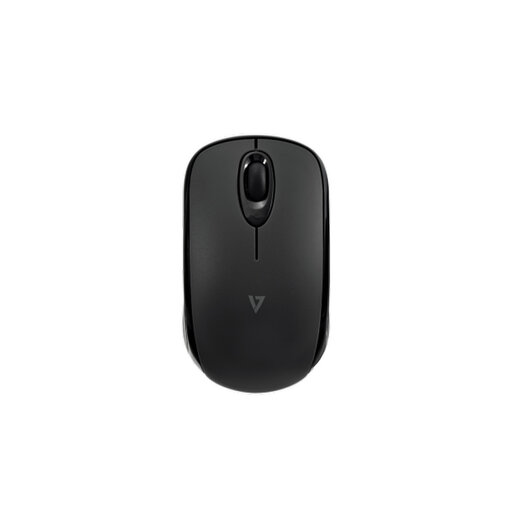
V7 MW150BT Compact Bluetooth 5.2 Mouse
- Why It Stands Out: With its compact size, dongle-free connection and impressive battery efficiency, the MW150BT is built for life on the move. It uses Bluetooth 5.2 Low Energy technology to provide a stable connection with a battery life of up to 24 months.
- Pros:
- Connects directly via Bluetooth, freeing up a USB port.
- Exceptional battery life of up to 24 months from two AAA batteries (included).
- Compact, pocket-sized ambidextrous design.
- Broad compatibility with Windows, macOS, iOS and Android devices.
- Who is it for?: Hybrid workers, frequent travellers and anyone who uses a laptop or tablet in multiple locations. It is an ideal travel mouse that combines convenience and reliability.
Looking for More Options?
While these selections cover some of the most common needs, your perfect PC mouse might have different features or a unique design. If you are looking for other specifications or styles, we invite you to explore our complete collection.
Discover our full range of mice accessories to find the perfect fit.
Frequently Asked Questions (FAQ)
What is a good DPI for an office mouse?
For general office work, such as navigating documents, spreadsheets and web pages, a DPI setting between 800 and 1600 is perfectly suitable. This range offers a good balance of speed and precision for most non-specialised tasks, ensuring smooth cursor movement without being overly sensitive.
Can I use a Bluetooth mouse with any laptop?
Most modern laptops are equipped with built-in Bluetooth, making them compatible with a Bluetooth mouse straight out of the box. This is a great advantage as it does not require a USB dongle, leaving your ports free for other devices. It is always a good idea to check your laptop's specifications to confirm it has Bluetooth capability.
Is a vertical mouse difficult to get used to?
There can be a brief adjustment period, usually lasting a few days, as your hand and arm muscles adapt to the "handshake" grip of a vertical mouse. However, many users find that once they are accustomed to the new posture, they experience a noticeable reduction in wrist and forearm strain, making the initial learning curve well worth it for long-term comfort.


