
24/7 Customer Support

Free returns

Same-day & Next-day Delivery

Quality Guaranteed

Unlock Your Welcome Offers: FREE Delivery | Up to 80% OFF | Free 30-day JoyPlus trial
Download the APP
Tired of appearing grainy and out-of-focus during important video calls? A built-in laptop camera often falls short, delivering poor video quality and muffled audio that can undermine a professional impression. Upgrading to a dedicated PC webcam is a straightforward way to enhance your on-screen presence, whether for work, study or connecting with others.
This guide is designed to help you navigate the key features to look for in a modern computer camera. We will explore what makes a great webcam and present a few carefully selected options to help you find the right fit for your needs and budget.
Selecting the right webcam involves more than just plugging it in. Consider these key factors to ensure you get the performance you need.
Resolution determines the clarity and detail of your video. While a basic HD webcam (720p) is a step up from many built-in cameras, Full HD (1080p) has become the standard for professional webcam for Zoom calls and meetings, offering a sharp and clear picture. For those who need the highest fidelity for streaming or recording, a 4K webcam provides exceptional detail and colour accuracy, though it requires more bandwidth. Look for features like low-light correction, which helps you look your best even in poorly lit rooms.
An autofocus webcam is essential for maintaining a sharp image as you move, preventing the frustrating blur that can happen with fixed-focus models. For the field of view (FOV), a narrower angle (around 65°-78°) is ideal for individual calls as it focuses on you without showing too much of your background. A wider FOV (90° or more) is better for capturing multiple people or showcasing a wider space, which is useful for a streaming webcam.
A good webcam with microphone can save you from needing a separate audio device. Many modern webcams feature built-in dual microphones with noise-reduction technology. This helps to minimise background sounds, ensuring your voice is transmitted clearly to your audience, whether you are in a busy office or a noisy home environment. A simple USB webcam connection makes setup effortless.
We have reviewed the specifications of numerous models to bring you our recommendations. These webcams stand out for their performance, features and overall value.
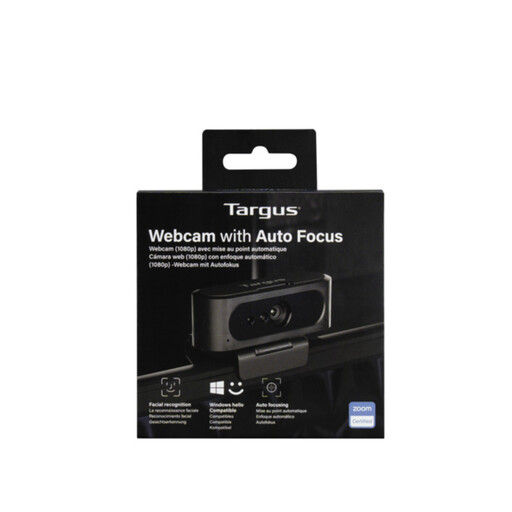
Why It Stands Out The Targus 2K Webcam is an excellent all-rounder that delivers a significant upgrade over standard laptop cameras. It combines high-quality video with user-friendly features, making it a reliable choice for daily professional use. Its auto-focus and lighting correction work together to ensure you always look clear and sharp.
Pros
Who is it for? This is an ideal webcam for laptop users, remote professionals and educators who need a dependable camera for daily video conferences on platforms like Zoom and Microsoft Teams.
View Details for Targus 2K Webcam
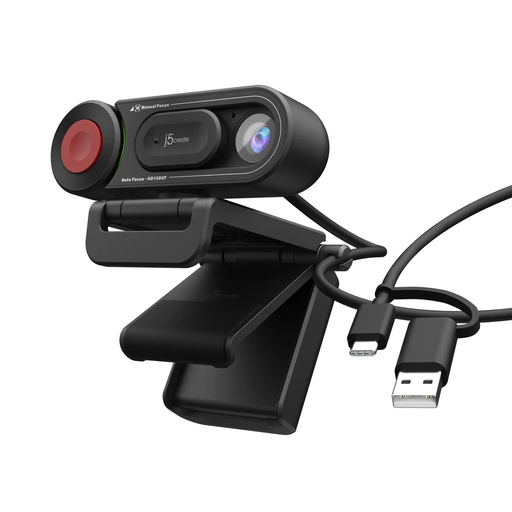
Why It Stands Out The j5create JVU250 offers fantastic flexibility with its unique dual-focus system. You can rely on the auto-focus for general use or switch to manual focus for precise control, which is perfect for product demonstrations or detailed work. It is a practical and affordable upgrade for everyday communication.
Pros
Who is it for? This webcam is well-suited for students, teachers and users who need a reliable camera for general video calls and appreciate the option of manual focus control for creative or instructional purposes.
View Details for j5create JVU250 HD Webcam
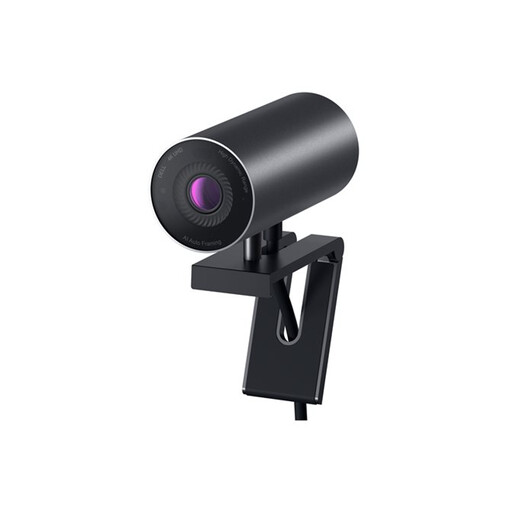
Why It Stands Out For those who demand superior image quality, the Dell WB7022 is a premium 4K webcam packed with intelligent features. It uses a large Sony STARVIS CMOS sensor and Digital Overlap HDR to deliver true-to-life colour and clarity, even in challenging lighting. The AI-powered auto-framing keeps you perfectly centred in the shot.
Pros
Who is it for? This is the ultimate streaming webcam for content creators, business leaders and anyone who needs to present themselves with the highest possible video quality.
View Details for DELL WB7022 - 4K Webcam
If these recommendations are not quite what you are looking for, we have a wider selection available. From affordable models to high-end streaming solutions, you are sure to find a camera that fits your setup.
Explore Our Full Range of USB Cameras for PC
Generally, yes. External webcams typically offer superior image sensors, resulting in higher resolution (e.g., 1080p or 4K vs. 720p), better performance in low light and more advanced features like autofocus. They also tend to have better quality built-in microphones.
For most professional video conferences on platforms like Zoom or Microsoft Teams, a 1080p (Full HD) webcam is more than sufficient and provides excellent quality. A 4K webcam is a great choice for content creators who record or stream video, as it offers much greater detail and flexibility in post-production.
Most modern webcams are designed to be "plug-and-play." You simply connect the USB webcam cable to an available USB port on your laptop or desktop computer. Your operating system should automatically recognise the device, and it will be available to select in your video conferencing or streaming software. No additional drivers are usually required.