
24/7 Customer Support

Free returns

Same-day & Next-day Delivery

Quality Guaranteed

Unlock Your Welcome Offers: FREE Delivery | Up to 80% OFF | Free 30-day JoyPlus trial
Download the APP
Upgrading your home lighting can feel like a complex task. You want the flexibility to change a room's atmosphere at a moment's notice—from a focused, cool white for working to a warm, cosy glow for relaxing—but the thought of complicated hubs, wiring and technical jargon can be off-putting. The good news is that creating a dynamic and responsive lighting environment is now more straightforward than ever.
A modern Philips smart light bulb offers a simple yet powerful solution. These app controlled lights connect directly to your home Wi-Fi, allowing you to transform your space with millions of colours and shades of white, all from your smartphone. This guide will walk you through the key considerations for choosing the right bulb and highlight some of our top recommendations to help you get started.
Before you choose, a few practical points can help ensure you select the perfect smart LED bulb for your needs.
In the UK, most light fixtures use one of three common fittings. Getting this right is the first step to a successful installation.
Early smart lighting systems required a central 'hub' or 'bridge' to connect the bulbs to your Wi-Fi network. While these systems are still available, many modern options offer a simpler setup. The Philips WiZ bulb range is a great example of a smart bulb no hub system. Each bulb contains its own Wi-Fi chip, allowing it to connect directly to your router. This simplifies installation and reduces clutter, making it an accessible entry point into home automation.
Consider how you plan to use your lights. A full colour changing light bulb offers millions of hues, perfect for creating themed ambiances, accentuating decor or setting dynamic scenes for parties and movie nights. However, if your main goal is functional lighting that adapts to your daily routine, a bulb offering an adjustable warm-to-cool white spectrum might be all you need. Many Philips smart bulbs offer both, giving you complete flexibility.
Here are a few standout options that cater to different needs and common UK household fittings.
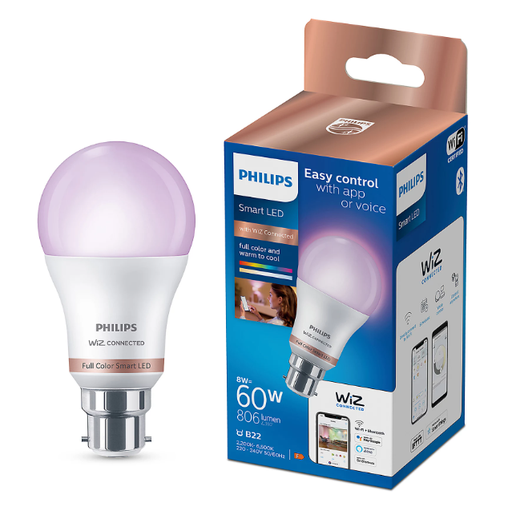
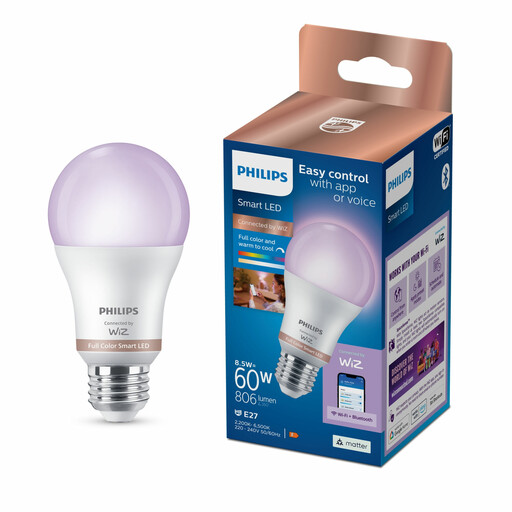

While a colour changing light bulb offers incredible versatility, sometimes all you need is a reliable, high-quality warm light. If you're interested in exploring energy-efficient bulbs that provide a classic, cosy ambiance, you may find what you're looking for in our broader collection.
? Explore our full range of Warm LEDs for more options.
Yes, the Philips smart bulbs that are 'WiZ Connected' do not require a separate hub or bridge. They have built-in Wi-Fi technology that allows them to connect directly to your home's Wi-Fi router, making setup simple and straightforward.
You control the bulb primarily through the free WiZ smartphone app, which is available for both iOS and Android devices. Once the bulb is connected to your Wi-Fi, the app allows you to turn it on or off, change the colour and brightness, set dynamic modes and create automated schedules from anywhere you have an internet connection.
You can use a smart bulb in most standard light fixtures, provided you match the fitting type (B22, E27, GU10 etc.) and do not exceed the fixture's maximum wattage rating. It is important to note that they should only be used in dry, indoor environments. For use in bathrooms or outdoors, the luminaire itself must have the appropriate IP (Ingress Protection) rating for damp conditions. Also, avoid using them in fully enclosed metal fixtures, which can interfere with the Wi-Fi signal.