
24/7 Customer Support

Free returns

Same-day & Next-day Delivery

Quality Guaranteed

Unlock Your Welcome Offers: FREE Delivery | Up to 80% OFF | Free 30-day JoyPlus trial
Download the APP
A Phomemo label maker can simplify stock control, parcel preparation, home organisation and creative projects. However, choosing the wrong printer or refill can quickly lead to wasted rolls, unclear barcodes and labels that do not fit the device.
Before buying, UK shoppers should look beyond the headline price and check three practical details: printer compatibility, label dimensions and the intended surface or purpose. A low-priced roll is not useful if it is the wrong width for your printer, while a compact Bluetooth printer may not suit someone who needs high-volume A4 address labels.
Phomemo label printers use different formats. M110 labels, M220 labels, D30 label tape and T02 sticker paper are not interchangeable simply because they come from the same product family.
Check the exact model before ordering. A roll designed for the M110 and M220 may not fit a D30 or T02 mini printer. Product listings should also be checked for roll width, label dimensions and whether the material is continuous or pre-cut.
A multi-roll pack may appear economical, but the number of labels per roll and the size of each label matter more than the roll count alone. A narrow label can be suitable for folders or small price tags but unsuitable for a parcel address or large product logo.
Compare:
Most compact Phomemo models use direct thermal printing, meaning they print without ink or toner. This keeps the printer compact and reduces the need for consumables beyond the labels themselves. However, thermal labels can be affected by unsuitable storage conditions, heat, moisture or prolonged exposure to strong light.
For important business records, buyers should consider where labels will be stored and whether a conventional inkjet or laser-printed sheet would be more appropriate.
The Phomemo M110 listed here connects by Bluetooth through the Print Master app and works with iOS and Android devices. Its app supports templates, batch printing, Excel data import, OCR, barcodes, QR codes and custom layouts.
This makes it practical for market traders, boutiques, home offices and mobile stock management. Before purchase, confirm that your phone or tablet uses a compatible operating system and that the app meets your workflow needs.
Label dimensions determine how much information can be printed clearly. For example:
Check the product dimensions against the available printing area in your app. A barcode should remain legible, while small text needs enough contrast and spacing.
For product labels and parcel labels, apply adhesive labels to a clean, dry surface. Paper, cardboard, plastic, glass, metal and wood can all behave differently depending on texture, dust and moisture.
If you need labels for chilled packaging, outdoor use or frequent handling, check the listing for material and adhesive information rather than assuming that every self-adhesive thermal paper product has the same durability.
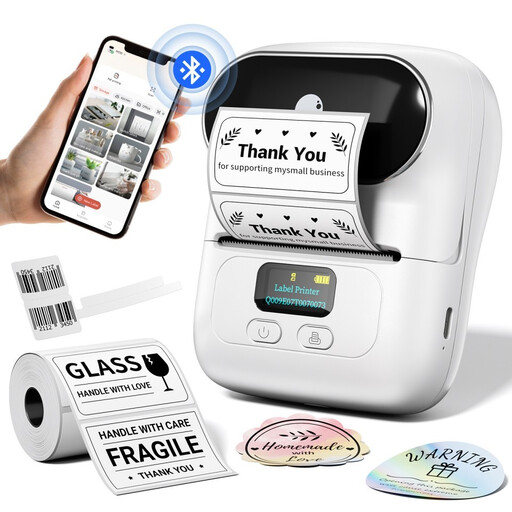
Why This Fits Their Persona: A compact Bluetooth printer with one label roll included, suitable for small shops, home offices, market stalls and occasional product labelling.
The supported label width is stated as 20mm to 50mm, helping buyers match the printer with appropriate refills before ordering.
Inkless printing, rechargeable battery, Bluetooth connectivity and app tools for barcodes, QR codes and batch printing.
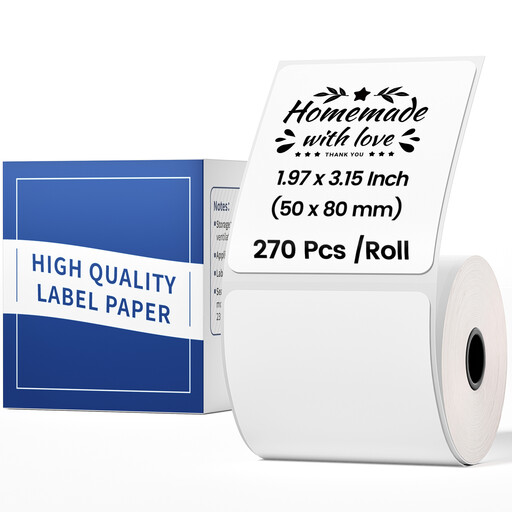
Why This Fits Their Persona: A larger white label format for sellers who want more room for product details, pricing, barcodes or package information.
The listing specifies compatibility with M110 and M220 printers and gives the exact 1.96 × 3.14-inch size.
Pre-sized labels for package, price and barcode uses; one roll contains 100 labels.
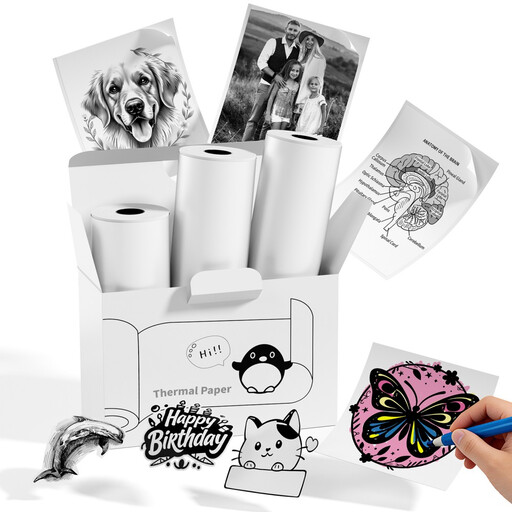
Why This Fits Their Persona: A three-roll refill for users making notes, photos, scrapbook pieces, study labels and repeated creative prints with compatible mini printers.
The listing clearly names compatible T02, Q02E, M02X and M02L printers, reducing the risk of buying an unsuitable refill.
50mm width, 3.5m length per roll and self-adhesive backing for flexible sticker and note-making tasks.
For users who already own a standard printer, A4 sheets can be more practical than a compact Bluetooth device. The Triplast A4 address labels provide 24 labels per sheet and are compatible with inkjet, laser and copier printers. Their matt finish is also suitable for handwriting, barcodes, name tags and product stickers.
For a round product or packaging design, the Phomemo 1.96 × 1.96-inch labels are listed for M110, M220 and PM241BT printers. For smaller barcode and price applications, the 1.57 × 1.18-inch M110/M220 labels contain 230 labels per roll. D30 owners should select the dedicated 0.55 × 1.57-inch Phomemo label tape, supplied as a three-roll pack.
We have compiled a complete, real-time list of products that fully satisfy these strict selection criteria and UK safety regulations.
It can be suitable for compact product labels, price tag labels, address labels and inventory barcodes, particularly where Bluetooth printing from a phone is convenient. Check the supported label width and app functions before purchase, especially if you need batch printing or spreadsheet imports.
Compatible thermal labels are designed for thermal printing, so a suitable Phomemo label printer does not require ink or toner. Keep unused rolls in a cool, dry place and follow the printer and label instructions for storage and handling.
Match the refill to the exact printer model first. Choose M110 or M220 labels for compatible M-series devices, D30 label tape for a D30 printer and T02 sticker paper for compatible T02, Q02E, M02X or M02L mini printers. Then select the dimensions and finish that match your intended use.