For one phone, choose a wired charger and cable after checking that phone’s connector, charging standard and supported rate; a higher wattage on the adapter alone does not establish faster charging. If several devices will share a socket, check a multi-port charger’s output when those devices are connected together. Choose wireless charging for a compatible phone and case when its convenience suits you, and check the exact model and seller for any mains-powered option.
Who needs a separate charging setup?
Single-phone wired-charging buyers
If a new phone needs a separate plug, start with its exact charging requirements. The connector, charger and cable all need to suit the intended setup; a wattage printed on the adapter is not the phone’s charging rate.
People sharing one mains socket
Charging a phone alongside a tablet or laptop calls for a closer look at a multi-port unit’s output with every intended device connected, not just its largest advertised output.
Wireless-charging users
A charging pad or stand may suit someone who values easy placement at a desk or bedside. Check the phone, case and charger against the relevant Qi or Qi2 requirements before choosing that route.
What should you check before buying?
Identify the phone’s requirements first, then decide whether the setup must serve other devices or support wireless charging. For a mains charger, make model and seller traceability part of that choice.
| Concern |
What to check |
Who this matters to |
| Wired compatibility and speed |
Check the exact phone model’s connector, supported charging protocol and maximum wired input against the charger’s output profiles and the cable’s capability. |
If I want my new phone to use its supported wired-charging rate, I need a matching setup rather than a larger number on the plug. Around 31% of consumers put phone-specific wired compatibility first. |
| Safety and traceability |
Identify the charger’s exact model and responsible business, inspect its documentation for the supply market, and search Office for Product Safety & Standards alerts and recalls. Great Britain and Northern Ireland have different conformity contexts. |
Before using a mains charger, I want to know which product and seller I am dealing with and whether that model has been flagged for a safety problem. Around 31% of consumers make traceability their primary concern. |
| Charging several devices |
Read the multi-port model’s output table for the ports you will use together, particularly if a laptop shares the charger with a phone. |
With a phone and another device sharing one socket, I need both to receive suitable power at the same time. For around 25% of consumers, simultaneous charging is the main priority. |
| Cable or wireless convenience |
For a cable, match its connectors and stated power capability to the setup. For wireless charging, check the phone and case against the charger’s Qi or Qi2 compatibility and confirm what powers the pad. |
For everyday charging, I want either a suitable cable that reaches where I use the phone or a wireless setup that works with its case. Around 13% of consumers put that connection convenience first. |
Charging mistakes to avoid
-
Choosing by USB-C shape or adapter wattage alone
USB-C does not establish which charging protocol a phone accepts, and the USB Implementers Forum notes that cables differ in capability. A higher-rated adapter alone does not establish a faster rate for the phone.
Use the exact phone model’s charging specification to match the adapter’s protocol and output with a suitable cable.
-
Treating a listing image or conformity mark as a complete safety check
The Office for Product Safety & Standards has published charger recalls involving electric-shock and fire risks. A visible mark alone cannot establish the condition or identity of a particular charger.
Check the model and responsible business, inspect the relevant product documentation and search official alerts and recalls. Confirm whether the product is being supplied in Great Britain or Northern Ireland before assessing its conformity information.
-
Reading a multi-port maximum as the output from every port
A charger may allocate power differently when a second device is connected, so its single-port figure need not describe the combination you intend to use.
Check the manufacturer’s output table for the exact ports and number of devices you plan to connect.
-
Buying a wireless charger before checking the phone and case
Qi or Qi2 compatibility and a stated charging output depend on the particular phone, charger and sometimes the case; magnetic attachment alone does not settle those questions.
Check the phone’s wireless specification, the charger’s exact compatibility information and the contents of the box.
Some setups may need a compatible case or a separate power supply, so confirm those requirements before ordering.
Brands to consider by charging need
Apple
An Apple-branded, single-port USB-C adapter is an option when its specification matches the exact device and cable.
- Apple lists a 20W USB-C Power Adapter for specified Apple devices.
- That product description does not establish 20W as the correct or maximum rate for every iPhone, iPad or other phone.
Samsung
Samsung lists wired adapters and Qi2 wireless products for compatible Galaxy setups.
- Samsung says Super Fast Charging 2.0 with its 45W adapter requires a USB Power Delivery 3.0-compatible device supporting Direct Charging.
- Check the exact Galaxy model and cable; Qi2 product compatibility may also depend on the phone and a suitable case.
Anker
Anker’s range includes multi-port USB-C chargers for people connecting a phone alongside other devices.
- Anker describes a 140W four-port model intended to charge four devices simultaneously.
- Check the chosen model’s shared-output allocation, protocol support and included cable rather than applying a range-wide claim to it.
Belkin
Belkin lists Qi2 wireless chargers and multi-device stations for compatible phones and accessories.
- Belkin specifies a 45W USB-C power supply for one of its 2-in-1 Qi2 units.
- Its wireless output claims have model-specific device conditions; confirm the phone and case before relying on a stated maximum.
Joybuy charger, cable and wireless options
These options cover single-port wired chargers, USB-C-to-USB-C cables and a two-device wireless base. Choose the type of setup first, then check the exact phone and any other device against the product’s requirements.
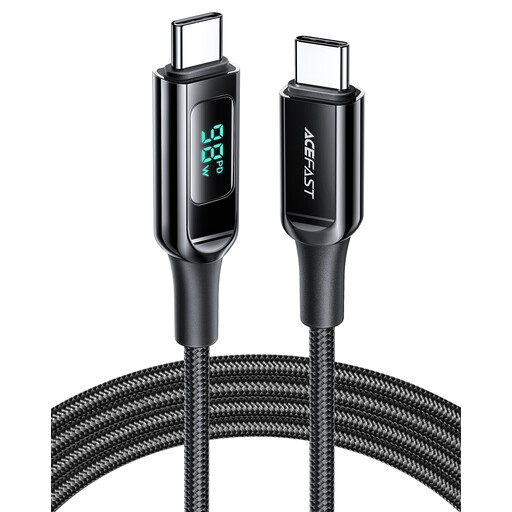 Image unavailable
ACEFAST 100W USB-C to USB-C Cable, 1.2 m, Black
A cable option for a phone and charger with matching USB-C connections. The listing states a 1.2 m length and 100W rating; check the cable’s supporting documentation before relying on that rating.
View on Joybuy
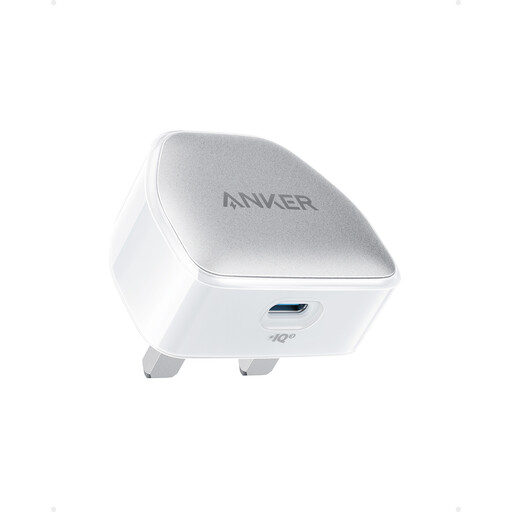 Image unavailable
Anker Nano Pro 20W USB-C Charger, White
A single-port wired option for a phone whose requirements match this charger. Check the phone’s supported charging standard and the charger’s plug and documentation for the intended supply market; the stated 20W does not establish the phone’s charging rate.
View on Joybuy
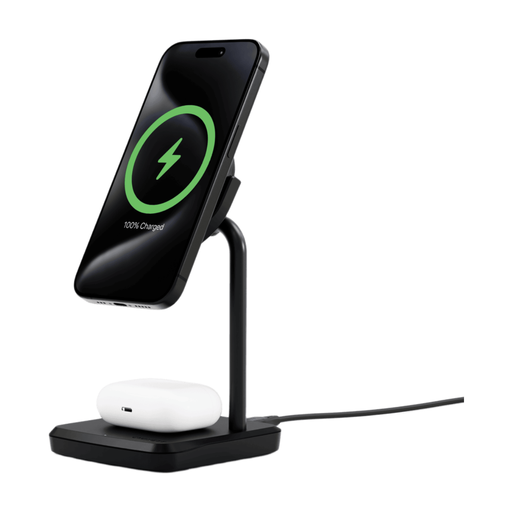 Image unavailable
Cygnett Qi2.0 2-in-1 Wireless Charging Base, Black (International)
A two-device wireless option if the phone, case and second device suit its charging positions. Check the exact devices’ compatibility, the applicable wireless output and whether a suitable power adapter is included or needed separately.
View on Joybuy
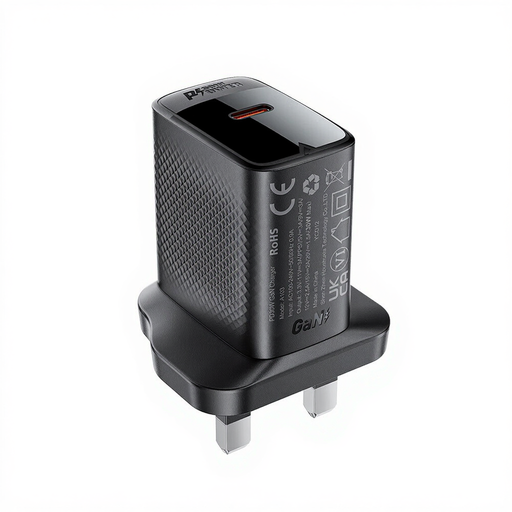 Image unavailable
ACEFAST PD30W GaN USB-C Charger, Black
A single-port wired option to assess against the phone’s charging requirements. The listing states a 30W output; check its supported protocols and model documentation rather than using that figure or a listing mark alone to judge compatibility or safety.
View on Joybuy
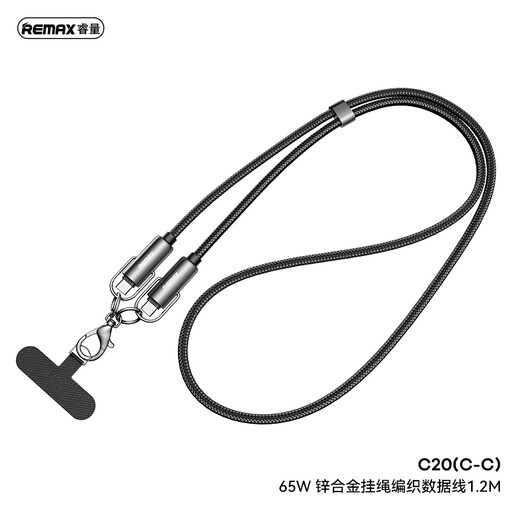 Image unavailable
REMAX 65W USB-C to USB-C Braided Data Cable, 1.2 m, Black
A USB-C-to-USB-C cable option for a matching charger and device. The listing states a 1.2 m length and 65W rating; check documentation for that capability and confirm it meets the intended charging setup’s requirements.
View on Joybuy
Frequently asked questions
Will a higher-wattage USB-C charger make my phone charge faster?
Not necessarily: the phone’s supported standard and input, the charger’s output profiles and the cable all matter. USB Power Delivery is designed to negotiate power between compatible equipment, but the adapter’s maximum alone does not establish the rate for a particular phone.
Does a USB-C connector guarantee fast charging?
No. The USB Implementers Forum notes that cables have different capabilities; check the phone’s requirements, charger protocol and cable power capability together.
Is a Qi or Qi2 logo useful when choosing a wireless charger?
Yes, when the certification claim is genuine: the Wireless Power Consortium says only Qi Certified products may display its Qi or Qi2 logo. You still need to check the phone, case and exact charger for compatibility and for any claimed charging output.
How can I check whether a charger has been recalled?
Search the Office for Product Safety & Standards Product Safety Alerts, Reports and Recalls service using the charger’s exact brand and model. Its notices include charger-specific electrical hazards, so keep the model details available when assessing a purchase or a charger you already use.


