
24/7 Customer Support

Free returns

Same-day & Next-day Delivery

Quality Guaranteed
Download the APP
Categories
As a Joybuy Product Recommendation Officer, my role is to help you navigate the crowded market of tech accessories. If you're a content creator, vlogger or simply someone who wants to capture smoother, more professional-looking videos with your smartphone, you've likely encountered the frustration of shaky footage. A phone gimbal stabiliser is designed to solve this exact problem, transforming wobbly clips into cinematic shots.
This guide is designed to cut through the clutter. We will explore the key features to look for in a modern gimbal and present a couple of our top recommendations for 2026 to help you make an informed choice.
Before diving into specific models, it's helpful to understand what sets a great gimbal apart. Consider these factors during your research.
The core function of any gimbal is to counteract unwanted movement. You will find that most high-quality options on the market today are a 3-axis smartphone gimbal. This means they stabilise movement across three axes: tilt (up and down), pan (left and right) and roll (rotational). This comprehensive stabilisation is what produces the signature smooth, floating-camera effect, making it a crucial feature for any serious stabiliser for video recording.
For vloggers and travellers, convenience is paramount. A good travel gimbal should be lightweight, foldable and easy to pack. Modern designs often integrate accessories that once had to be purchased separately. Look for a gimbal with a tripod base built into the handle or a built-in extension rod. These features add immense versatility, allowing you to set up a static shot or capture wide-angle selfies without carrying extra gear.
A gimbal's hardware is only half the story. The companion software is what unlocks its advanced capabilities. A gimbal with tracking is particularly valuable for solo creators, as it can automatically keep you or a subject in the frame while moving. Check for features like one-tap editing templates, gesture controls and seamless connectivity with your phone, whether you're using a gimbal for iPhone or a gimbal for Android.
Based on a combination of features, user-friendliness and versatility, here are our standout recommendations for anyone looking to purchase a phone gimbal stabiliser this year.
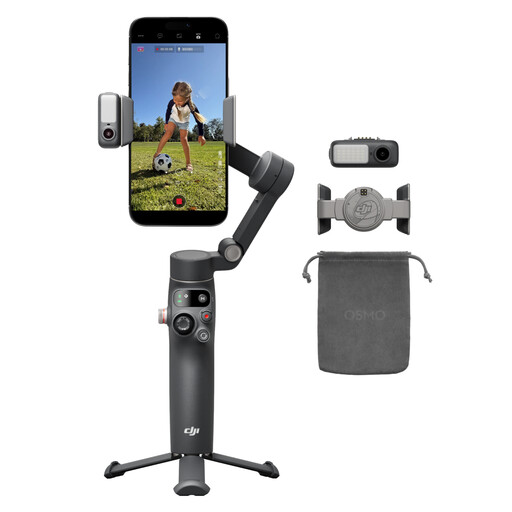
Why It Stands Out
The Osmo Mobile 8 is notable for its all-in-one approach to mobile content creation. Its Multifunctional Module integrates native tracking with audio reception and a fill light. This combination means you can achieve a well-lit, sharply focused shot with clear audio without attaching multiple accessories. The ability to perform a seamless 360° pan rotation while tracking a subject offers significant creative potential for dynamic, immersive shots.
Pros
Who is it for? This model is well-suited for the dedicated vlogging gimbal user, live streamer or content creator who requires a comprehensive and reliable tool for daily on-the-go production. Its integrated features streamline the filming process, making it a powerful choice for those who value efficiency and quality.
View Details for DJI Osmo Mobile 8
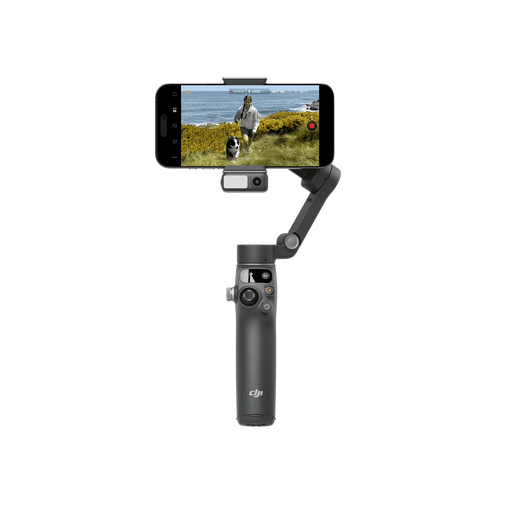
Why It Stands Out
The Osmo Mobile 7P is engineered for speed and simplicity. A key feature is its Quick Launch capability; unfolding the gimbal automatically powers it on and the magnetic clamp design can trigger the companion app to open on a paired smartphone. This removes friction from the creative process, allowing you to go from idea to filming in seconds. It also includes the versatile Multifunctional Module for intelligent tracking and a built-in extension rod and tripod.
Pros
Who is it for? This gimbal is an excellent option for aspiring creators and anyone who values a fast, intuitive user experience. If you want to capture spontaneous moments, family events or travel highlights without a complicated setup, the Osmo Mobile 7P's focus on ease of use makes it a compelling choice.
View Details for DJI Osmo Mobile 7P
While a gimbal is perfect for dynamic shots, sometimes a traditional, static support is what you need. If you're looking for more ways to keep your camera steady, from lightweight travel tripods to heavy-duty studio stands, you can explore our full range of support gear.
Explore Our Camera Tripod Collection
A 3-axis gimbal provides comprehensive stabilisation by correcting for shakes and jitters on the tilt, pan and roll axes. This results in exceptionally smooth, professional-quality video that is difficult to achieve by hand, even with in-phone image stabilisation. It allows you to walk, run or move the camera dynamically while the footage remains steady.
While you can often use a gimbal for basic stabilisation with your phone's native camera app, using the manufacturer's dedicated app is highly recommended. The app is what unlocks the gimbal's advanced features, such as intelligent subject tracking, dolly zoom effects, time-lapses and one-tap editing templates. For the DJI models mentioned, the DJI Mimo app is required to access their full potential.
Many modern phone gimbals, including the models recommended above, are designed with a small, foldable tripod integrated directly into the base of the handle. This allows you to quickly set the gimbal down on a flat surface for stable static shots, time-lapses or for filming yourself without needing to hold it. This dual functionality makes it a highly versatile tool for content creation.