
24/7 Customer Support

Free returns

Same-day & Next-day Delivery

Quality Guaranteed

Unlock Your Welcome Offers: FREE Delivery | Up to 80% OFF | Free 30-day JoyPlus trial
Download the APP
A phone mount can make navigation, video calls, filming and hands-free viewing more convenient, but the wrong design may become frustrating quickly. A mount that slips on a dashboard, blocks an air vent or struggles with a phone case can waste money even when its product listing sounds impressive.
Before buying, look beyond phrases such as “universal”, “strong grip” or “360-degree adjustment”. The practical details—mounting surface, device dimensions, locking method and charging compatibility—usually determine whether a holder works reliably in a UK car, home office or outdoor setting.
Most phone mounts support a range of screen sizes, but compatibility can be affected by the phone’s thickness, camera bump and protective case. For example, a motorcycle phone mount may accept devices between 4.7 and 7 inches while still excluding larger models when a thick case is fitted.
Magnetic designs also require either a phone with built-in magnetic attachment or a compatible magnetic disc. Check whether the disc can be fitted without interfering with wireless charging, NFC functions or the phone case.
A 360-degree phone mount may offer plenty of angle adjustment, but each extra joint can introduce movement if the locking mechanism is weak. A car phone mount should have a firm base, secure clamp or locking suction system, particularly on uneven roads.
For cycling and motorcycling, vibration resistance matters more than a long list of viewing angles. Check for a safety lock, padded contact points and a mounting base suited to the handlebar diameter.
A wireless charging phone mount is only useful if the phone supports the relevant charging standard and the charging coil lines up correctly. Thick cases, metal plates and misalignment can interrupt charging. In a vehicle, also consider whether the mount leaves enough room for the charging cable and does not obstruct the driver’s view.
Choose the mounting style around where you will actually use it:
Compare the product’s stated size range with your phone and case together. The Oxerbog motorcycle model, for example, specifies support for phones from 4.7 to 7 inches and cases below 12 mm thick. That is more useful than simply seeing the word “universal”.
For a projector phone holder or camera accessory, also check the supported thread size and the weight of the attached equipment. Never assume that a phone clip designed for a smartphone can safely hold a camera, projector or lighting unit.
A useful holder should be easy to position but difficult to move accidentally. Look for:
Clean suction and adhesive surfaces before installation, and allow the mount to settle if the instructions require it. For wall-mounted accessories, select fixings appropriate to the wall material rather than relying only on the supplied hardware.
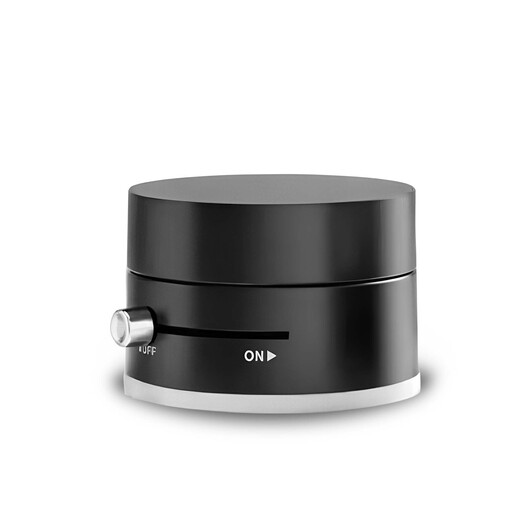
Why This Fits Their Persona: A practical option for drivers, renters and office users who want one compact holder for smooth dashboards, desks or other hard surfaces.
It specifies smooth-surface installation, includes an on/off vacuum switch and explains that non-magnetic phones need a magnetic insert.
Foldable design, 360-degree adjustment and a compact 5.9 cm diameter base.
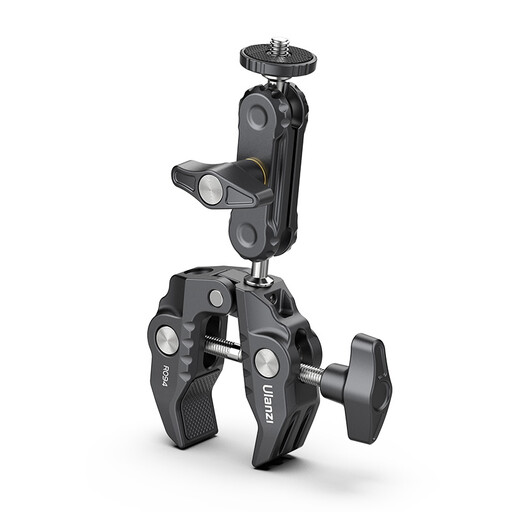
Why This Fits Their Persona: Suitable for content creators and home studio users who need flexible positioning on a desk, pole, tripod or light stand.
The instructions emphasise tightening the clamp and locking knobs before use, rather than relying on adjustment alone.
Includes a phone holder, 360-degree ballhead and 1/4-inch and 3/8-inch thread options.
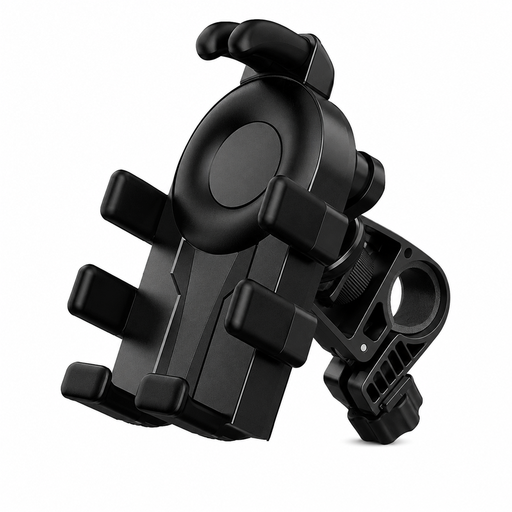
Why This Fits Their Persona: Designed for motorcycle, bicycle, scooter and ATV riders who need a handlebar-mounted phone holder for regular outdoor journeys.
It lists the supported phone range, case thickness limit, silicone padding, spring mechanism and safety-lock design.
Supports 360-degree viewing adjustment and is specified for handlebars across motorcycles, bicycles, scooters and ATVs.
No. The phone or case must support magnetic attachment, or you may need an adhesive magnetic disc. Metal plates and thick cases can reduce magnetic strength and may affect wireless charging alignment. Check the holder’s compatibility information before installation.
Lifespan depends on heat, sunlight, vibration, cleaning and repeated adjustment. A dashboard or suction design may deteriorate faster when exposed to high temperatures. Regularly inspect the base, hinge and locking parts, particularly before long journeys.