Drivers with restrictive vents or dashboards
Choose the mounting surface first. Vent clips depend on vent geometry, while dashboard, windscreen and vehicle-specific brackets each have different fit and placement conditions.


Choose the mounting location before choosing the attachment: a vehicle-specific bracket can suit a known car layout, while vent, dashboard and windscreen mounts depend on the available surface and sightline. Clamp mounts are the broader option for phones and cases, while magnetic charging mounts need compatible phone, case and power arrangements.
Choose the mounting surface first. Vent clips depend on vent geometry, while dashboard, windscreen and vehicle-specific brackets each have different fit and placement conditions.
Check whether a clamp can hold the phone and case, or whether a magnetic mount needs a compatible case or magnetic ring. Magnetic attachment is not universally compatible.
Match the mount to your phone's wired or Qi/Qi2 charging method, then confirm the cable and in-car power adapter required for the chosen setup.
Start with a position that leaves the road view and vehicle controls clear, then check the attachment method, phone fit and charging arrangement.
| Priority | What to check | Your needs |
|---|---|---|
| Clear, hands-free placement | Check the phone does not block the road and traffic ahead; make sure the position does not interfere with controls; set the display before moving. | I need navigation visible without holding the phone or losing control of the vehicle. GOV.UK says the device must not obstruct the road view and the driver must remain in full control. |
| Mounting-surface fit | Compare vent slat shape, direction, thickness and depth; check whether a suction base needs a smooth, flat surface; match vehicle-specific brackets to the exact car application. | My vehicle layout determines whether a vent clip, suction mount or fixed bracket is practical. |
| Phone and case fit | Check clamp dimensions including the case; confirm MagSafe or Qi2 compatibility for magnetic mounting; keep any metal ring or plate away from the wireless charging coil. | I want the phone to stay attached with its everyday case fitted, without compromising wireless charging. |
| Charging setup | Confirm the phone's charging standard, stated mount output, cable connection and car adapter requirements; look for Qi or Qi2 certification where applicable. | I use power-hungry navigation and need to know whether the mount and vehicle power setup can support charging on journeys. |
A mount may hold the phone securely but still be unsuitable if its position blocks the road view, vehicle controls or requires adjustment while moving.
From the driving seat, identify a location that leaves the road and traffic view clear, then choose a mount that works with that location.
Vent slat geometry and strength vary. Circular, small or unusually shaped vents may not support a typical clip securely.
Compare the vent shape, slat direction, thickness and depth with the exact mount specification. Consider dashboard, suction or vehicle-specific mounting when the vent is unsuitable.
A phone may need a compatible case or ring for magnetic attachment, and a metal plate near the wireless charging coil can prevent charging.
Confirm the phone model, case thickness, magnetic system, wireless standard, coil clearance, stated charging output and required power hardware separately.
Depending on the setup, you may need a compatible case, magnetic ring, cable or car adapter.
A cradle does not remove the requirement to remain in full control of the vehicle. A hands-free setup can still become distracting.
Set navigation and audio before moving, use voice guidance where suitable, and stop safely for changes that require attention.
Vehicle-specific ProClip platforms and holders for cars, vans and HGVs, relevant when a generic vent, windscreen or adhesive mount does not suit a vehicle layout.
MagSafe- and Qi2-oriented vent and charging mounts for compatible iPhones, Qi2 phones and magnetic cases.
Clamp, vent and suction-mounted holders for drivers needing adjustable fit for larger phones, cases or non-magnetic devices.
A range covering dashboard, vent, magnetic and charging formats, including some Tesla-oriented designs.
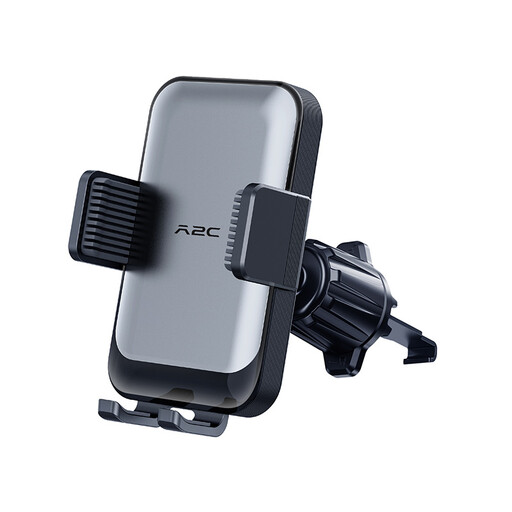
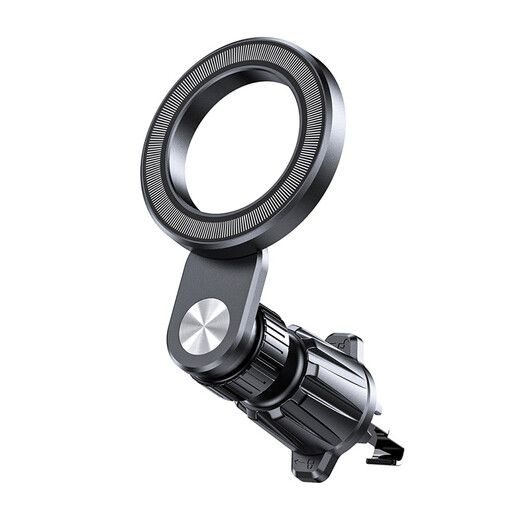
Joybuy product options for vent-mounted phone navigation, including a clamp holder and a magnetic holder.
 No image available
A clamp-style choice for compatible standard vent louvres and phones with thicker cases.
Stated dual locking, automatic clamping and an adjustable support foot fit phones from 4.7–6.9 inches, including thick and battery cases. It is not compatible with circular, oval or recessed hidden-style vents; charging capability is not specified. Check the installed position from the driving seat.
 No image available
A compact magnetic option for drivers already using a MagSafe-compatible phone, case or suitable metal ring.
It states N52 magnets, a dual-lock vent clip and 360° rotation. Confirm the vent can accept the clip and check the exact phone-and-case arrangement; Qi/Qi2 certification, charging function and charging power are not specified.
Yes, a dashboard holder, mat or windscreen mount can provide hands-free access if you do not hold the device. GOV.UK says the device must not block your view of the road and traffic ahead, and you must remain in full control of the vehicle.
No. GOV.UK lists a windscreen mount as a hands-free example, but the placement is not acceptable if it blocks the road and traffic view or affects proper control of the vehicle.
Check the vent's slat orientation, thickness, depth and firmness against the mount specification. For its WIC002 model, Belkin specifies slats up to 3 mm thick and 20 mm deep, with straight horizontal slats working best; PCMag UK notes that circular or small vents may not fit vent mounts.
Only when the phone or case is compatible with the mount's magnetic system. Check any ring or plate placement carefully, as metal near a wireless charging coil can interfere with charging.
Confirm your phone's charging standard, the mount's stated maximum output, the cable connection and whether a suitable car adapter is included. The Wireless Power Consortium states that only certified products may display the Qi or Qi2 logo; Qi2 uses magnetic alignment and supports up to 15 W for compatible Qi2 devices.