What matters when choosing?
Check the fitted position first, then the fixing method, available power and phone-case compatibility.
| Concern |
Buying check |
Who this matters to |
| Forward visibility |
Test the phone and mount from your normal driving position. For a windscreen fitting, check the applicable Zone A and Zone B obstruction limits in Driver and Vehicle Standards Agency guidance. |
If the windscreen or dashboard leaves little clear space, I need to settle on a position before buying a mount. About 31% of consumers put an unobstructed mounting position first. |
| Vehicle and phone fit |
Check the vehicle fixing point and the holder's stated fit for the phone with its case attached; vehicle-specific systems also need the correct car selection. |
When my vent or dashboard has an unusual shape, I need a fitting method that works with that particular car and phone. For about 25% of consumers, secure fit is the primary concern. |
| Power during navigation |
Confirm the phone's supported charging method, the vehicle power source and the correct cable or wireless charger. Check whether the chosen position exposes the phone to sustained sun. |
On a longer journey, I need charging that can support navigation rather than relying on an unsuitable vehicle port. Keeping the phone powered comes first for about 25% of consumers. |
| Magnetic compatibility |
Check the exact phone and case against the mounting system, and confirm any proprietary case requirement or stated wireless charging compatibility. |
If I want magnetic attachment, my existing case may determine which system I can use. About 19% of consumers make phone-and-case compatibility their main concern. |
Joybuy air-vent mount options
These two air-vent holders offer clamping and magnetic mounting respectively. Check that your vent accepts the fitting and arrange compatible charging separately if navigation needs continuous power.
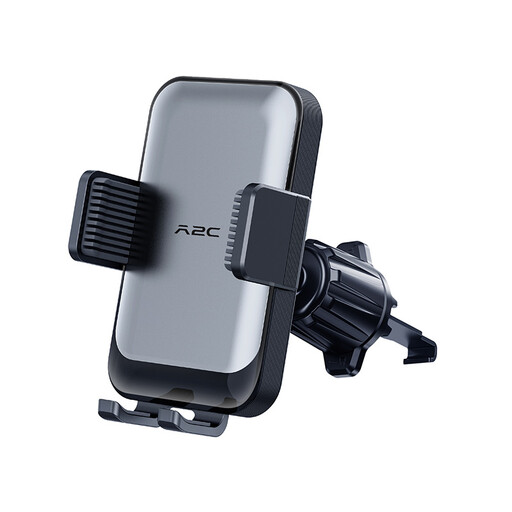 Image unavailable
A2C I02-S02 air-vent phone holder
Consider this holder if you prefer automatic phone clamping and your vehicle has a vent that accepts the clip. The product name specifies dual locking; check the vent shape, phone fit and final position before use. Confirm what charging equipment you need for longer navigation trips.
View on Joybuy
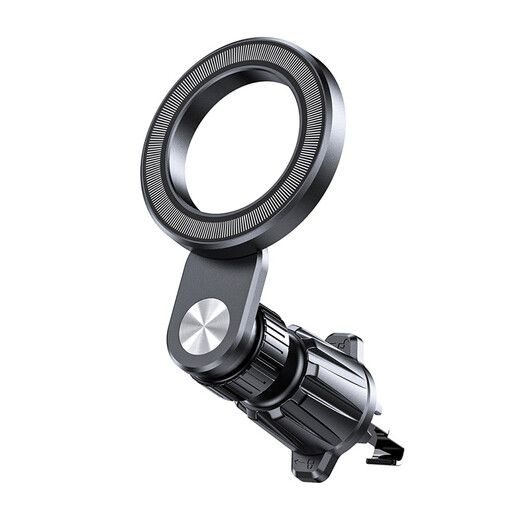 Image unavailable
A2C M10M-AV6S magnetic air-vent phone holder
Consider this holder if you want magnetic attachment and can confirm that your phone or case and vehicle vent fit the mounting setup. Its product name specifies N52 magnets, dual locking and 360° rotation. Check charging equipment separately rather than assuming the magnetic holder charges the phone.
View on Joybuy
Common questions
Can I use a phone holder for navigation while driving in the UK?
Yes, GOV.UK allows hands-free access through arrangements including a dashboard holder or windscreen mount. You must not hold and use the phone while driving, the device must not block the road and traffic ahead, and you must remain in full control of the vehicle.
Where can I position a windscreen phone mount?
Choose a position that preserves your view from the normal driving seat. Driver and Vehicle Standards Agency guidance says obstructions must not encroach more than 10 mm into Zone A, the 290 mm-wide area aligned with the steering wheel, or more than 40 mm into Zone B, the rest of the swept windscreen area. Check the zones on your particular vehicle with the phone fitted.
Will a wireless mount keep my phone charged during navigation?
That cannot be determined from the mount's advertised output alone. Check the phone and case compatibility, wireless charger and vehicle power supply; Apple Support also notes that iPhone charging can slow or pause when the device becomes too hot or cold.
Do I need a particular case for a magnetic mount?
Check the requirement for the exact system: magnetic mounts do not all use the same phone-and-case interface. For example, Quad Lock specifies a Quad Lock MAG Case for its MAG Wireless Charging Head.
What if my phone gets hot while charging in the car?
Move it out of sustained direct sunlight where you can do so without compromising visibility or control, and reassess the mounting position when safely parked. Apple Support says iPhone charging may slow or pause when the device is too hot or cold, whether charging by cable or wirelessly.


