People keeping a large photo library
If you plan to keep many photos and videos, check the usable space at the destination and make sure you can inspect a copy after moving devices.


Choose backup storage according to the files you need to keep, your internet access and the devices that must read or restore the copy. The UK National Cyber Security Centre advises making and checking a backup before handing over a device; a cloud photo library may not be an independent archive, as Apple says iCloud Photos deletions sync across devices and those photos are not duplicated in iCloud Backup. Check that your files and account access work on the destination before erasing the old phone.
If you plan to keep many photos and videos, check the usable space at the destination and make sure you can inspect a copy after moving devices.
Choose a route that fits your connection, phone ports and receiving devices. A connector that fits does not by itself confirm that the phone or software supports the transfer.
Check that wanted data and account access are available elsewhere before erasing the old device. The UK National Cyber Security Centre advises backing up personal data before handover.
List the files you need to keep, then choose a cloud, computer or compatible local-storage route that can hold them. The UK National Cyber Security Centre advises completing and checking the backup before erasing personal data with the device’s built-in procedure and handing it over.
| Concern | What to check when buying | Who this matters to |
|---|---|---|
| Enough space for photos and videos | Compare the files you intend to keep with usable cloud, computer or drive space, allowing for other files already using it. | I need room for the photos and videos I plan to retain. Around 30% of consumers put capacity first. |
| A copy you can recover | Check that the backup has finished and open sample files from the destination before erasing the phone. | I want to know that important files can be opened or restored without relying on the old phone. Around 30% of consumers prioritise recoverability. |
| Backing up with limited internet | Check local storage capacity, the connection and file-system requirements, and whether a phone-connected drive needs extra power. | If my connection is limited, I need a local copy I can access without uploading the whole library first. Around 20% of consumers prioritise offline access. |
| Compatibility across devices | Check the exact connector, supported file system and whether the receiving phone or computer can read the copy or restore the backup. | I need the copy to work across the particular phones and computers I use. Around 10% of consumers put device compatibility first. |
| Keeping account access | Check your sign-in details, recovery methods and authenticator restore requirements before the old phone is erased. | I need to keep access to my accounts while changing phones, including any authentication steps. Around 10% of consumers prioritise account continuity. |
Apple says iCloud Photos deletions sync across devices, and photos in iCloud Photos are not duplicated in iCloud Backup. A synced library alone may not give you a separate copy of wanted images.
Open a separate, readable copy of important photos before deleting anything or erasing the phone.
Phone support can depend on the exact device, drive format, power and connection. Samsung rates the T7’s speeds under specified host and cable conditions.
Check your phone model, drive format, power needs and computer connection against the exact drive before buying.
A compatible adapter or powered hub may be needed for some setups, or you may need to use a different transfer route.
A transfer moves data to another device but does not, by itself, establish a durable, independent copy. Apple’s temporary iCloud transfer storage has eligibility and restoration conditions.
Check the restored files on the new phone, then choose an ongoing backup destination if you need a separate copy.
Some authentication methods may need to be registered again after a device change. Microsoft says Authenticator backups from an iOS device cannot be restored to Android.
Test sign-in and the relevant recovery or authentication methods while the old phone is still available.
You may need time to recover or re-register accounts if their access methods are not ready.
Apple offers iCloud Photos, iCloud Backup, computer backups and supported iPhone-to-iPhone transfer for different parts of a device move.
Google Photos and Android account backup provide cloud-based photo access and restoration options for supported Android devices.
Samsung Smart Switch offers transfer and computer-backup routes for Galaxy devices, while the T7 is a separate portable SSD option for local files.
SanDisk’s phone-oriented USB drives include different connector combinations for copying files between compatible devices.
Seagate Expansion Portable hard drives are a computer-oriented local-storage route for exported phone files or computer backups.
These options focus on local copies: portable SSDs and hard drives for larger collections, plus a dual-connector flash drive for selected files. Check that your phone, computer and connector support the intended use before relying on a direct connection.
 Image unavailable
Consider this portable SSD for a local copy of a large file collection when your computer or device supports the connection.
4 TB capacity; USB Type-C; USB 3.2 Gen 2 (3.1 Gen 2).
 Image unavailable
This is a portable SSD option for keeping a local copy of selected files, provided the devices you use support it.
1 TB capacity; USB 3.2 Gen 2; USB-C.
 Image unavailable
Consider this computer-connected drive for a local copy of a large collection when you have a compatible computer.
4 TB capacity; USB 3.0.
The listing describes computer connection; reformatting may be required for Mac or other operating systems.
 Image unavailable
This local-storage option is listed for use with specified USB-C devices; check compatibility with your exact phone before choosing it.
1 TB capacity; USB 3.2 Gen 2x2; USB-C; Model LPS2000M-3.
The listing states compatibility with iPhone 15 series and newer models, and not with iPhone 14 or earlier.
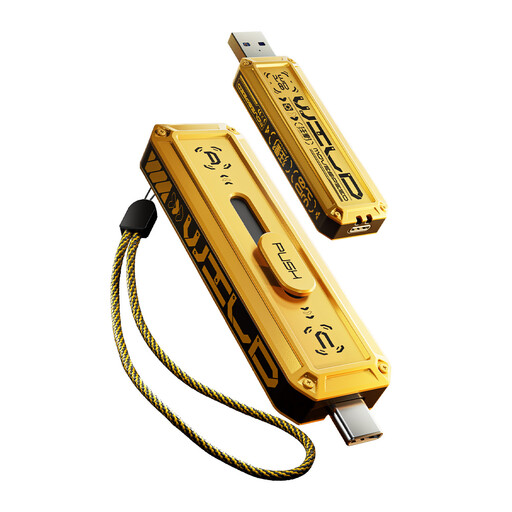 Image unavailable
Consider a dual-connector flash drive for selected files when the phone and receiving device support the intended transfer.
1 TB capacity; USB-A and Type-C interfaces; Model YSUWD10-1TSY.
Wait for the backup or transfer to finish, then open representative photos, videos and documents from the destination and confirm that you can sign in or restore what you need. The UK National Cyber Security Centre advises checking account verification on another device before erasure.
No. Apple says deleting a photo or video on one device using iCloud Photos also deletes it on other devices using that service. Do not manually delete wanted synced photos as a clean-up method; confirm your copies and follow the device handover procedure.
No. Apple specifies supported formats and a single data partition for external storage, says a suitable connector or adapter may be needed, and notes that external hard drives often require extra power.
Do not assume it will. Microsoft says Authenticator backups made on iOS cannot be restored to Android, and some account types need to be signed in and registered again. Check each authentication method while the old phone still works.
Not necessarily. Apple says iCloud Photos syncs changes, including deletions, and its photos are not duplicated in iCloud Backup. If you need a separate copy, check that another destination contains files you can open.