What matters when choosing storage?
Dual-connector flash drive
Choose it when: You occasionally move photos directly between a phone and a computer with different USB ports.
Trade-off: The matching plugs are useful only if the phone can access the drive, and this need not be your sole backup copy.
Portable SSD
Choose it when: You regularly move large photo libraries or video files between compatible devices.
Trade-off: Direct phone access and transfer speed depend on the host, cable, format and, sometimes, power.
External hard drive
Choose it when: You mainly maintain an archive through a computer rather than carrying storage for direct phone transfers.
Trade-off: Apple Support notes that external hard drives often need external power when connected to an iPhone.
Phone-compatible backup drive
Choose it when: Its stated connector, app or Files workflow, format and supported phone models match your device.
Trade-off: A phone-compatibility label does not establish that the drive works with every iPhone or Android phone.
Computer-assisted backup
Choose it when: Direct phone-to-drive access is uncertain or you want to inspect and organise files before archiving.
Trade-off: You need a computer and an extra transfer step, using a data-capable cable and the appropriate phone transfer mode.
Across these routes, check that the connection works before choosing capacity; then decide how you will verify and retain the copies you make.
| Concern | What to check | Who this matters to |
|---|
| Phone compatibility |
Check the exact phone’s port and storage-access workflow, then confirm the drive’s format and any adapter or power requirement. Apple Support specifies a single data partition and a supported file system for direct iPhone storage access. |
I want to copy photos without opening a computer, so I need to know the drive will connect and appear on my phone. Around 42% of consumers would put that compatibility need first. |
| Capacity and transfer |
Allow for the size of your current library and future files; compare quoted speeds only against the modes supported by your devices and cable. |
With large photo or video folders to move repeatedly, I want enough room and a workable transfer routine. Consumers putting capacity and practical transfer performance first account for around 33%. |
| Backup resilience |
Open copied photos and videos before deleting originals, and keep a separate copy disconnected when not in use, as advised by the National Cyber Security Centre. |
For photos I cannot replace, I care most about being able to recover them if one device or copy is lost. That is the primary need for around 25% of consumers. |
Our top recommendations on Joybuy
These portable SSDs and the dual-connector flash drive offer options for local photo and video transfers. Choose a direct-phone workflow only after checking it against your phone; the same drive may instead be useful in a computer-assisted backup.
 No image available
Samsung Portable SSD T7, 2 TB, grey
Consider this portable SSD for a larger local photo library if its connection works with your intended phone or computer.
The named variant has 2 TB capacity and USB 3.2 Gen 2. Confirm your phone’s storage access and drive-format requirements before relying on a direct connection.
Joybuy
 No image available
Samsung T7 Shield MU-PE1T0S, 1TB, black
Consider this portable SSD for regular file transfers where its capacity suits your library and the devices support the connection.
This USB Type-C, USB 3.2 Gen 2 variant has 1TB capacity. Samsung UK rates the T7 Shield at up to 1,050 MB/s read and 1,000 MB/s write with the required host, cable and interface mode; check phone compatibility separately.
Joybuy
 No image available
DigiEra LPS2000M-3 magnetic portable SSD, 1TB, pink
Consider this model if you want a magnetic portable drive and can confirm that its intended phone workflow suits your exact device.
Its title specifies USB 3.2 Gen 2×2 Type-C and advertises up to 2,000 MB/s. Check the required phone model, cable, recording workflow and storage format rather than assuming the quoted speed or advertised iPhone compatibility applies to your setup.
Joybuy
 No image available
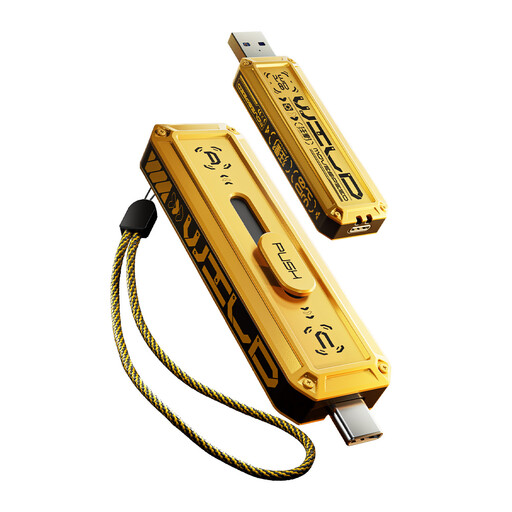
MOVESPEED YSUWD10-1TSY dual-interface flash drive, 1TB, yellow
Consider this compact transfer-drive format if its two interfaces match your phone and computer and the phone can access USB storage.
The named variant has 1TB capacity and a Type-C interface. Confirm the other connector, your phone’s supported file format and the transfer speed available through your actual connection.
Joybuy
 No image available
SanDisk Portable SSD, 2TB
Consider this 2TB portable SSD as a destination for a substantial photo or video library when you have a compatible transfer route.
Check its connector and format against your intended phone or computer; if frequent copying matters, check the write performance relevant to that workflow too.
Joybuy
Frequently asked questions
Can I copy iPhone photos directly to an external drive?
Yes, if the iPhone can access the connected drive through a compatible connector or adapter and a supported app. Apple Support says the storage device must have one data partition and a supported format, including APFS, macOS Extended, exFAT or FAT32; unlock the iPhone before using the storage accessory.
Will any USB-C SSD work directly with an Android phone?
No: the USB-C plug alone does not establish direct SSD support. Crucial says Android use of its X9 depends on USB Mass Storage over OTG, while host capability and drive formatting also matter; check the intended phone and drive together before relying on direct transfers.
Why isn’t my phone recognising an external drive?
Start by unlocking the phone, then check the adapter or cable, supported drive format and available power. For an Android-to-computer transfer, Google Android Help says to select File transfer; for direct iPhone storage, Apple Support notes that an external hard drive often needs external power.
Is one external drive enough to back up my photos?
No: a single external copy still leaves valuable photos dependent on that drive. The National Cyber Security Centre advises keeping backup storage separate from active devices and suggests using more than one backup location; open copied files before deleting phone originals.


